
Adding images to your posts and product pages makes your content more engaging. Good images support your message and improve your chances of appearing in image search, visual search, and AI-powered results. However, you need to describe those images properly. Alt text helps screen readers, search engines, and AI understand what your images show.
Key takeaways
- Adding alt text improves accessibility and SEO, as it helps screen readers and search engines understand images.
- The
alttag describes images for visually impaired users, while thetitleattribute offers optional tooltips. - Use descriptive and relevant alt text in your images to enhance searchability and user experience.
- AI tools can help generate alt text quickly, but always review and edit suggestions to ensure quality.
- For visual search, optimize alt text with product details and structured data to improve machine understanding.
Watch the video for a quick walkthrough of alt and title attributes.
What are alt attributes and title attributes?
This is a complete HTML image tag:

An image’s alt and title attributes are commonly referred to as ‘alt tag’ or ‘alt text’, and ‘title tag’. Technically, they’re not tags but attributes, but you don’t need to worry about that. These attributes allow you to add textual descriptions of your image, which can help with SEO and accessibility.
Alt text
The alt tag is used by screen readers, an assistive technology used by people with visual impairments, for example. These screen readers tell them what is on the image by reading the alt tag. It’s not just screen readers that read alt text, though. Search engines like Google also use this information to understand the context of an image; to find out what an image shows, and its purpose.
Images you use should have alt text. Not only for SEO purposes but also for accessibility. People using a screen reader will otherwise not know what the image is about. One thing to note, however, is that not every image needs alt text. Instead, think of alt text as part of your content, consider its value to your reader, and be mindful of it. A purely decorative image doesn’t necessarily need an alt text. Meanwhile, an image with statistics should have alt text that explains what the statistics represent.
Title text
The title attribute shows as a tooltip when someone hovers over an image. You don’t need it for most images. Screen readers don’t reliably announce title attributes, and mobile users can’t see them. If you have information worth sharing, put it in the page text instead. The title attribute is optional everywhere except on embedded frames, where it serves as the frame’s accessible name. This is the only way screen reader users can tell what an iframe contains. Images don’t need it because alt already does that job.
What if an image doesn’t have a purpose?
If you have images in your design that are purely there for design reasons, please put these images in your CSS and not in your HTML. If you can’t do anything about these images being there, give them an empty alt attribute, like so:

The empty alt attribute makes sure that screen readers skip over the image. If you’re using WordPress, you can leave the “Alt text” field in the Image settings empty.
Tip: Use our SEO Checker tool to quickly scan your page and find out how many of your images have alt text.
Alt text and SEO
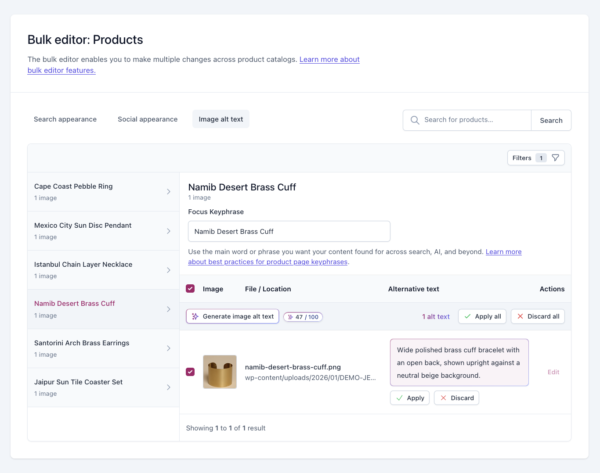
Google’s article about images has a heading “Use descriptive filenames, titles, and alt text”. This is no coincidence. Google places a relatively high value on alt text. They use it to determine what is in the image and how it relates to the surrounding text. Adding good alt text can be a chore, especially if you use many images. For sites with large product catalogs, we built Yoast AI Generate for image alt text that reads your product data and generates a relevant alt tag. Validate and apply.
You should always add images to your posts and pages to make your content more descriptive and appealing. By adding alt text to your images, you provide screen readers, AI platforms, and search engine users with a textual description of what’s on that image. This improves accessibility, and including your keywords helps search engines and AI platforms understand your product images.
We’re not saying you should spam your focus keyphrase into every alt tag. You need good, high-quality, relevant images for your posts, with the focus keyword in the alt text where it makes sense. Here’s Google’s advice on choosing a good alt text:
When writing alt text, focus on creating useful, information-rich content that uses keywords appropriately and is in context of the content of the page. Avoid filling alt attributes with keywords (also known as keyword stuffing) as it results in a negative user experience and may cause your site to be seen as spam.
If your image is of a specific product, include both the full product name and the product ID in the alt tag so it can be found more easily. In general, if a keyphrase could be useful for finding something that is in the image, include it in the alt tag if you can. Also, don’t forget to change the image file name to something describing what’s on it.
Alt and title attributes in WordPress
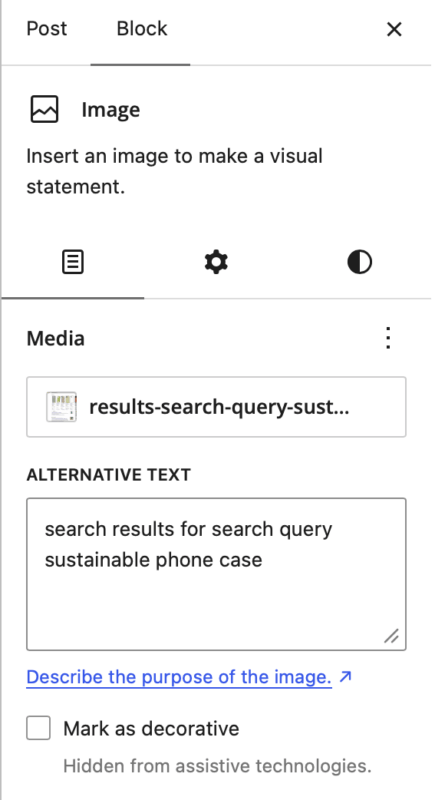
WordPress makes it easy to add alt text. When you upload an image, fill in the Alt Text field in the media library. WordPress copies the filename if you leave it blank, but that’s not helpful. Take a moment to write a proper description. WordPress also lets you mark an image as decorative, if necessary. Yoast SEO AI+ and Yoast WooCommerce SEO generate alt text for your product images with AI, right in the product editor or the Yoast SEO bulk editor. Review the suggestions and apply what works
Alt text, AI, and visual search, or how machines can see your images
Today, many people use the cameras on their smartphones to search for things online. They point their phones at a chair or a pair of shoes and ask Google to find it. AI Mode in Search accepts photos, and Google Lens helps shoppers identify products on the street. All of this means that your alt text matters more than ever.
Google’s AI uses computer vision to analyze images. While it’s good at recognizing objects and patterns, it has trouble understanding context and specific product details. Your alt text can help these machines to see by offering extra information about the images. This way, you give AI platforms what they need to match your images to people’s searches.
When you use the Lens app to search for a product, Google combines what it captures in the images with what you wrote about it. Here’s an example: if your alt text says “red waterproof running shoe, size 10, breathable mesh upper,” the AI connects that description to the visual input. As a result, your image might appear when someone searches for “waterproof running shoes” or uses Lens on a similar shoe.
AI Overviews work the same way. Google pulls images from across the web to illustrate its answers, and it could use your alt text to decide which images fit the query. Therefore, good descriptions increase your chances of showing up in these results.
Optimizing for visual search
Here is how to optimize for visual search. You can find more tips in our image SEO article:
Write alt text that answers the question “what is this and why does it matter?” Include product names, features, colors, and context. Keep it natural, and do not even think about stuffing keywords.
Add structured data to your images, which describes your content to search engines. Furthermore, it helps AI platforms understand and categorize your images.
Use descriptive file names, so instead of “IMG_1234.jpg,” try “red-waterproof-running-shoe.jpg.”
Test your images, so upload them to Google Lens to see what comes up. If you’re not happy with the results, adjust your alt text and try again.
Remember, the goal stays the same. You’re helping machines understand your images as we humans do. Do that well, and you can show up in more places, including the list of AI platforms that keeps growing by the day.
Use AI to write alt text, but check its work
We all know that writing a good alt text for hundreds of product images takes a lot of time. AI can help you do that job a lot faster.
AI alt text tools use computer vision to analyze your images and automatically generate descriptions. Upload a photo of a coffee mug in the product editor or the Yoast SEO bulk editor. Add a focus keyphrase in Yoast SEO, and the AI returns alt text like ‘blue ceramic mug with handle on wooden table’.
The technology has improved quickly over the years. Today, good tools can accurately recognize products, colors, settings, actions, and more. For e-commerce sites with large catalogs, this can save a huge amount of time. Clear the backlog without writing every description yourself.
AI isn’t perfect
Unfortunately, generic AI doesn’t understand your products, but ours reads your product data. It cannot tell whether your navy shirt is blue or whether the model is smiling. It does not distinguish between decorative images and those that carry crucial information. Most importantly, it cannot judge whether its description helps someone who cannot see the image.
It’s good to remember that the AI is not the expert; you are. The results it produces give you a good starting point, but you still need to review and edit. In some cases, you even have to rewrite or regenerate it completely.
Use AI for the biggest jobs, like your product catalog. That way, you can focus on making the best possible alt text for your homepage hero image, landing pages, and content that explains complex ideas. Charts, infographics, and screenshots deserve your own words, because AI often produces generic descriptions for them.
Keep it simple:
- Generate alt text for your images with Yoast AI Generate for image alt text
- Review each and every suggestion before publishing
- Rewrite and correct every wrong suggestion
- Don’t forget to add your brand voice where it matters most
Yoast SEO AI+ and Yoast WooCommerce SEO do this for product images, right in the Yoast SEO bulk editor. You only have to add focus keyphrases, generate the alt text, review and approve the suggestions.
The speed at which the AI works is great, but please use your own judgment. Let AI handle the volume, but use your eyes and expertise to ensure every image serves your readers.
Read more about image SEO
We have a popular, in-depth article about image SEO. That post describes many different ways to optimize images but is relatively lacking in detail when it comes to alt and title tags. Think of this as an add-on to that article. That article is recommended reading if you want to learn more good practices for image SEO.
Read more: Optimizing images for search engines »