What a connected store session looks like 🧪
No claude.ai or ChatGPT sessions were run for this article; what follows are the Claude Code runs from the route comparison.
A delete that waits for approval
With WordPress 7.1.3, WooCommerce 11.2.1, Easy MCP AI 2.2.2 and Claude Code with a full-access API key bound to the store’s admin user, the opt-in “Ask before destructive actions” switch was turned on and the opening prompt was:
“Our fall promo ended early. Delete the FALL5 coupon.”
Claude Code listed the coupon, then stopped:
“I haven’t deleted it yet because this site requires an administrator to approve deletions first.”
The site first offered Claude Code an in-chat approval prompt, which the headless session could not answer, then returned a link to an approval page, preview “WooCommerce: Delete Coupon (id: 29)”, that only the WordPress user the AI acts as can decide, and the request would have expired after 15 minutes if nobody answered.
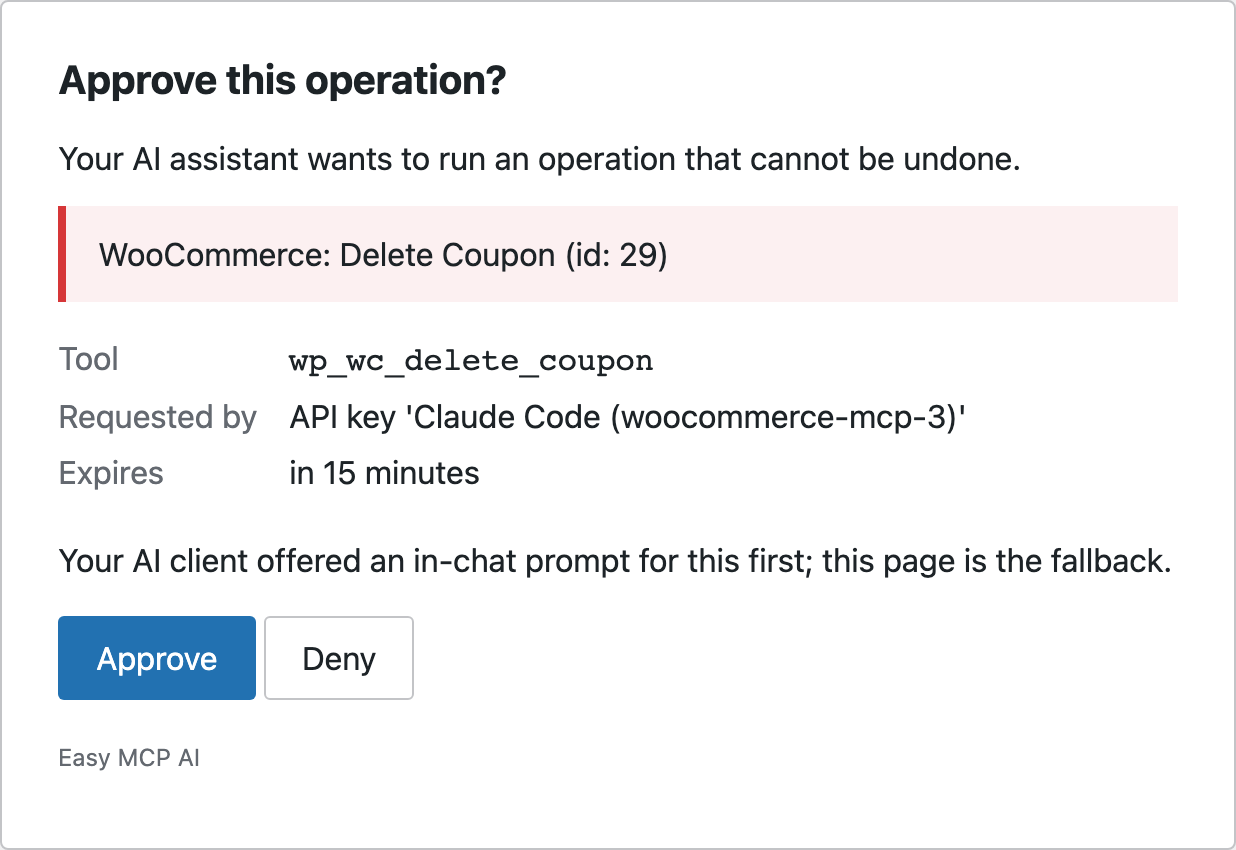
After a human approved it, the identical call went through:
“I deleted the FALL5 coupon (ID 29), so customers can no longer use it at checkout. The two orders that already used it keep their discount.”
The delete was permanent: no trash entry, no coupon afterwards. The follow-up prompt, “Order #40 shipped this morning. Mark it as completed.”, ran with no pause at all, because the single-order update tool, cancelled and refunded statuses included, is not on the default approval list (the batch-orders tool and REST writes do pause):
“Order #40 (Lena Hoffmann, $68.95) has moved from Processing to Completed.”
Completing the order also triggered WooCommerce’s “Completed order” email, which the order notes show failed to send because the store had no mail set up. On a live store with that email switched on, completing the order triggers WooCommerce’s customer notification, and whether it arrives depends on the store’s mail setup.
The native route: products and orders only
A second store ran the native route (WooCommerce 11.2.1, MCP Adapter 0.7.1, the experimental “WooCommerce MCP” option off, Claude Code signed in with an Application Password). The prompt “Which of my products are low on stock or sold out right now, and are any of them in orders that are still processing or on hold?” got a correct answer:
“One low-stock product is in a processing order: Swiss Water Decaf Colombia, in order #39.”
The agent created Kenya AA at $19.50 with 30 in stock and published it by its own reasoning, since the other products were published:
“I created the product and it’s live, but it isn’t in the Single Origin category yet. The tools I can use here have no way to set categories when creating or updating a product.”
11.2.1’s product-create has no category field, so the agent set everything else and flagged the gap. 11.2.1 registers no coupon ability at all, so a coupon request has nothing to call on the native route; a scripted probe of the adapter’s default server found no WooCommerce abilities beyond the seven for products and orders.