Imagine your agency manages the WordPress help center for an appointment-booking software company. Customers keep asking support how to reschedule recurring appointments. The instructions already exist, but a search for “move my Friday bookings” doesn’t lead to the guide.
The client wants to try AI search. Instead of relying on customers to type the exact words in an article, it could match their question to a guide with a similar meaning. The first version would return links to existing documentation.
Choosing a provider raises a harder question. Will the service you recommend today still suit the site next year? You can’t promise that, and the client shouldn’t need that promise before you start.
You can keep the original guides in WordPress and build the integration so replacing the search service doesn’t mean rebuilding the help center.
This article follows that project from a limited trial to wider use. It explains which parts of the setup need to remain under your control and how hosting can give your team room to adjust no matter what AI tool, trends, or integration you opt for.
You can’t wait for certainty
Here’s one possible scenario. Your developer starts comparing services just as another vendor announces a new search product. The client forwards the announcement: “Should we wait for this?”
Meanwhile, support keeps sending the same article link.
Before buying anything, your agency can investigate why the current search misses the guide. It’s possible that the help center stores articles in a custom post type that the current search configuration leaves out. Or the article calls recurring appointments “series management,” a phrase customers rarely use.
Those problems need different fixes, of course. Developers can check whether WordPress search includes the help-center articles, and an editor can add the wording customers use and clarify which instructions cover the current software version.
Recent support tickets give you real questions to test. The support team already knows which guide answers each question, which is helpful. Trying out those questions on the site shows where search fails, without guessing what customers might type.
Semantic search is another way to improve this. It uses machine learning to find content with a similar meaning to the query, even when the wording differs. This helps connect phrases like “move my Friday bookings” to other phrases like “reschedule recurring appointments.”
The underlying documentation still matters. If two guides describe different versions of the booking software, the search service needs enough information to distinguish them.
Your agency can resolve those content problems while the purchasing decision stays open. When you test AI search, you have a cleaner library and a set of questions to compare against.
WordPress remains the source of the content
Canceling the search subscription shouldn’t remove a single guide from the client’s WordPress site. Editors continue working in WordPress. The search provider holds an indexed copy of the content that the integration sends it.
That distinction matters when you plan a replacement. Your agency needs to rebuild the search index from the original articles, without depending on the outgoing provider to return the only copy.
For this help center, custom post types can keep guides separate from blog posts. A custom field or taxonomy can identify the booking-software version each guide covers. That information belongs with the article in WordPress, where editors can maintain it.
The indexing code sends the relevant text and metadata to the search service. It also preserves a reference to the WordPress post ID so a search result points back to the correct guide.
Provider exports still deserve attention. Your team might configure synonyms or ranking rules in the service’s dashboard. Those settings may need exporting or documenting separately before you close the account. They shouldn’t be the only place you record which guides cover the current software.
Edits need to reach the index, too. When an editor replaces obsolete instructions, the integration needs to update or remove the corresponding indexed content. If this step doesn’t happen, search will continue returning an answer that’s no longer included in the resource library.
The public guides keep the first trial straightforward. If the client later adds members-only documentation, the integration will need to enforce the site’s access rules before displaying restricted results or sending excerpts to an answer-generating model. Knowing that someone signs in doesn’t establish which articles their membership lets them read.
How to make provider changes manageable
The search box can stay in the WordPress theme while a plugin handles the provider’s API. The theme submits the query to the plugin, which sends the request and converts the response into the format the site expects.
For example, the plugin can map the provider’s document identifiers back to WordPress post IDs. The theme then displays the matching guides using their WordPress titles and permalinks. A new provider requires work in the integration, while the help-center layout can remain essentially the same.
“AI search” also needs a more precise definition before you estimate that work.
In an embedding-based system, a model converts article text into numerical representations called embeddings. A search index stores those representations. The system converts a visitor’s query into a compatible representation and searches for relevant content.
A large language model can then use retrieved excerpts to generate an answer, if the feature includes that step. Returning relevant article links doesn’t require a generated answer.
Your agency might buy these capabilities together from a managed search provider. Another implementation might use separate services. Either way, the developer needs to know which part a proposed change affects.
You can often replace the model that writes answers and keep the existing search index. A different embedding model usually means regenerating the document embeddings and rebuilding the index. Relevance scores can vary between providers, too, so your developer needs to check whether the existing cutoff still selects useful results.
One thing to note is recent data compiled in Andreessen Horowitz’s 2025 survey of 100 enterprise CIOs. The survey reports that 37% of CIOs use at least five models, compared with 29% in the previous survey. For this hypothetical client, one service may be enough, but the practical concern is understanding what a later replacement involves.
A small plugin can provide that separation without turning the project into a framework for every possible vendor under the sun. The way it’s coded and configured should make the replacement work clear enough to estimate.
Give experiments a manageable scope
Twenty public guides about appointment management give the team enough material for a useful first test. Support staff supplies the questions customers ask and identifies the article that should answer each one.
The developer runs those queries through the existing search and the trial service. Does the right guide appear among the first few results? Does search distinguish changing one appointment from changing every future appointment in a series?
The test also needs questions the documentation can’t answer. A query about an unsupported feature shouldn’t lead customers to unrelated instructions simply because the wording looks similar.
If the trial includes generated answers, those need a separate review. An answer can cite the correct guide while misrepresenting a step. Support staff should check whether a customer following the response can complete the task.
A four-week trial gives the client enough time to decide whether to continue with that specific tool. The budget needs a limit, too. If the provider lacks a hard spending cap, the tool needs usage limits that stop new paid requests before the agreed budget runs out. An email alert alone doesn’t stop charges, so it’s best to plan ahead for that.
Deloitte’s 2026 State of AI in the Enterprise research reports that only 25% of respondents move around 40% of their AI experiments into production, so it’s worth understanding that it might not be a good fit.
Prepare for changes in workload
The trial works well enough that the client wants to promote it in the customer newsletter. A few support colleagues testing searches during a meeting won’t tell you how the integration handles that audience.
Suppose the WordPress plugin makes a synchronous API request for each search. Its PHP thread stays occupied while it waits for the external response. Several slow searches at once can leave less capacity for other uncached requests.
That’s a reason to test concurrent searches before the newsletter goes out. Your developer can measure how long results take while checking whether the rest of the site remains responsive. The external provider’s rate limits belong in that test as well.
Usage costs need the same attention. One visitor may try several queries. If the feature generates answers, the amount of text sent to and returned by the model can affect token-based charges. The trial’s request records give you a better estimate than multiplying visitors by the cost of one search.
Indexing creates work outside visitor sessions. Updating one guide should normally update its indexed content, rather than regenerate embeddings for the entire help center. The developer needs to check what the chosen plugin or service actually does when an editor clicks Update.
Expansion can stay selective. If customers find the links useful but rarely read generated summaries, the client can keep semantic search and turn off answer generation. Separating those settings gives them a concrete way to reduce cost without removing the improvement they value.
Reasons to reconsider
A provider retiring the API your plugin uses puts a change on the schedule. A new model announcement can wait until there’s a reason to investigate it.
The distinction between components helps here. If your agency chooses and calls a model directly, it needs to track that model’s availability. A managed search service may handle model changes internally, while your team monitors its API notices and the quality of its results.
The questions from the trial become a small regression test set. A developer can run them after a significant provider update or against a proposed replacement. The expected results make a discussion about “better search” much more specific.
For the recurring-appointment query, does the current guide still appear near the top? If the feature generates an answer, does it preserve the difference between changing one booking and changing the series?
Comparisons need consistent source content. Testing one provider against last month’s articles and another against rewritten guides tells you little about the providers themselves. The test record should identify the content revision and relevant model or service configuration.
Support tickets can add new queries as customers encounter gaps. A replacement then faces the questions that cause actual trouble on this site.
Cost can also justify another review. A cheaper model for generated answers may suit the client, as long as the answers remain accurate. A general benchmark score gives you less useful evidence than its performance on the client’s own documentation.
Choose hosting that gives you room to adjust
A WordPress staging site is a great way to give developers a way to install a replacement tool while customers continue using the live search. Kinsta provides staging environments for this work, with Premium Staging available for tests that need more resources.
The external search setup needs separation as well. Cloning WordPress can copy plugin settings that point to the production index. Before running an indexing job on staging, the developer needs to configure a test index and credentials with appropriate access. Otherwise, a staging test can change live search results.
Kinsta’s application performance monitoring helps investigate the WordPress side of the integration. With APM enabled, your developer can examine slow server-side external requests and database queries. Browser-side calls require browser diagnostics. APM doesn’t show every request a visitor’s browser makes.
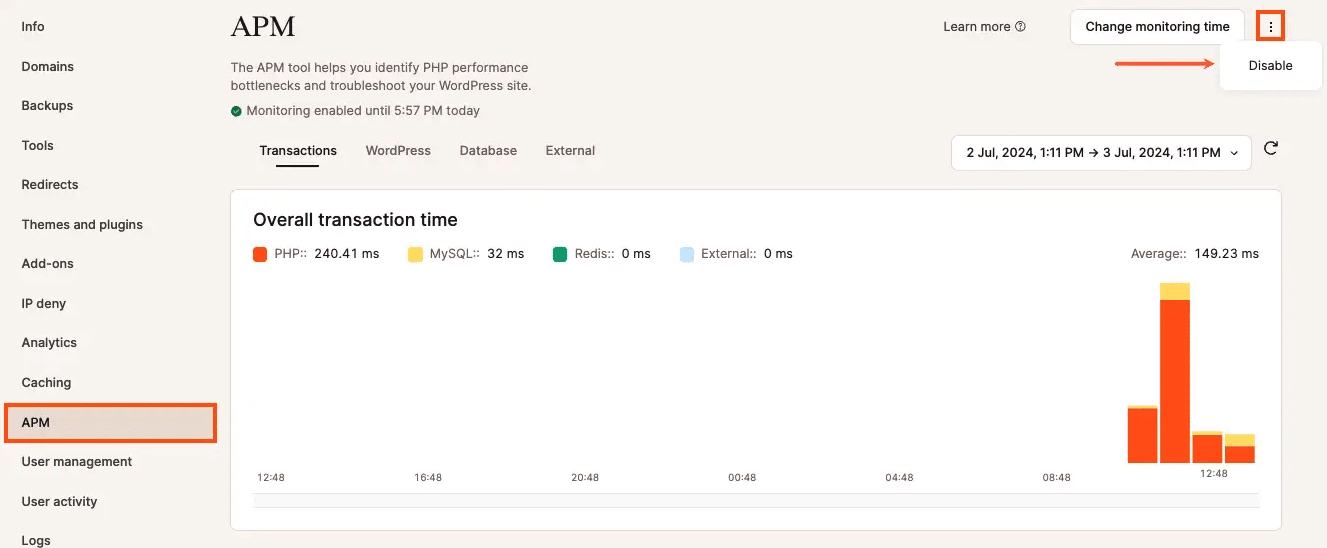
Those traces can establish whether WordPress spends most of a slow search waiting for the provider. Additional hosting capacity won’t shorten that provider’s response time.
When testing identifies a PHP capacity constraint, MyKinsta offers PHP resource adjustments within the available plan options. More PHP threads can handle additional concurrent requests, but dividing the same memory pool among more threads reduces the memory available to each. Performance comparisons also need staging resources and caching settings that reasonably reflect production.
As your agency runs trials across more sites, Kinsta API endpoints let internal tools retrieve environment details or create staging environments. The team can automate that preparation without giving the search provider control over the hosting account.
Your agency still decides whether the replacement performs well enough to release. The hosting environment supplies a place to test that decision and investigate the results.
The commitments in the proposal
“Add AI search” leaves too much room for disagreement. Your estimate may cover relevant article links while the client expects a chatbot that writes complete answers.
The proposal should describe what customers actually see. For this project, the initial commitment could cover semantic search across twenty public guides, with generated answers subject to a separate decision.
A few questions help make the remaining boundaries clear:
- What problem does the trial address? Customers can’t find current appointment-management instructions. The agreed test queries reflect those support requests.
- What stays under the client’s control? WordPress retains the original guides and their metadata. The agency documents search settings that exist only in the provider’s dashboard.
- What depends on this service? The proposal identifies the help-center search integration and any model APIs it calls. Other areas of the site continue using their existing search.
- How does the client stop the experiment? A setting restores the existing search. The shutdown procedure also stops scheduled indexing jobs and closes unnecessary paid services.
- What earns a wider rollout? The client agrees what counts as a relevant result and how long visitors can wait. Usage during the trial informs the running-cost estimate.
The wider rollout needs its own allowance for indexing the rest of the library and testing under heavier use. Giving that work a separate estimate lets the client judge the trial before committing to it.
The proposal can also name who reviews the results at the end of four weeks. Otherwise, the next subscription renewal can make the decision by default.
Room for the next decision
The booking-software client can learn whether semantic search helps customers find the appointment guide without choosing a provider for the next five years.
The original articles remain in WordPress. If the trial disappoints, the client keeps the editorial improvements and returns to the existing search. If it succeeds, your agency has evidence to support a wider rollout.
A future provider change still takes work. Someone needs to adapt the API integration and test the results. Depending on the change, rebuilding the index may take time and incur usage costs. Keeping those tasks separate from the rest of the site makes them easier to plan.
That’s a useful kind of control to offer a client. You can explain what they’re committing to today and what choosing differently later involves.
Kinsta’s managed WordPress hosting gives your team staging environments and performance tools to support those decisions. Your agency can try a useful AI feature now, with a clear path to change it as the client’s needs evolve.

Kinsta
Carlo is a passionate lover of webdesign and front-end development. He has been playing with WordPress for more than 20 years, also in collaboration with Italian and European universities and educational institutions. He has written hundreds of articles and guides about WordPress, published both on Italian and international websites, as well as on printed magazines. You can find him on LinkedIn.