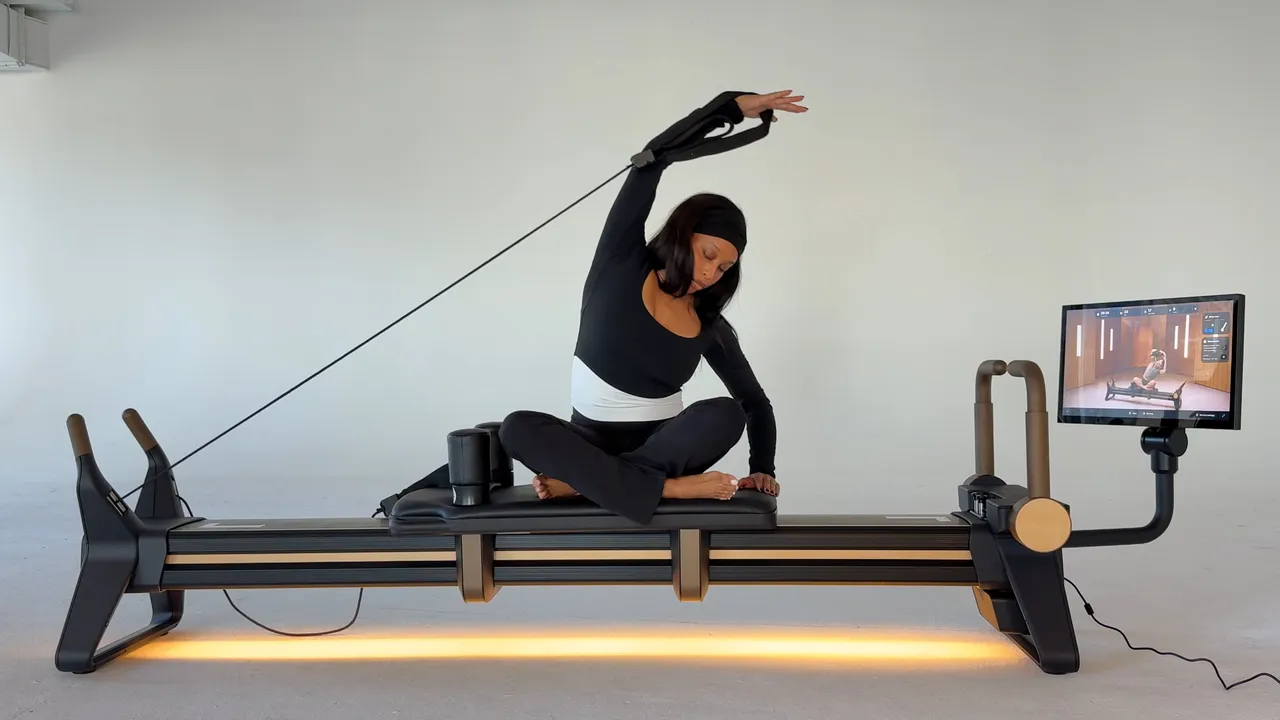
About the NordicTrack Ultra 1 Reformer
Launched in May 2026, the Ultra 1 is NordicTrack’s second reformer (the Ultra 1 RX-S launched in 2025); an obvious next chapter for the exercise equipment brand, as Pilates interest continues to grow globally. “We saw a need to create a connected Pilates studio experience that anyone could enjoy at home with a reformer that felt more like high-end furniture than fitness equipment,” Mandy Crane, NordicTrack’s VP, head of brand and product marketing, tells Vogue. “The Ultra 1 Reformer sits at the intersection of excellence in performance and design.”
What you’ll first notice about the Ultra 1 is that it’s a treat to the eyes. Easily one of the most aesthetically pleasing reformers I’ve ever seen (versus reformers I’ve seen in studio and at home), this is crafted with sculpted form, soft edges, and under-side ambient lighting that makes it a statement piece in any room you place it. This, the brand tells me, is precisely what they were going for. “It’s a piece of equipment you don’t feel the need to hide away; you want it to be part of your home,” Fit Pilates product marketing director Yvette McGaffin says. “For me, that’s an important part of wellness through design: creating something that is as considered aesthetically as it is in the way it supports how you move and feel.”
McGaffin, a Pilates instructor and studio owner herself, continues that every design decision serves a purpose, as do the details of the experience itself. “Traditional reformers can involve a learning curve around spring combinations, manual adjustments and the mechanics of the machine. The Ultra 1 brings together studio-grade equipment, push-button resistance, and iFIT-guided instruction to make that experience more intuitive and connected.”
How to Use the NordicTrack Ultra 1 Reformer
Most importantly, NordicTrack wanted the Ultra 1 to suit different body types and experience levels. Though I am not a beginner, I was admittedly a bit hesitant using the machine without a certified instructor present. However, there are a few things in place to eliminate much of the guesswork. Of course, there’s the handy touchscreen that not only offers 75+ streamable reformer Pilates sessions, it also confirms the spring you’re on, flags when it doesn’t match the instructor’s cues, and reinforces the correct footbar position. That way, you can be more certain you’re on the right track. For more experienced users, McGaffin says it’s about expanding what’s possible: “The rear toggles support upper-body work against greater spring resistance, while the Smart Spine can be used as a stable platform for more advanced core, lunge and dynamic, athletic-style exercises,” she says. “
Once the device is in place, getting started is really as simple as plugging it in and toggling the on switch. From there, the lights will illuminate, and you can log in to your iFit account (or make one, obviously) to stream your workout.
The trickiest part of my entire experience, ironically, was situating the springs and footbars. To change the springs, your carriage must be firmly in the home position. If you’re having trouble, learn from me, and ensure the long strap is on the shoulder rest; mine was on the short strap, which pulled the carriage towards the other end of the frame. Once home, you can press the button located near the footbar to activate your desired resistance level. From left to right, you have Blue (33 lbs), Red (44 lbs), and Green (22 lbs); pick one or any combination of the three to your liking or as cued by your workout.
What’s nice, though, is that the spring system is enclosed, meaning you’ll never have to worry about hitting or falling on them throughout your workout. According to McGaffin, this is its Smart Spine framing. “The push-button controls also remove the need to manually change springs, helping simplify setup for people who are new to reformer Pilates and allowing them to focus more on learning the movement.”
The footbars, on the other hand, have four positions available. To change position, gently lift and push or pull to the desired angle. Once locked in place, the footbar position and resistance level will appear in the top right of your screen.