There are dozens of LMS plugins for WordPress, but most “best of” lists compare them on features copied from each vendor’s homepage. As a result, you can end up with a plugin that can’t take a card payment until you buy an add-on.
Instead, this comparison focuses on the things that change your bill and your setup: what’s actually free, what it costs to take payments, and what you’ll pay in year two once introductory pricing ends.
Quick disclosure: Masteriyo is part of the Themeisle family, the same team behind this blog. Still, it’s in this list alongside eight other plugins, and its renewal prices are shown just like everyone else’s.
Only looking for free options? Our list of the best free LMS plugins for WordPress goes deeper on free plans, while this guide covers free and premium plugins together.
The short answer: For selling courses on a free plugin, Masteriyo includes Stripe and certificates at no cost. Meanwhile, Tutor LMS is the most popular, with 100,000+ active installs and front-end dashboards for students and instructors. LearnDash is the most established premium option, from $259 a year. Finally, LifterLMS suits membership-plus-course sites, and Academy LMS has the cheapest multi-site licences.
Quick picks and pricing
| Plugin | Best for | Free version | Paid from | After year one | Lifetime option |
|---|---|---|---|---|---|
| Masteriyo | Selling courses on a free plugin | Yes | $99/yr (Basic) | Renews at $199/yr | $499 (1 site) |
| Tutor LMS | Marketplaces and multi-instructor schools | Yes | $199/yr | Renewal price not published | $499 |
| LearnDash | Established course businesses | No | $259/yr | Same price (no intro discount) | None |
| LifterLMS | Memberships plus courses | Yes | $199 first year (Earth bundle) | Renews at $398/yr | $10,000 (unlimited sites) |
| LearnPress | Paying only for the add-ons you need | Yes | $299 (Pro Bundle, lifetime licence; regular price $710) | Optional: $209.30/yr to keep getting updates | The licence is already lifetime |
| Sensei LMS | Block editor and WooCommerce sites | Yes | $179/yr (Sensei Pro) | Renewal price not published | None |
| MasterStudy LMS | Udemy-style marketplaces | Yes | $99/yr (regular price $149) | Renewal price not published | $249 (regular price $379) |
| Academy LMS | Agencies and multi-site licences | Yes | $99/yr (regular price $199) | Renewal price not published | $149 |
| MemberPress Courses | Membership sites with courses inside | No | $199.50 first year (Launch) | Renews at $399/yr | None |
How they compare
WordPress.org stats
| Plugin | Active installs | Rating | Number of ratings | 5-star share |
|---|---|---|---|---|
| Tutor LMS | 100,000+ | 4.4/5 | 589 | 82% |
| LearnPress | 70,000+ | 4.3/5 | 597 | 80% |
| LifterLMS | 10,000+ | 4.8/5 | 392 | 93% |
| MasterStudy LMS | 10,000+ | 4.5/5 | 486 | 85% |
| Sensei LMS | 9,000+ | 3.5/5 | 40 | 52% |
| Masteriyo | 6,000+ | 4.8/5 | 183 | 93% |
| Academy LMS | 2,000+ | 4.9/5 | 120 | 95% |
LearnDash and MemberPress are premium-only, so they aren’t listed on WordPress.org.
Taking payments: what’s free?
This matters most if you plan to sell courses, but it’s the part most comparisons skip.
| Plugin | Stripe on the free plugin | PayPal on the free plugin | Transaction fee |
|---|---|---|---|
| Masteriyo | ✅ Yes (plus Mollie and Lemon Squeezy) | ✅ Yes | None |
| Tutor LMS | ❌ Pro only | ✅ Yes | None |
| LifterLMS | ❌ Paid add-on ($149/yr) | ❌ Paid add-on | None |
| LearnPress | ❌ Paid add-on ($39) | ✅ Yes | None |
| Sensei LMS | ❌ Needs Sensei Pro + WooCommerce | ❌ Same | None |
| Academy LMS | ✅ Through StoreEngine, a separate free plugin | ✅ Through StoreEngine | None |
| LearnDash | ✅ Included on every plan | ✅ Included | None |
| MemberPress Courses | ✅ Included | From the Growth plan (Launch is Stripe only) | 4.9% on the Launch plan |
Every option still pays the payment provider’s standard processing fee (Stripe’s is 2.9% + 30¢ per card payment in the US).
1. Masteriyo: best for selling courses on a free plugin

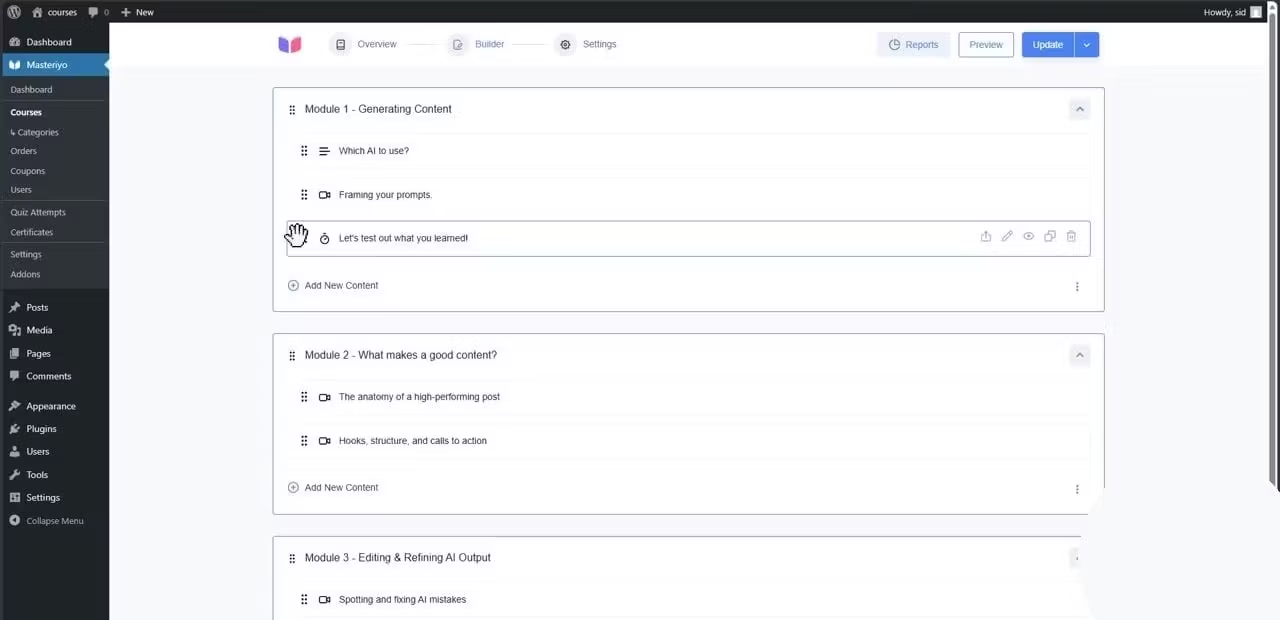
Masteriyo‘s free plugin is built around one idea: you should be able to sell a course without paying for the plugin first.
What’s free:
- Stripe, PayPal, Mollie, and Lemon Squeezy checkout, plus WooCommerce and SureCart integrations
- A drag-and-drop course builder with unlimited courses and students
- A certificate builder, with certificates issued automatically when a student completes a course
- Live classes through Google Meet, and group seats so a team or class can enroll together
- Revenue sharing with instructors, and multi-currency
What’s paid: assignments, the gradebook, prerequisites, coupons, subscriptions, course bundles, advanced quiz question types, and multiple instructors on one course.

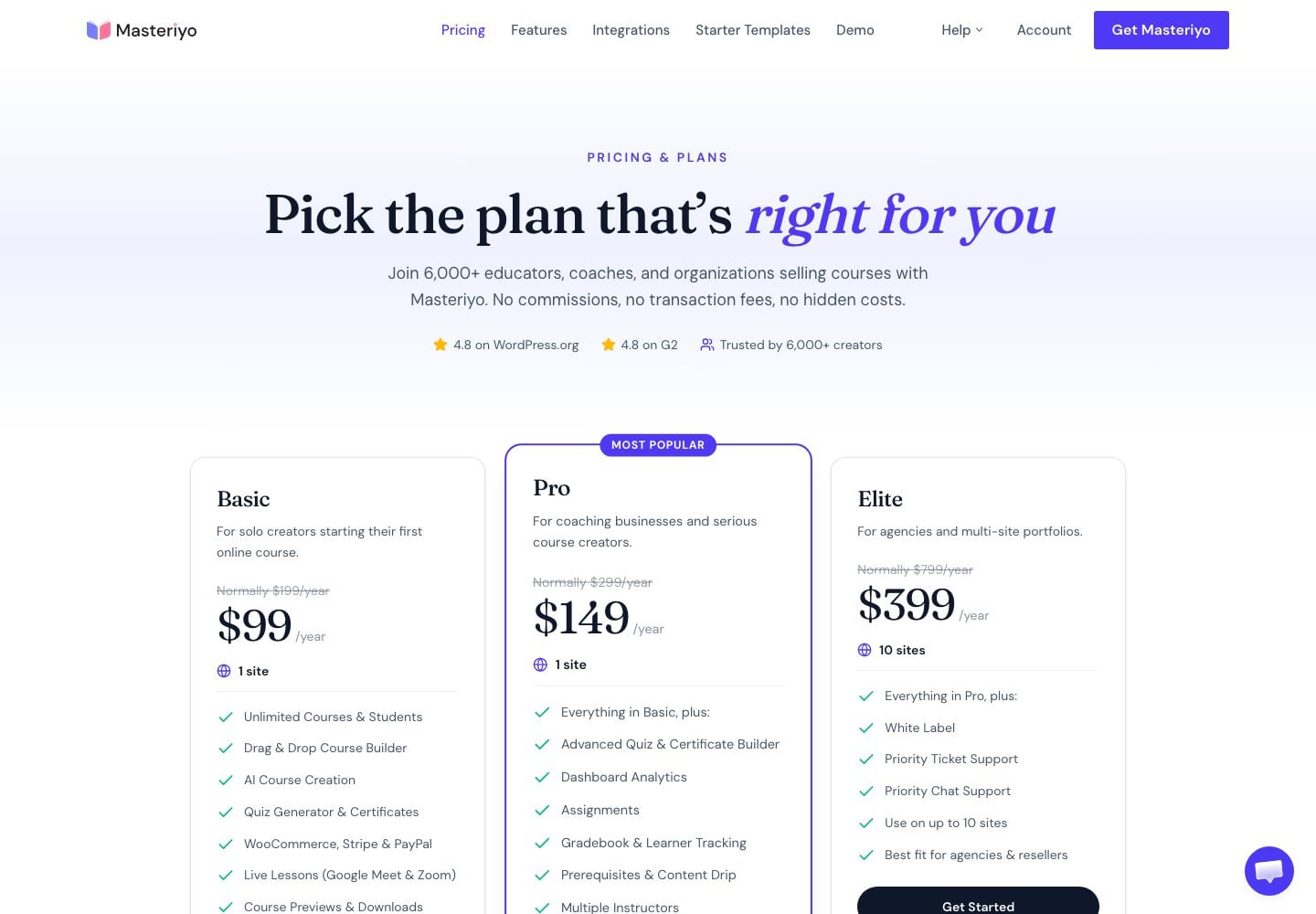
Pricing: Basic is $99 in the first year (renewing at $199), and Pro is $149 (renewing at $299). Also, Masteriyo doesn’t take a cut of your sales on any plan, so you only pay your payment provider’s standard processing fees.
The honest weakness: with 6,000+ active installs, it has a smaller user base than most plugins here, so there are fewer third-party tutorials and add-ons. In addition, the free plugin only includes three quiz question types (true/false, single choice, and multiple choice), and renewal prices double after the first year.
Best for: solo creators and small academies selling their first courses, especially if you want card payments and certificates without buying anything. For a head-to-head, see our Tutor LMS vs Masteriyo comparison.
2. Tutor LMS: best for marketplaces and multi-instructor schools

Tutor LMS is the most-installed plugin in this list, with 100,000+ active installs. It also got a redesigned student experience in version 4.0.
What’s free: a course builder, a quiz builder with unlimited quizzes, basic certificates, built-in eCommerce with PayPal and manual payments, and front-end dashboards for both students and instructors.
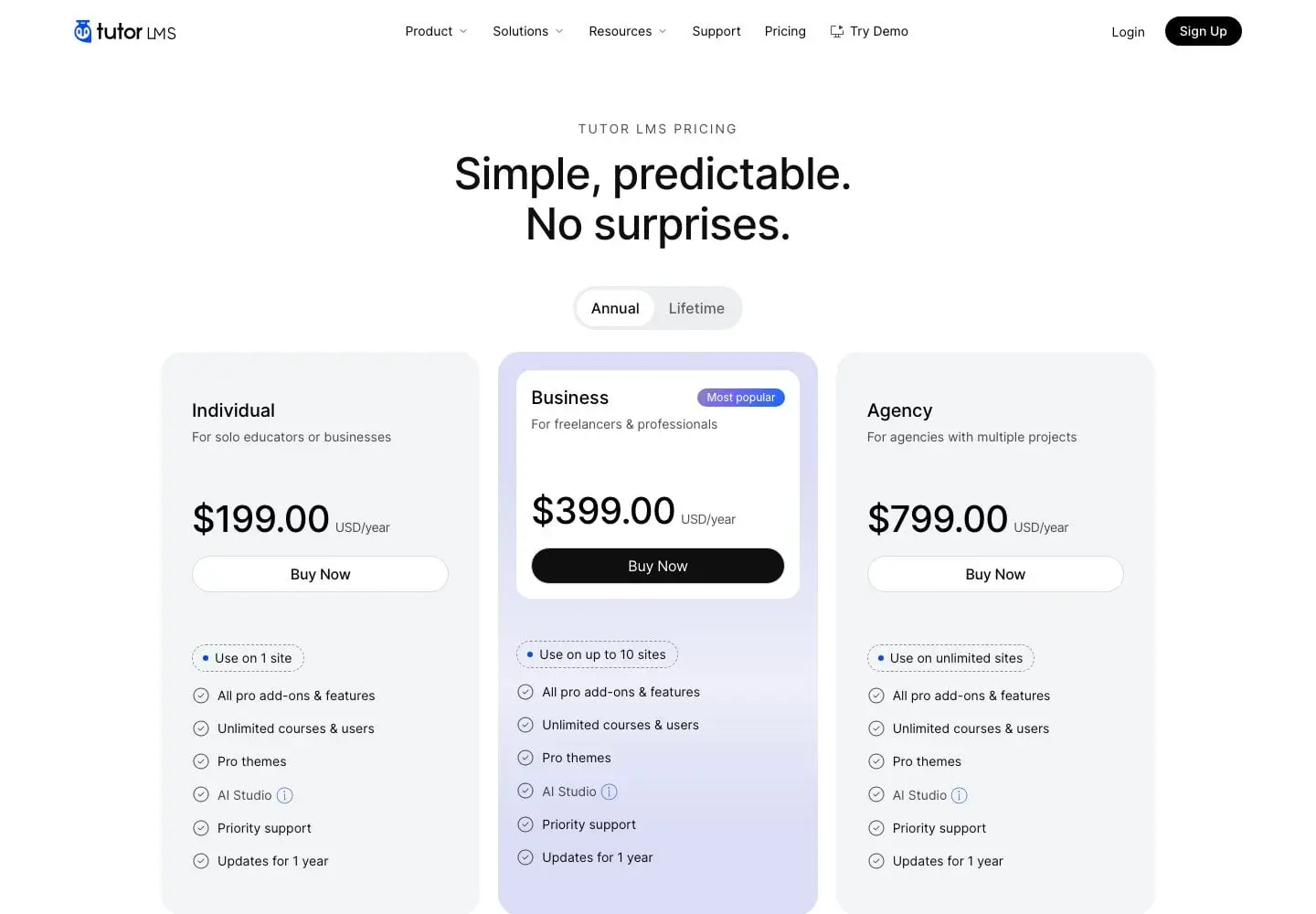
What’s paid: Stripe (along with Mollie, Paddle, and Authorize.net), content drip, assignments, the drag-and-drop certificate builder, subscriptions, and AI Studio. The Individual plan is $199 a year for one site, and every paid plan also includes all Pro add-ons.
The honest weakness: you can’t take card payments through Stripe without Pro, and its 4.4/5 rating is lower than most plugins here.
Best for: multi-instructor schools and course marketplaces, especially if you want a mature, widely used platform.
3. LearnDash: best for established course businesses

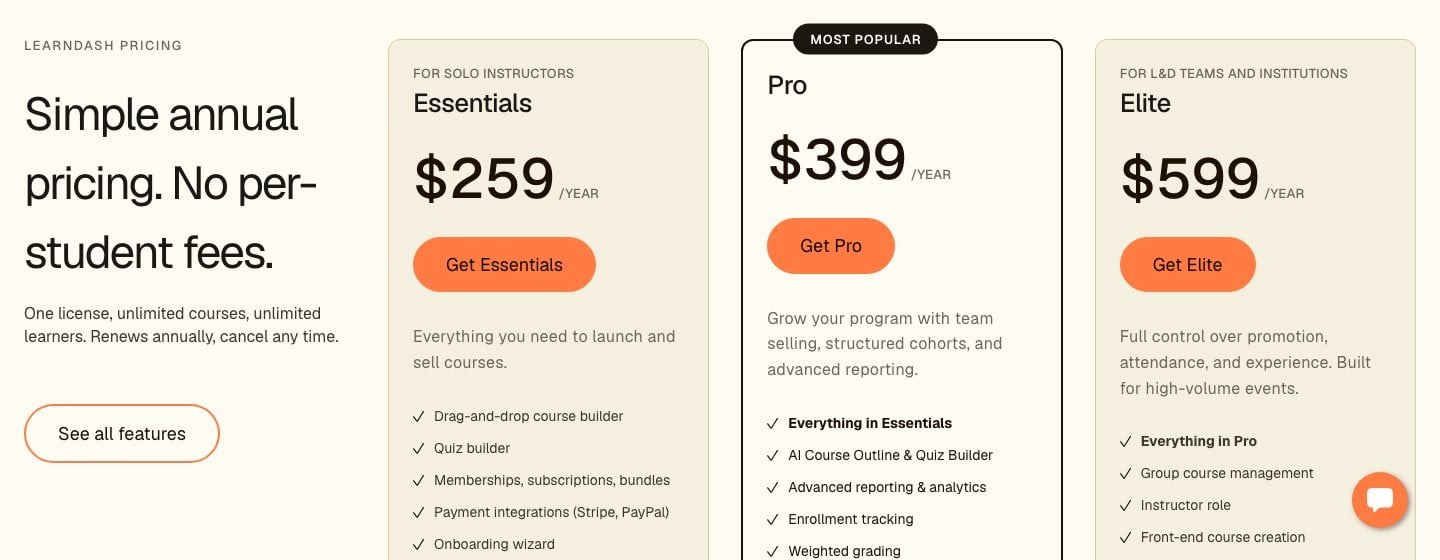
LearnDash has no free version, but it’s the best-known premium LMS for WordPress, and Stripe and PayPal are built into every plan.
Pricing: Essentials is $259 a year, Pro is $399, and Elite is $599, with no introductory discount, so the price you pay is the price you renew at. However, advanced reporting needs Pro or Elite, and group management is on Elite.
The honest weakness: it’s the most expensive way to start in this list, and unlike most plugins here, there’s no free version to try first.
Best for: established course businesses and training teams, because the price you pay is the price you renew at.
4. LifterLMS: best for memberships plus courses

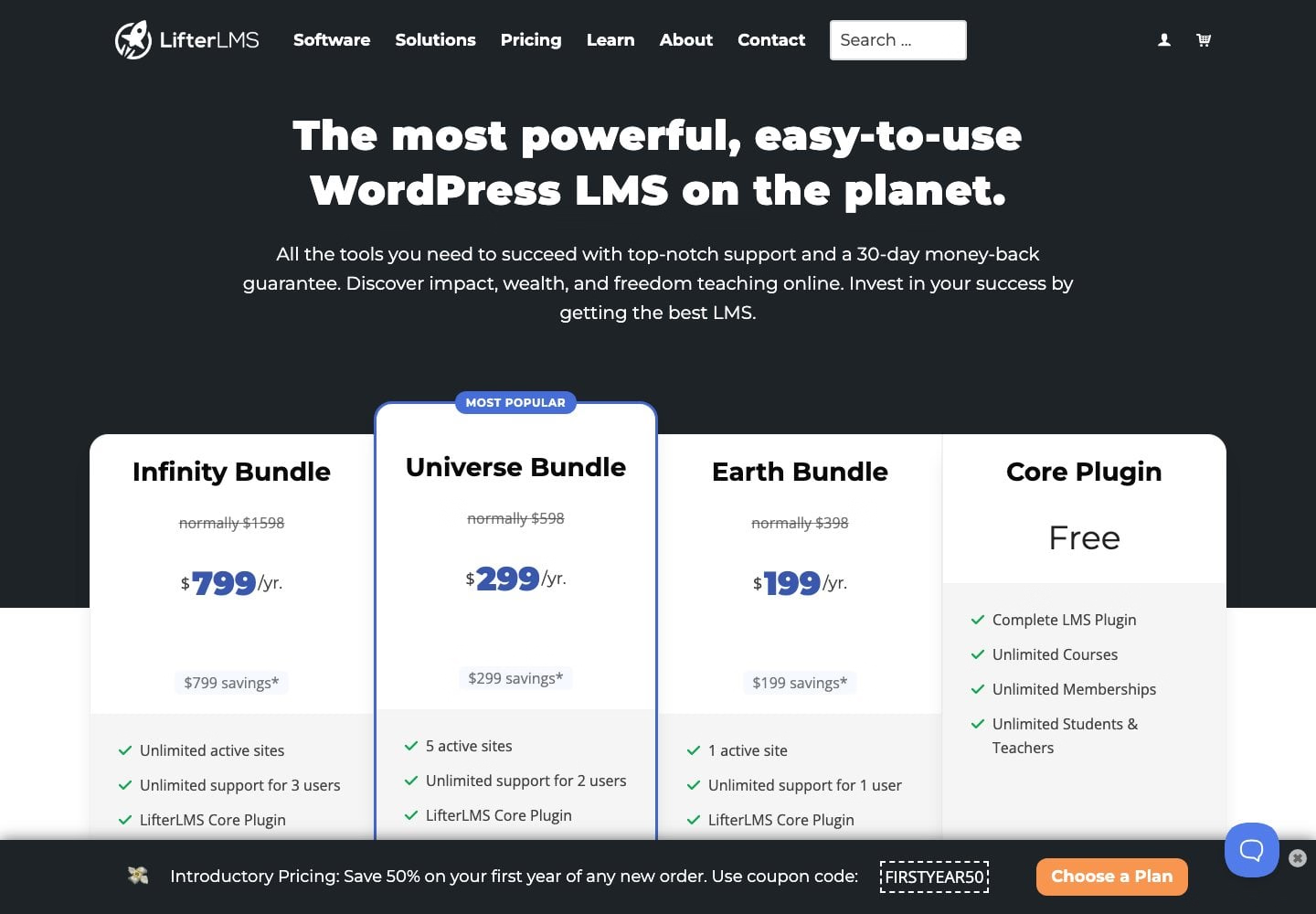
LifterLMS has one of the most generous free plugins for building courses. For example, certificates, content drip, prerequisites, memberships, multiple instructors, and four quiz question types are all included.
The catch: the free plugin can’t take card payments. Stripe is a paid add-on ($149 a year), and so are PayPal and WooCommerce. Instead, the Earth bundle ($199 in the first year, renewing at $398) includes the payment gateways.
The honest weakness: selling costs money from day one, and bundle renewals also double.
Best for: membership-style course businesses that want engagement features in the free plugin and don’t mind paying for payments.
5. LearnPress: best for paying only for what you need

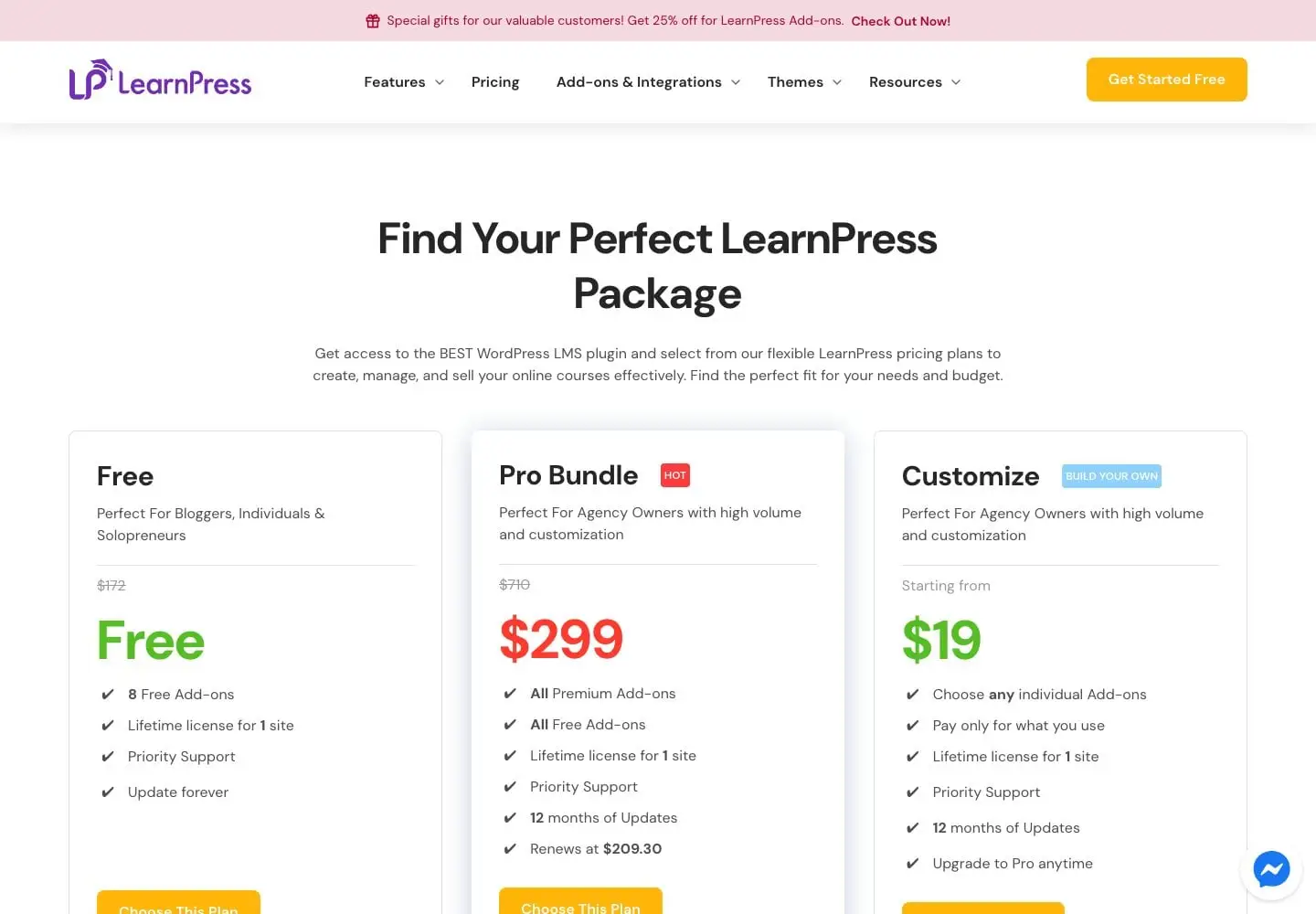
LearnPress is the second most-installed plugin here, with 70,000+ active installs. Its free plugin also includes PayPal, offline payments, SCORM support, and question banks.
How it’s priced: most other features are separate add-ons, like Stripe ($39), certificates ($39), content drip ($39), assignments ($39), and WooCommerce ($49). However, the Pro Bundle ($299) includes all of them with a lifetime licence for one site and 12 months of updates. After that, renewing updates costs $209.30 a year, but that’s optional: you keep the licence either way.
The honest weakness: as a result, a full selling setup means buying several add-ons or the bundle.
Best for: budget builds where you add paid features one at a time.
6. Sensei LMS: best for block editor and WooCommerce sites

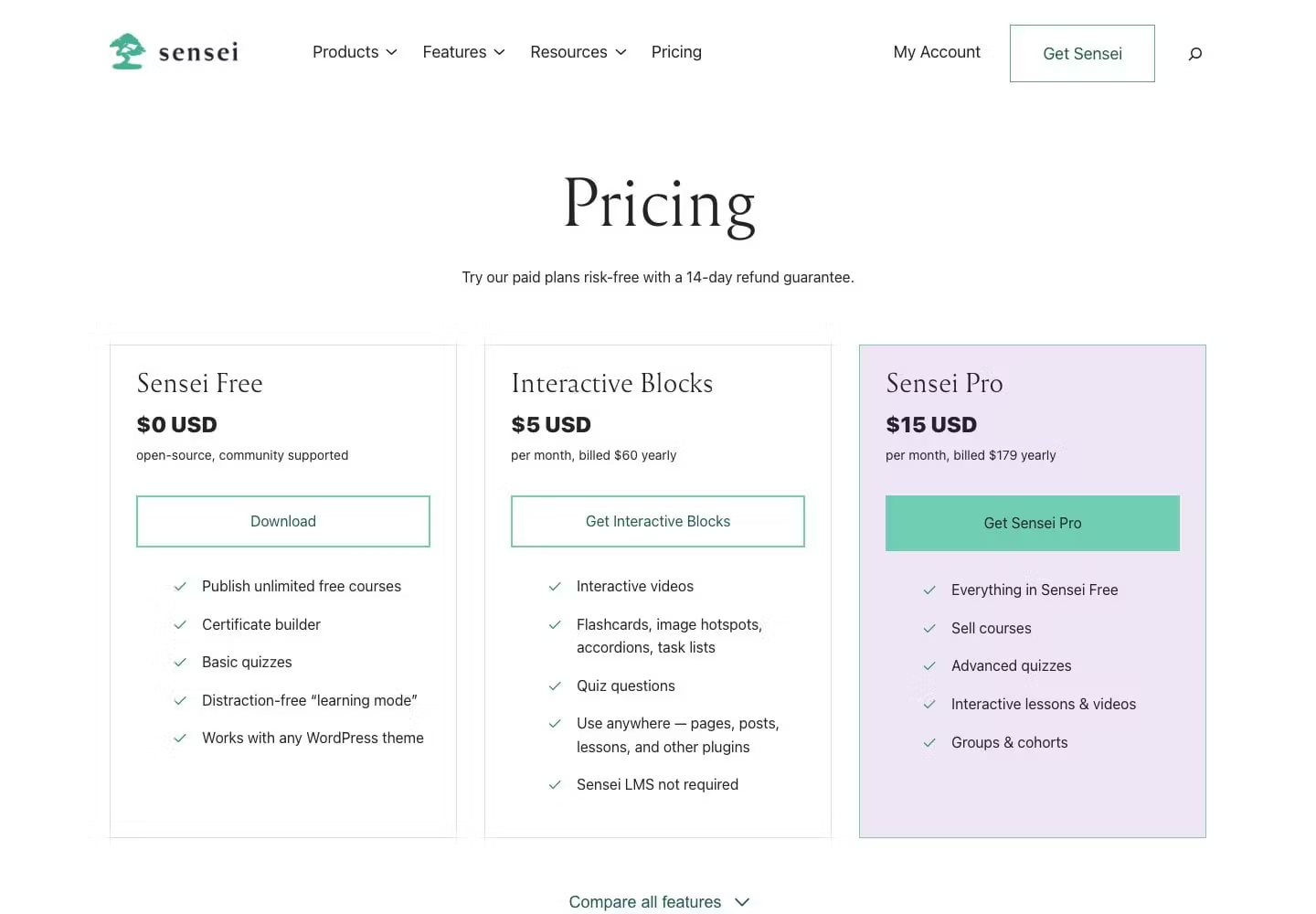
Sensei LMS is made by Automattic, and you build courses entirely in the WordPress block editor, so it feels familiar if you already use it. The free plugin also includes quizzes, a distraction-free learning mode, and a free certificates extension.
The catch: you can’t sell courses with the free plugin. Instead, selling needs Sensei Pro ($179 a year) and WooCommerce.
The honest weakness: it has only a small number of ratings (40, averaging 3.5/5), and it also has no built-in payment gateways.
Best for: WooCommerce stores adding courses, and also internal or employee training where nothing needs to be sold.
7. MasterStudy LMS: best for Udemy-style marketplaces

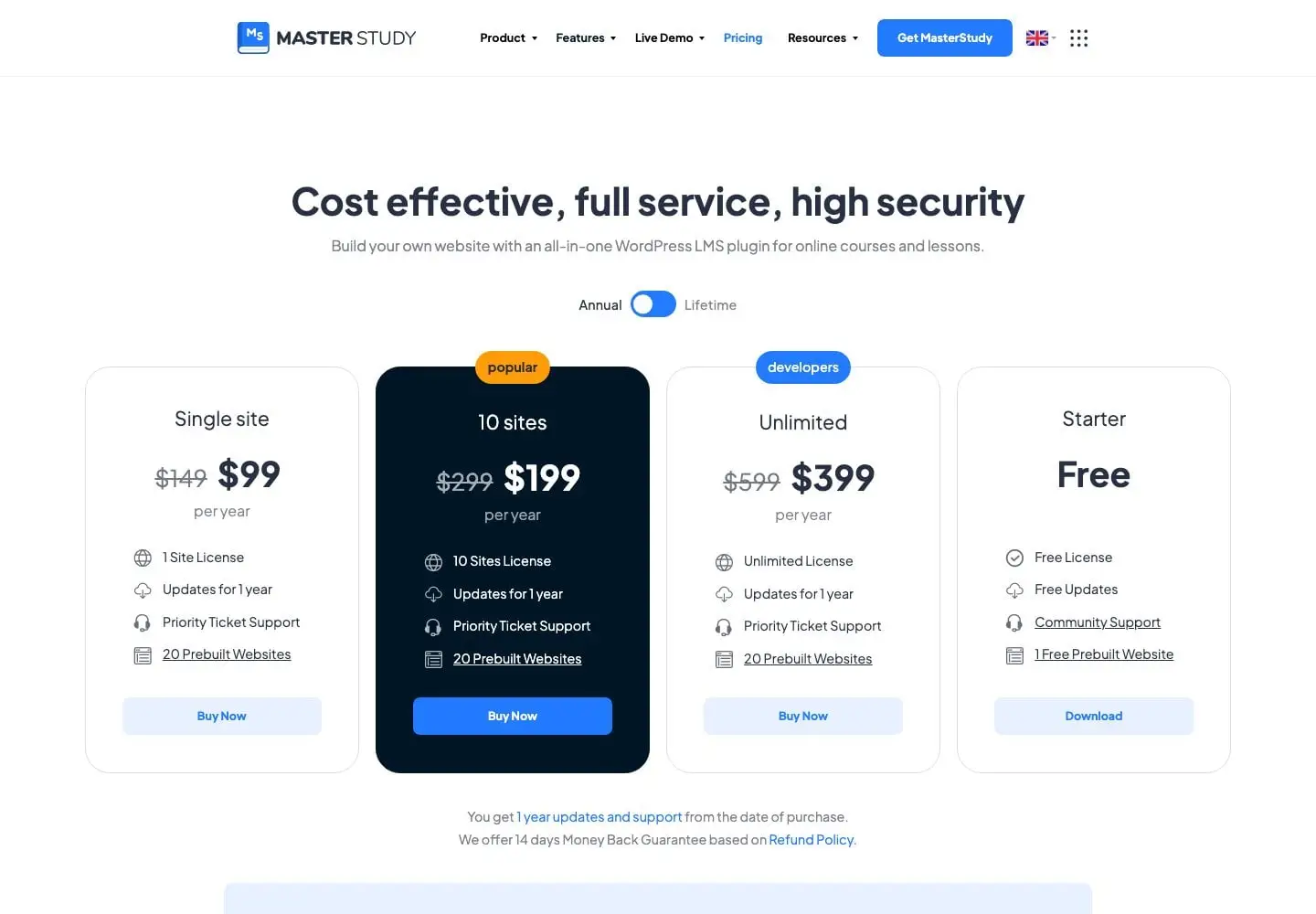
MasterStudy LMS is built around the marketplace model, so its free plugin includes a teacher marketplace with earnings, commissions, and withdrawal requests, plus a certificate builder and eight quiz question types.
Pricing: $99 a year for one site, or $249 for a lifetime licence, both discounted from $149 and $379 when we checked. However, content drip, assignments, SCORM, and co-instructors are in Pro.
The honest weakness: it hadn’t been tested with the latest version of WordPress (7.1) when we checked, and content drip needs Pro.
Best for: multi-teacher course marketplaces, especially if you want a polished, ready-made design.
8. Academy LMS: best for agencies and multi-site licences

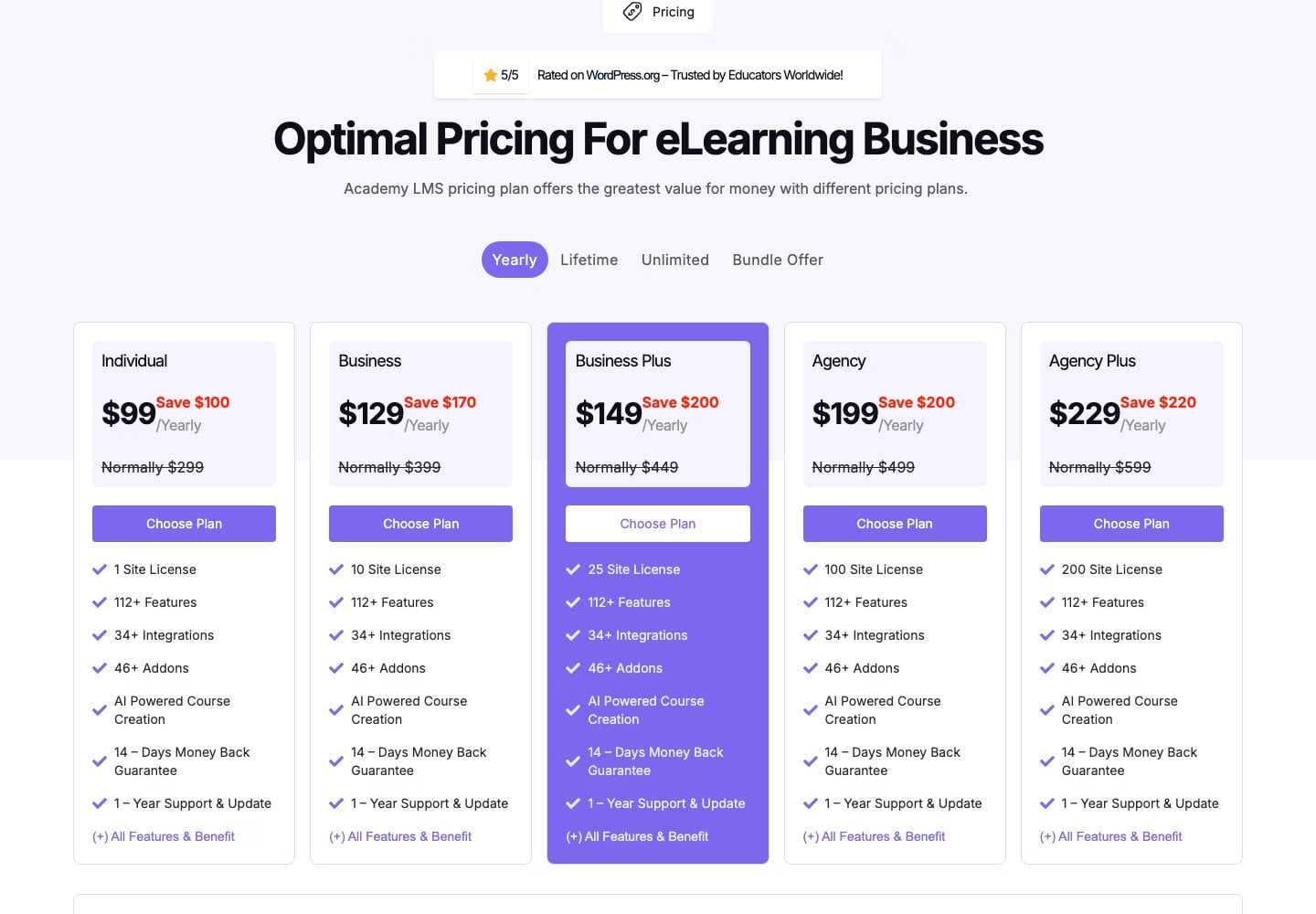
Academy LMS has the highest rating in this list (4.9/5) and a generous free plugin. For example, it includes a front-end course builder, eight quiz question types, certificates, instructor revenue sharing, and dashboards for students and instructors.
Pricing: the Individual plan is $99 a year, and multi-site plans stay cheap, from $129 for 10 sites to $229 for 200 sites. Lifetime licences also start at just $149.
The honest weakness: it’s the smallest plugin here, with 2,000+ active installs, and card payments also run through StoreEngine, a separate plugin.
Best for: agencies building course sites for several clients.
9. MemberPress Courses: best for membership sites

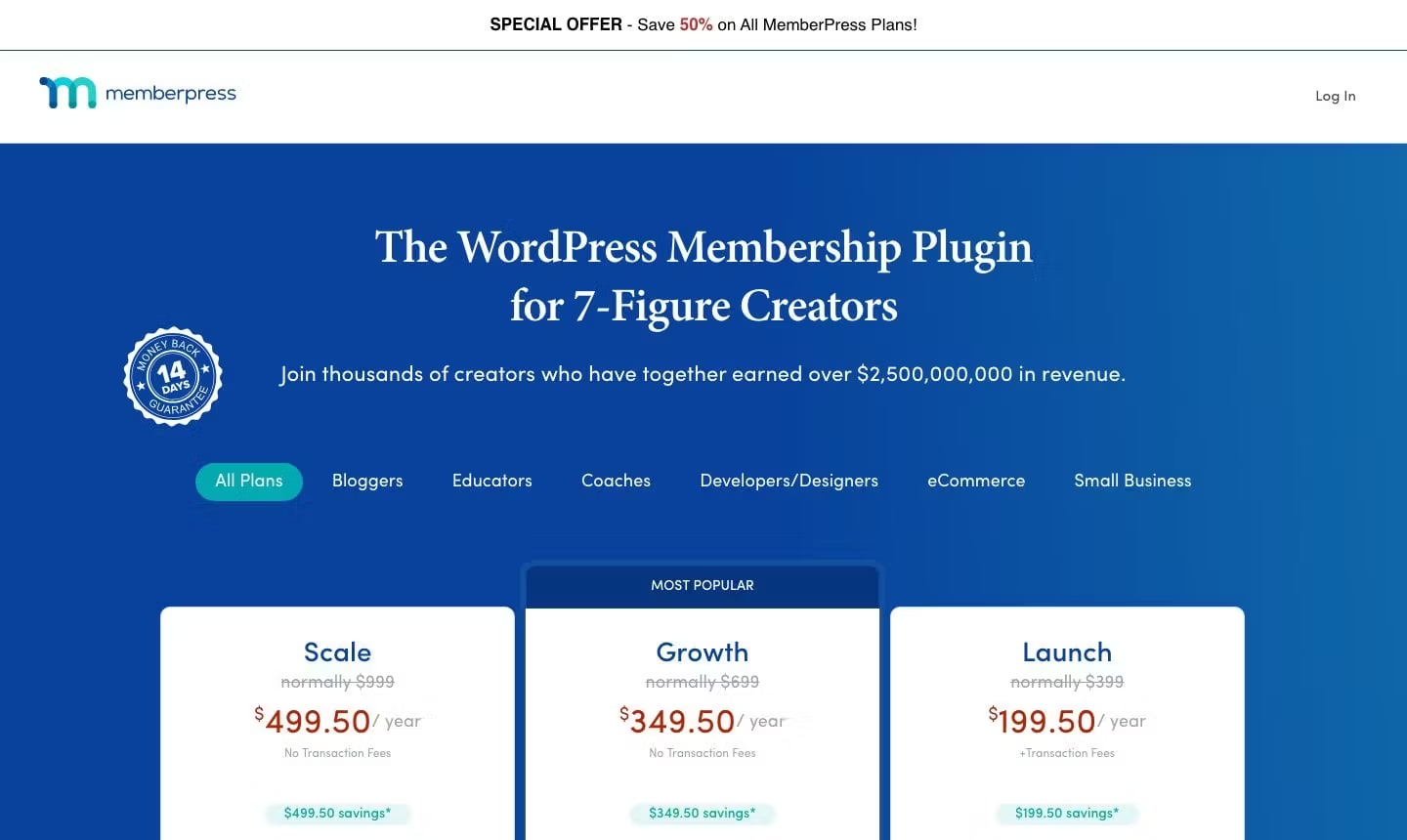
MemberPress is a membership plugin first, and Courses is included on every plan, alongside its membership and paywall tools. However, the entry Launch plan only gets unlimited courses and lessons; quizzes, assignments, the gradebook, certificates, and content drip start on the Growth plan.
Pricing: Launch is $199.50 in the first year and renews at $399. It also charges a 4.9% transaction fee on every payment, on top of processing. The Growth plan ($349.50 in the first year, renewing at $699) removes that fee and adds PayPal and the LMS features above.
The honest weakness: there’s no free version, and the entry plan’s 4.9% fee also adds up quickly as you sell more.
Best for: paid membership sites where courses are one part of the content.
How to choose
Three questions narrow the list quickly:
- Do you need to take card payments on day one? Masteriyo includes Stripe in its free plugin, and Academy LMS offers it through its free StoreEngine plugin. LearnDash and MemberPress include it, but they aren’t free.
- Is this a marketplace with multiple instructors? If so, look at Tutor LMS, MasterStudy LMS, or Academy LMS.
- What’s your year-two budget? Compare renewal prices rather than introductory prices. LearnDash stays the same, LearnPress’s licence is lifetime (with optional $209.30 update renewals), and Masteriyo, LifterLMS, and MemberPress roughly double.
💡 PRO TIP: Switching LMS plugins later is possible, but it’s rarely painless. If you ever migrate, test it on a staging copy of your site with a full backup before touching a live site with real students.
Want to see the whole budget, not just the plugin? If so, our course platform fees comparison adds up the plugin, hosting, video, and card fees on $30,000 in sales, and its calculator lets you plug in your own numbers.
Frequently asked questions
Tutor LMS is the most widely used, with 100,000+ active installs. LearnDash, however, is the best-known premium option. Masteriyo is a strong free choice, since it includes Stripe and certificates at no cost.
Masteriyo, Tutor LMS, LifterLMS, LearnPress, Sensei LMS, MasterStudy LMS, and Academy LMS all have free versions on WordPress.org. However, LearnDash and MemberPress are premium-only. The free versions differ most on payments: some include Stripe, while others need a paid add-on to take card payments.
Masteriyo includes Stripe in its free plugin, and Academy LMS also supports Stripe through its free StoreEngine plugin. However, Tutor LMS needs Pro for Stripe, LifterLMS and LearnPress sell Stripe as a paid add-on, and Sensei LMS needs Sensei Pro and WooCommerce.
LearnDash costs $259 a year for Essentials, $399 for Pro, and $599 for Elite. There’s no free version and no introductory discount, so the renewal price is the same as the first year.
LearnDash renews at the same price, while Masteriyo, LifterLMS, and MemberPress renew at roughly double their first-year price. Meanwhile, LearnPress’s Pro Bundle ($299) comes with a lifetime licence, and renewing updates after the first year ($209.30) is optional. Finally, Tutor LMS, Sensei LMS, MasterStudy LMS, and Academy LMS don’t publish renewal prices.
None of the dedicated LMS plugins here charge a transaction fee. However, MemberPress’s entry Launch plan is the exception, with a 4.9% fee on every payment. You’ll still pay your payment provider’s standard processing fee, such as Stripe’s 2.9% + 30¢.
Wrapping up 🏁
- Selling on a free plugin: Masteriyo
- Marketplaces and multi-instructor schools: Tutor LMS, MasterStudy LMS, or Academy LMS
- Established premium business: LearnDash
- Memberships plus courses: LifterLMS or MemberPress
- Add-on-by-add-on budget: LearnPress
- Block editor and WooCommerce: Sensei LMS
Whichever you choose, check the year-two price and what it costs to take payments before you commit.
Which LMS plugin are you using, and would you still choose it again? Tell us in the comments! 💬


FREE GUIDE
4 Essential Steps to Speed Up Your WordPress Website
Follow the simple steps in our 4-part mini series and reduce your loading times by 50-80%. 🚀
Yay! 🎉 You made it to the end of the article!
