“What’s new in Gutenberg The Gutenberg project is the new Editor Interface for WordPress. The editor improves the process and experience of creating new content, making writing rich content much simpler. It uses ‘blocks’ to add richness rather than shortcodes, custom HTML etc.
https://wordpress.org/gutenberg/…” posts (labeled with the #gutenberg-new tag) are posted following every Gutenberg release on a biweekly basis, showcasing new features included in each release. As a reminder, here’s an overview of different ways to keep up with Gutenberg and the Editor.
What’s new in
Gutenberg 24.3?
Gutenberg 24.3 is released and available for download!
This release lets you format text across several blocks at once, adds emoji reactions to notes, and redesigns the Media inserter on top of the DataViews grid. Save and autosave failures now tell you what went wrong. Developers get server-side Core Core is the set of software required to run WordPress. The Core Development Team builds WordPress. actions and fields, plus a few Interactivity API An API or Application Programming Interface is a software intermediary that allows programs to interact with each other and share data in limited, clearly defined ways. fixes. All of this thanks to a fantastic team of contributors, including ten first-timers.
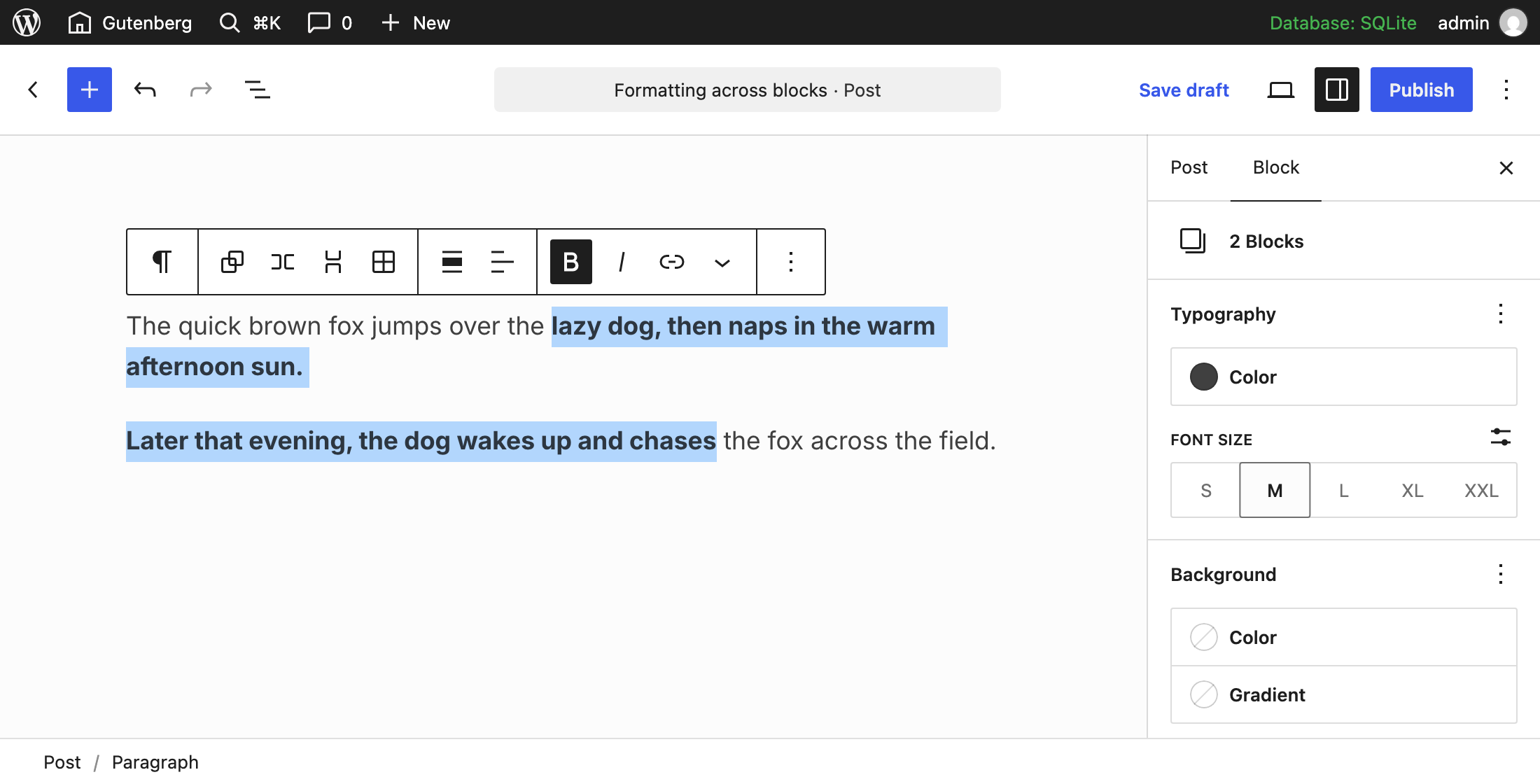
Format text across blocks
Selections that span several blocks are no longer off-limits for formatting. Select the text, and the formatting controls now apply to all of it (#58913).

Working with multi-block Block is the abstract term used to describe units of markup that, composed together, form the content or layout of a webpage using the WordPress editor. The idea combines concepts of what in the past may have achieved with shortcodes, custom HTML, and embed discovery into a single consistent API and user experience. selections got a few other upgrades, too. You can drag a selection by pressing anywhere inside it (#81602), move a dragged text selection (#81603), and keep your rich text selection when you Shift+click within the same block (#84579).
Emoji reactions for notes
Sometimes an emoji is all the reply a note needs. Notes now support reactions like ❤️, 🎉, 😄, 👀, and 🚀 (#76767).
Notes also got some polish. They highlight and connect to their content more clearly (#80578), and the text for an unsent note now gets a draft marker (#84125). The “Add note” toolbar button now only adds notes and no longer shows avatars (#84635).
The Media inserter now shows your media in a DataViews grid, the same component behind the lists in the Site Editor (#82749).
Additionally, audio and other files that aren’t images or videos get proper previews (#84882).
Save failures that explain themselves
Nobody likes a failed save action. Save failure notices now have a copy option and a “Show/Hide details” button, so you can share what went wrong (#82496). Autosave failures with no server response are explained, too, and the HTTP HTTP is an acronym for Hyper Text Transfer Protocol. HTTP is the underlying protocol used by the World Wide Web and this protocol defines how messages are formatted and transmitted, and what actions Web servers and browsers should take in response to various commands. status is shown when available (#85157).
After a failed autosave, a countdown shows when the next attempt will run (#84656), and the notice goes away once a later save succeeds (#84649).
Security fixes from WordPress 7.1.4
Gutenberg 24.3 also includes the security fixes from WordPress 7.1.4, so updating is recommended.
Other notable highlights
- Patterns: the inserter’s “My patterns” is now “Site patterns” and has an author filter Filters are one of the two types of Hooks https://codex.wordpress.org/Plugin_API/Hooks. They provide a way for functions to modify data of other functions. They are the counterpart to Actions. Unlike Actions, filters are meant to work in an isolated manner, and should never have side effects such as affecting global variables and output., and synced patterns you can read but not edit are listed in the inserter and can be detached (#84680, #84661, #84641, #84681).
- Design tools: the consistency work continues, with Search, Table, Tab List, Paragraph, and Icon gaining more support, fit text reaching Post Title, and writing mode reaching Quote and Pullquote (#83954, #83949, #83953, #83934, #83948, #83036, #83965, #83964). A new background clip control also lands in the block supports UI User interface (#77142). The changelog lists every block and support.
- Non-breaking spaces: they are now marked with a red dot, and a button replaces them with regular spaces (#84737).
- Navigation: links can be edited in a popover from the sidebar A sidebar in WordPress is referred to a widget-ready area used by WordPress themes to display information that is not a part of the main content. It is not always a vertical column on the side. It can be a horizontal rectangle below or above the content area, footer, header, or any where in the theme. List View, and an empty Navigation Menu A theme feature introduced with Version 3.0. WordPress includes an easy to use mechanism for giving various control options to get users to click from one place to another on a site. shows the inserter in the sidebar (#84005, #84003).
- Gallery: the mobile lightbox gets animated swiping (#79114).
- Query Loop The Loop is PHP code used by WordPress to display posts. Using The Loop, WordPress processes each post to be displayed on the current page, and formats it according to how it matches specified criteria within The Loop tags. Any HTML or PHP code in the Loop will be processed on each post. https://codex.wordpress.org/The_Loop: taxonomy A taxonomy is a way to group things together. In WordPress, some common taxonomies are category, link, tag, or post format. https://codex.wordpress.org/Taxonomies#Default_Taxonomies. terms are listed so they can be browsed, not recalled (#82583).
- Table of Contents: headings are read from the post when the block is used in a block context (#85040).
- Block toolbar: the parent selector plus only shows when no allowed block splits (#84645).
- List View: nesting with top-level items is allowed (#84856).
- Client-side media: animated image sub-sizes are generated by default, and EXIF metadata is preserved when converting HEIC to JPEG (#80385, #82040).
- Icons: new asterisk and form-based icons (#85442, #84074), popular icons shipped to the core-admin (and super admin) collection (#85072), and the Icon block shows the collection name in the “All” tab (#84055).
- Reduced motion: uploaded Cover background videos and front-end Videos no longer autoplay when reduced motion is preferred (#83853, #84308).
- Performance: the theme.json JSON, or JavaScript Object Notation, is a minimal, readable format for structuring data. It is used primarily to transmit data between a server and web application, as an alternative to XML. data merged from all origins is cached, and the icon library renders faster (#81979, #84327).
Changelog
Features
- Block Editor: Allow rich text formatting across blocks. (58913)
- UI: Add Avatar An avatar is an image or illustration that specifically refers to a character that represents an online user. It’s usually a square box that appears next to the user’s name. with initials, colored fallbacks, and an optional color ring. (84145, 84653, 84822, 84824)
Enhancements
- React React is a JavaScript library that makes it easy to reason about, construct, and maintain stateless and stateful user interfaces.
https://reactjs.org 19: Add new incompatible plugins. (84607) - Scripts: Run end-to-end tests against the configured wp-env test environment. (84654)
- Standardize focus rings with the design system:
- Components: Checkbox and radio, DataViews list items, Link, Snackbar, Tabs panels, and the UnitControl unit select. (85379, 85358, 84697, 85168, 84914, 85444)
- Editor: Block Directory downloadable blocks, Edit as HTML HyperText Markup Language. The semantic scripting language primarily used for outputting content in web browsers. textarea, LinkControl preview, MediaEdit, and the Meta Meta is a term that refers to the inside workings of a group. For us, this is the team that works on internal WordPress sites like WordCamp Central and Make WordPress. Boxes panel toggle. (85307, 85266, 84695, 84940, 85355)
Block Library
- Accordion Heading: Add background gradient support. (83938)
- Comments Pagination Previous and Next: Add border and padding support. (64308, 64310)
- Cover: Add link and button color support. (83972)
- Cover: Add minimum width support. (83975)
- File: Add typography support. (83969)
- Gallery: Improve mobile lightbox with animated swiping. (79114)
- Heading: Enable editableRoot for multi-selection on mobile. (84358)
- Icon: Add background image, size, and gradient support. (83948)
- Icon: Add minimum width and height support. (83971)
- Icon: Add shadow support. (83921)
- Icon: Show the collection name in the “All” tab of the icon library. (84055)
- List: Add minimum width and height support. (83915)
- Navigation Link: Check page create permission only when needed. (84663)
- Navigation Overlay Close: Add margin support. (83970)
- Navigation Overlay Close: Add minimum width and height support. (83907)
- Paragraph: Add background image, size, and gradient support. (83934)
- Paragraph: Add minimum width and height support. (83924)
- Playlist: Add background image, size, and gradient support. (83928)
- Playlist: Add minimum width and height support. (83909)
- Post Navigation Link: Add background image, size, and gradient support. (83940)
- Post Navigation Link: Add minimum width and height support. (83973)
- Post Template: Add minimum width and height support. (83911)
- Post Title: Add fit text support. (83036)
- Pullquote: Add writing mode and text indent support. (83964)
- Query Loop: List taxonomy terms so they can be browsed, not recalled. (82583)
- Quote: Add writing mode support. (83965)
- Search: Add background gradient support. (83954)
- Search: Add border style support. (83960)
- Search: Add minimum width and height support. (83977)
- Search: Add shadow support. (83937)
- Tab List: Add background image, size, and gradient support. (83953)
- Tab List: Add line height, font weight, letter spacing, and text transform support. (83961)
- Table of Contents: Read headings from the post in block context. (85040)
- Table: Add background gradient support. (83949)
- Table: Add link color support. (72229)
- Table: Add text align support. (83966)
- Term Count: Reuse term data from Term Template. (84119)
- Term Template: Add heading and button color support. (83968)
- Terms Query: Add padding, margin, and block gap support. (83959)
- Video: Add minimum width and height support. (83974)
Components
- Button: Use Spinner for loading indicators. (84321)
- BorderBoxControl: Unpack multi-value shorthand width when unlinking border sides. (84826)
- DataViews: Format footer counts. (84622)
- DataViews: Improve bulk actions discoverability. (82730)
- DataViews: Render table bulk actions outside the table. (85250)
- DataViews: Support mixed-library overlays. (84305)
- Dialog: Add an auto popup size that fits content width. (84559)
- Migrate SelectControl consumers to wordpress/ui. (83035, 84345, 84546, 84584, 84936)
- Modal: Add focus fallback for firstContentElement. (84344)
- Notice: Match dismiss controls and titles to status colors. (84571)
- Popover: Use design system tokens on the default surface. (84574)
- RangeControl: Add size prop. (69844)
- SearchableSelect, SelectControl: Add trigger slots for props and content. (84934, 84828)
- Select, Combobox, Autocomplete: Align popup list spacing. (84393)
- Snackbar: Keep snackbars with an action on screen longer. (84842)
- Tabs: Align interaction backgrounds and focus states. (84572)
- Theme: Enrich the design-tokens.js export with more token data. (76604)
- Theme: Generate JavaScript JavaScript or JS is an object-oriented computer programming language commonly used to create interactive effects within web browsers. WordPress makes extensive use of JS for a better user experience. While PHP is executed on the server, JS executes within a user’s browser.
https://www.javascript.com design token fallbacks. (84569) - UI: Support button items in Breadcrumb. (84156)
- UI: Use solid brand highlights for popup items. (84087)
- UI: Use the compatibility overlay slot for AlertDialog, Dialog, and Drawer. (83878, 84379, 84380)
Block Editor
- Block Breadcrumbs: Use the wordpress/ui Breadcrumb component. (84295)
- Block Supports: Add background clip UI. (77142)
- Block Toolbar: Only show the parent selector plus when no allowed block splits. (84645)
- Drag a multi-selection by pressing anywhere inside it. (81602)
- FontAppearanceControl, FontFamilyControl: Migrate to wordpress/ui. (84715, 84716)
- LinkControl, PostURL: Use the wordpress/ui Link. (84819, 84820)
- Mark non-breaking spaces with a red dot and add a button to replace them. (84737)
- Media Inserter: Redesign using a DataViews grid. (82749)
- Move a dragged text selection. (81603)
- Navigation: Edit links in a popover from the sidebar List View. (84005)
- Navigation: Show the inserter for an empty Navigation Menu in the sidebar. (84003)
Post Editor
- Core Data: Keep read-only taxonomy fields out of collaborative edits. (84838)
- Editor: Stabilize the DataForm-based inspector. (85081)
- Improve save and autosave failure handling:
- Add a copy option and a “Show/Hide details” button to save failure notices. (82496)
- Explain autosave failures with no response, and show the HTTP status. (85157)
- Show a countdown to the next autosave after an autosave fails. (84656)
- Remove the autosave failure notice once a later save succeeds. (84649)
- Show the browser backup’s date and compare it before restoring. (84735)
- Don’t promise a browser backup in save failure notices. (84948)
Notes
- Add emoji reactions to notes ❤️ 🎉 😄 👀 🚀. (76767)
- Improve how notes highlight and connect to content. (80578)
- Make the “Add note” toolbar button add-only and drop the avatars. (84635)
- Mark the text an unsent note is about with a draft marker. (84125)
- Remove the divider between the canvas and floating notes. (84850)
Patterns
- Rename the inserter’s “My patterns” to “Site patterns” and add an author filter. (84680)
- Support synced patterns the user can read but not edit: list them in the inserter, load them without “Edit original”, and allow detaching them. (84661, 84641, 84681)
Global Styles
- Add pseudo-selector support for text inputs and select elements. (71634, 81644)
- Font Library: Mark installed font variants in font collections. (84023)
- List elements alongside blocks. (81645)
- Preview the selected state on element screens. (83787)
- Remove the custom styles dot from the block list. (84657)
- Style states: Add footer viewport and responsive styles status. (84146)
- Style states: Enable state-specific custom CSS Cascading Style Sheets.. (83539)
Extensibility
- Actions and Fields APIs: Register the core entity actions and fields on the server. (84650, 84660, 84696, 84700)
- Blocks: Accept a feature path array in getBlockSupport and hasBlockSupport. (84708)
- Rename “fields” to “entity fields”. (84691)
Media
- Client-side media: Upgrade wasm-vips to 0.0.19 and raise memory budgets. (84980)
- Generate animated image sub-sizes by default. (80385)
- Media editor: Add an edits slice to the session and reset the whole session in one step. (83899, 84591)
Icons
- Add asterisk and form-based icons. (85442, 84074)
- Experiment with proportional stroke scaling. (84081)
- Mirror the tag A directory in Subversion. WordPress uses tags to store a single snapshot of a version (3.6, 3.6.1, etc.), the common convention of tags in version control systems. (Not to be confused with post tags.) icons to match the other angled icons. (84675)
- Ship popular icons to the core-admin collection. (85072)
Bug Fixes
- DOM: Fix getOffsetParent infinite loop on a non-element parent. (84374)
- Experiments: Don’t invalidate saved option with a legacy key. (84619)
- Icons: Restore the missing speech bubble in the postComments icon. (85275)
Components
- BorderControl: Remove double focus outline. (85173)
- CustomGradientPicker: Keep the color interpolation method when editing a gradient. (84383)
- DataForm: Center the text control’s prefix and suffix. (84314)
- DataViews: Fix the page title row jumping on hover when a page type badge is shown. (84368)
- DropdownMenu: Keep a disabled toggle closed on ArrowDown. (84556)
- DropdownMenu: Match initial focus to the opening interaction. (85486)
- Grid: Fix bottomLeft alignment mapping to the bottom left corner. (82641)
- InputControl: Ignore the drag gesture on touch devices. (81519)
- Link: Keep the new-tab indicator with the link text. (84806)
- SearchableChipSelect: Preserve selected chips on Escape. (84172)
- SearchableSelectControl: Fix search icon orientation. (84690)
- Select: Preserve scrolling when item alignment falls back. (84682)
- SelectControl: Fix default options showing the Select placeholder. (85172)
- Snackbar: Restore focus when used outside SnackbarList. (84342)
- Tabs: Expand vertical interaction backgrounds and focus rings. (84821)
- Tabs: Restore fit-content width for horizontal tab lists. (84626)
- UI: Keep popups open for presses inside their iframes. (83870)
- UI: Preserve explicit null portal containers. (84370)
- UI: Show keyboard focus on disabled menu items. (85488)
- UI: Synchronize popup hover and keyboard targets. (85487)
- UnitControl: Use a neutral color for static unit labels. (85456)
Post Editor
- Customize Widgets: Keep the block selected when using wordpress/ui overlays. (84628)
- Editor: Fix long author name overflowing the Post sidebar panel. (84165)
- Editor: Keep a preview canvas from adopting the entity’s selection. (84832)
- Editor: Keep the block toolbar row on phones while no block is selected. (84461)
- Editor: Validate parent container when converting blocks to template parts. (84155)
- Ensure “Hide block tools” text isn’t wider than the button background. (85051)
- Fields: Lock the status and slug fields for users who can’t publish. (84371)
- Post Taxonomies: Restore shortcuts to create terms. (84601)
- Post slug: Derive the slug preview from the current title instead of generated_slug. (84893)
- PostURL: Remove double focus ring outline. (84694)
- Revisions The WordPress revisions system stores a record of each saved draft or published update. The revision system allows you to see what changes were made in each revision by dragging a slider (or using the Next/Previous buttons). The display indicates what has changed in each revision.: Save unsaved changes as a revision before restoring a revision. (84590)
- Style Book: Fix crash when the Heading block is unregistered. (84359)
- Template field: Show the default template instead of the Select placeholder. (85167)
- URL A specific web address of a website or web page on the Internet, such as a website’s URL www.wordpress.org: Make cleanForSlug match WordPress Core’s sanitize_title(). (84896)
Notes
- Focus the new note form once it’s positioned. (84639)
- Keep the avatar round when it fails to load. (85807)
- Read note markers from the rich-text record, not its HTML. (84310)
- Select the note under the caret. (84147)
- Skip the reaction summary pre-fetch when Core already does it. (85047)
Block Library
- Accordion Heading: Anchor inline notes to selected title text. (84497)
- Cover: Decode the oEmbed iframe iFrame is an acronym for an inline frame. An iFrame is used inside a webpage to load another HTML document and render it. This HTML document may also contain JavaScript and/or CSS which is loaded at the time when iframe tag is parsed by the user’s browser. source before parsing its query string. (83770)
- Custom HTML: Show a floating marker when the block renders nothing. (84150)
- Gallery: Let columns override legacy responsive styles. (84360)
- Icon: Fix display issues in the block manager. (84107)
- Image: Measure the lightbox container, not the image’s parent. (82312)
- Layout: Pair physical margins with the physical float on .alignleft and .alignright. (83520)
- Login/out: Mark the block as content. (84849)
- Media & Text: Restore content padding in classic themes with a CSS reset. (85200)
- Navigation Link: Apply “Open in new tab” from the link popover. (83506)
- Navigation: Fix error when inserting a block via “Browse all” in List View. (84665)
- Navigation: Keep custom CSS, including from Global Styles, off inner list containers. (84881, 85366)
- Navigation: Keep the flex layout on a block inserted into an overlay. (82232)
- Navigation: List only the blocks the sidebar supports in its link search. (85122)
- Pattern: Load the view record, and the edit record only once it’s loaded. (84799)
- Search: Don’t clip the button focus outline when the field is collapsed. (84685)
Block Editor
- Allow block toolbar to wrap when text labels are enabled. (84802)
- Block Styles: Clamp variation labels to two lines and show the label in a tooltip. (85721)
- Block Toolbar: Fix UI menus requiring two clicks to open. (84547)
- Block Toolbar: Keep last item fills out of the placeholder toolbar. (84554)
- Keep multiline paste inside empty Preformatted and Poetry blocks. (83552)
- List View: Allow nesting with top level items. (84856)
- List View: Show appender in contentOnly locked section. (84713)
- Preserve rich text selection on Shift+click within the same block. (84579)
- Rich Text: Derive active formats at the caret for input and paste. (84303)
- Rich Text: Strip every object replacement character in getTextContent. (81526)
Global Styles
- Add icons and tweak styling for element and block buttons. (85363)
- Custom CSS: Generate styles for blocks rendered by their parent block. (82590)
- Custom CSS: Use the correct selector for block style variations on the front end. (84530)
- Fix inconsistent “Elements” tools panel heading level. (85247)
- Font Library: Load all installed font families. (84684)
Media
- Preserve EXIF metadata when converting HEIC to JPEG client-side. (82040)
- Skip auto-attach on save when attachment pages are enabled. (84851)
- For published posts, only auto-attach newly added images. (84890)
Interactivity API
- Align directive name validation with WordPress Core. (81023)
- Fix late data-wp-html values, throwing functions, and directive conflicts. (84652)
- Keep server-rendered data-wp-html content for the server’s token representation. (84889)
Accessibility Accessibility (commonly shortened to a11y) refers to the design of products, devices, services, or environments for people with disabilities. The concept of accessible design ensures both “direct access” (i.e. unassisted) and “indirect access” meaning compatibility with a person’s assistive technology (for example, computer screen readers). (https://en.wikipedia.org/wiki/Accessibility)
- Block Toolbar: Give the phone placeholder button a name and icon when the default block is unregistered. (84533)
- ColorPicker: Improve accessibility and discoverability of inputs. (70214)
- Cover: Don’t autoplay an uploaded background video when reduced motion is preferred. (83853)
- Modal: Keep an accessible name when the header The header of your site is typically the first thing people will experience. The masthead or header art located across the top of your page is part of the look and feel of your website. It can influence a visitor’s opinion about your content and you/ your organization’s brand. It may also look different on different screen sizes. is hidden. (82645)
- navigateRegions: Only outline focused Publish and Save regions. (84343)
- Notes: Drop misleading aria-haspopup from the “Add note” menu item. (84818)
- PaletteEdit: Name picker dialogs and add screen reader dismissal. (84333)
- Revisions: Meet AA contrast for the inline deletion diff without an opacity filter. (82258)
- ToolsPanel: Put setting names first in accessible action labels. (84341)
- Video: Don’t autoplay on the front end when reduced motion is preferred. (84308)
Performance
- Cache the theme.json data merged from all origins. (81979)
- Connectors: Preload REST API The REST API is an acronym for the RESTful Application Program Interface (API) that uses HTTP requests to GET, PUT, POST and DELETE data. It is how the front end of an application (think “phone app” or “website”) can communicate with the data store (think “database” or “file system”)
https://developer.wordpress.org/rest-api/ responses on the Connectors screen. (77353) - Icon: Speed up rendering of the icon library. (84327)
- Icons: Skip sanitizing the core icons. (85083)
- Interactivity API: Optimize toVdom walk. (81699)
- Site Editor: Preload the entity actions of the screen. (85155)
Documentation
- Badge: Clarify that badges should not be interactive. (84920)
- BaseControl: Update prop documentation. (70064)
- Breadcrumb: Fix usage guidelines sidebar structure. (84564)
- Components: Update guidance after the Emotion migration Moving the code, database and media files for a website site from one server to another. Most typically done when changing hosting companies.. (85020, 85023)
- Framework: Improve AGENTS.md guidance around running package scripts. (84195)
- Menu: Clarify icon, label, and description usage guidelines. (84020)
- Note reduced-motion handling for autoplaying media. (84594)
- Storybook: Add more visual pages for all tokens. (84373)
- Storybook: Keep documentation first by sorting unlisted folders alphabetically. (84563)
- Storybook: Present motion tokens as an MDX documentation page. (85080)
- Tabs: Fix filled link icon in Storybook. (84618)
- UI: Add missing popup width stories. (84320)
Code Quality
- Custom CSS: Apply changes from the Core review. (84757)
- Duotone: Sync unsupported attribute type guard from Core. (84801)
- Global Styles: Ignore theme.json values and preset items of unexpected types to avoid fatal errors. (84523, 84529, 84534)
- Remove the wordpress/lazy-import package. (84318)
- Remove unused internal helpers, components, and dependencies. (84575, 85091, 85092, 85093, 85094, 85098)
- Tests: Use strict assertions in PHPUnit tests. (84510, 84513, 84514, 84515, 84683, 84686, 84883, 84884, 84885, 84886, 84887, 84888)
- Use the null coalescing assignment operator in singleton getters. (85174)
- TypeScript:
- Block Editor: Convert the store, hooks In WordPress theme and development, hooks are functions that can be applied to an action or a Filter in WordPress. Actions are functions performed when a certain event occurs in WordPress. Filters allow you to modify certain functions. Arguments used to hook both filters and actions look the same., shared components, utilities, InspectorControls, LinkControl, URLInput, typography controls, and useBlockDropZone to TypeScript. (84615, 84616, 84625, 84629, 84655, 84677, 84720, 84725, 84730, 84844, 84848, 84946)
- Rich Text: Convert to TypeScript. (84324, 84365, 84378, 84610)
- Commands, Compose, Components, DOM, Preferences Persistence, Primitives, Workflow: Convert to TypeScript. (84315, 84377, 84382, 84611, 84317, 84312, 84375, 84309, 84311, 84361)
- Convert tests to TypeScript in Data Controls, DataViews, Date, Format Library, Kebab Case, Private APIs, Undo Manager, Upload Media, URL, and Warning. (84852, 84836, 84830, 85032, 84825, 84901, 84895, 84930, 84916, 85085)
- Blocks: Type the background clip, gradient, position, and repeat supports. (84709)
- React 19 types: Migrate away from MutableRefObject. (84550)
- Remove redundant checkJs: false from fully converted packages. (84366)
Components
- Migrate Emotion styles to SCSS Modules: ColorPicker, CustomSelectControl, DatePicker, DateTimePicker, FocalPointPicker, InputControl, Menu, Navigator, NumberControl, PaletteEdit, RangeControl, SelectControl, Tabs, TimePicker, and UnitControl. (84128, 84131, 84724, 84129, 84736, 84728, 84706, 84565, 84330, 84130, 84562, 84732, 84332, 84331, 84561)
- Remove Emotion: context system, StyleProvider cache, styling utilities, test and story fixtures, dependencies, and compiler tooling. (84925, 85019, 84929, 84926, 85022, 85021, 85038, 84707)
- Actions API: Remove the unsupported single action context. (85186)
- Dialog: Check story and test sizes against popup prop types. (84705)
- Gradient parser: Switch to the official gradient-parser types. (84582)
- Simplify RangeControl, Tabs, and BorderBoxControl styles. (85086)
- Text: Simplify the internal highlighter. (85101)
- Theme: Consolidate border mode overrides in the token resolver. (84108)
- Tip: Migrate inserter usages to Notice and deprecate the component. (84197)
- UI: Consolidate shared iframe dismissal tests. (84296)
Block Editor
- Block Supports: Share the state text clip helpers with theme.json. (85057)
- Include migration hint in useSetting deprecation warning. (85100)
- Rich Text: Remove refs from event listener contexts. (84545)
- Sorting: Rely on stable standard sort and use toSorted. (52213)
Block Library
- A11y Accessibility (commonly shortened to a11y) refers to the design of products, devices, services, or environments for people with disabilities. The concept of accessible design ensures both “direct access” (i.e. unassisted) and “indirect access” meaning compatibility with a person’s assistive technology (for example, computer screen readers). (https://en.wikipedia.org/wiki/Accessibility): Move prefersReducedMotion into the block library’s shared utils. (84297)
- Blocks: Clarify button background comment and template part error string. (85176)
- Media & Text: Replace deprecated word-break with overflow-wrap: anywhere. (82580)
- Remove compat function for unsupported unprefixed style states. (84531)
- Rename inspector and toolbar style-states slots for consistency. (84598)
Extensibility
- Actions API: Extract the core actions into the wordpress/core-actions script modules, and remove the fields that moved to wordpress/core-fields. (84643, 84897)
- Core Actions, Core Fields: Translate the labels with the default text domain. (85139)
- Fields API: Take over Core’s registry singleton like the Icons API. (84168)
Tools
- Props Bot: Queue runs instead of cancelling superseded ones. (84176)
Testing
- Add an iOS The operating system used on iPhones and iPads. end-to-end test harness and test selecting text across two paragraphs. (84463, 84585, 84640, 84741, 84859)
- Add end-to-end tests for the autosave failure notice. (84644)
- Automated Testing: Add AI review guidance for lint suppressions. (84638)
- Automated Testing: Fix Storybook manifest errors and validate in CI. (84198)
- Changelog validation: Reject blank lines between Unreleased entries. (84804)
- DuotonePicker: Add component tests. (69264)
- Entity Actions: Fix the taxonomy collision test against Core trunk A directory in Subversion containing the latest development code in preparation for the next major release cycle. If you are running “trunk”, then you are on the latest revision.. (85146)
- Flaky end-to-end tests: Open settings sidebar in constrained canvas test. (84606)
- Icons: Add unit test Code written to test a small piece of code or functionality within a larger application. Everything from themes to WordPress core have a series of unit tests. Also see regression. coverage for WP_REST_Icon_Collections_Controller. (83168)
- React 19 codemod: Apply defaultProps when rendering a memo component. (84568)
- Tests: Fix HTML comparison tests. (84294)
- Tests: Fix list item unsafe markup test on older WordPress versions. (84302)
- Tests: Scope Classic block media checkbox locator. (84524)
- Upgrade JSDOM to 30.1.2. (84367)
Build Tooling
- babel-preset-default: Add polyfill list to generated bundle. (84835)
- Build: Fix npm run dev failing on the patterns tsconfig comment. (84898)
- Build: Guard SCRIPT_DEBUG with defined() in script and style registration. (83633)
- Build: Keep absolute paths out of worker source maps. (84163)
- Build: Update pr-baseline-action to v0.3.0. (84692)
- CI: Run the required trunk changes cron every 4 hours. (84301)
- CI: Set explicit retention periods for large artifacts. (84525)
- Cherry-pick script: Add an optional dry-run parameter. (78878)
- Packages: Stop publishing tsconfig files, TypeScript build info, tests, and Markdown files other than README.md. (84164, 84307)
- PR meta: Add a Playground preview link. (84687)
- PR meta: Log fallback bodies verbatim and keep query strings in run links. (85119)
- PR meta: Write sections on stacked pull requests. (84703)
- Project management automation: Convert to TypeScript and move to tools as an internal action. (71193, 85087)
- Raise the minimum required Node.js to 22 with CJS/ESM interop. (84313)
- Release Tooling: Publish wp/X.Y branches with their own npm configuration. (84160)
- Remove some stale overrides. (84674)
- Update Ariakit to 0.4.42, Base UI to 1.9.0, Terrazzo token tools to 2.9.0, Testing Library user-event to 14.6.8, and Vite to 8.3.4. (84539, 85066, 84542, 85067, 85068, 84544)
- WP Build: Support importing SVG files as inlined data URIs. (85147)
- Zed: Exclude node_modules from the file scan and turn off Tailwind CSS. (84604)
Linting
- ESLint: Align UI caution components with Storybook status. (84319)
- ESLint: Allow design tokens in component JavaScript. (84827)
- ESLint: Make jsdoc/escape-inline-tags an error. (84701)
- ESLint: Remove an unused comments-plugin A plugin is a piece of software containing a group of functions that can be added to a WordPress website. They can extend functionality or add new features to your WordPress websites. WordPress plugins are written in the PHP programming language and integrate seamlessly with WordPress. These can be free in the WordPress.org Plugin Directory https://wordpress.org/plugins/ or can be cost-based plugin from a third-party. dependency. (85102)
- ESLint: Require TypeScript for new files. (84829)
- ESLint: Require WCSpinner alias for legacy Spinner imports. (84390)
- JSDoc: Escape WordPress package names in comments. (84369)
- Stylelint: Consolidate lint rules for simplification. (71235)
Env
- Update simple-git to v4. (84137)
- Use the matching wordpress-develop branch A directory in Subversion. WordPress uses branches to store the latest development code for each major release (3.9, 4.0, etc.). Branches are then updated with code for any minor releases of that branch. Sometimes, a major version of WordPress and its minor versions are collectively referred to as a “branch”, such as “the 4.0 branch”. for pre-release PHPUnit tests. (84758)
First-time contributors
The following PRs were merged by first-time contributors:
- @00kaku: Search: Don’t clip the button focus outline when the field is collapsed. (84685)
- @anamwp: Revisions: Meet AA contrast for the inline del diff without an opacity filter. (82258)
- @ariel-maidana: Media & Text: Restore content padding in classic themes with a CSS reset. (85200)
- @awss1i: DropdownMenu: Keep a disabled toggle closed on ArrowDown. (84556)
- @bitworks-io: Env: Update simple-git to v4. (84137)
- @poligilad-auto: Icons: Mirror the tag icons to match the other angled icons. (84675)
- @preetpatel713: Editor: Fix long author name overflowing the Post sidebar panel. (84165)
- @rajpreetcodes: Block Editor: Preserve rich text selection on Shift+click within the same block. (84579)
- @salvatorecorsi: Accordion Heading: Anchor inline notes to selected title text. (84497)
- @yotatameguchi-boop: Duotone: Sync unsupported attribute type guard from Core. (84801)
Contributors
The following contributors merged PRs in this release:
@00kaku @aaronrobertshaw @adamsilverstein @aduth @amitraj2203 @anamwp @andrewserong @annezazu @ariel-maidana @awss1i @bhaskargurram-ai @bitworks-io @ciampo @CookieDarb @DAreRodz @desrosj @dhruvikpatel18 @dinhtungdu @ellatrix @fabiankaegy @faisalahammad @fushar @gigitux @himanshupathak95 @im3dabasia @jameskoster @jasmussen @jeryj @jorgefilipecosta @joshualip-plaudit @jsnajdr @Kgupta62 @kraftbj @lancewillett @luisherranz @MaggieCabrera @Mamaduka @manzoorwanijk @Mayank-Tripathi32 @mirka @nb @nickchomey @noruzzamans @ntsekouras @oandregal @obenland @poligilad-auto @prasadkarmalkar @preetpatel713 @R1shabh-Gupta @rajpreetcodes @ramonjd @SainathPoojary @salvatorecorsi @sanketio @scruffian @sgomes @shail-mehta @shimotmk @simison @sirreal @Soean @t-hamano @talldan @tellthemachines @vedant-ere @westonruter @yashjawale @yotatameguchi-boop @youknowriad
Kudos to all the contributors that helped with the release! 👏
