Some WordPress lead generation tools find potential customers and partners beyond a business’s website. Others capture interest from visitors already on the site. Choosing a plugin starts with deciding which of these jobs the business needs it to do.
Superb Lead Finder focuses on external prospect discovery. Its documented workflow connects niche searches with contact research and lead tracking inside WordPress, helping businesses organize opportunities for outreach.
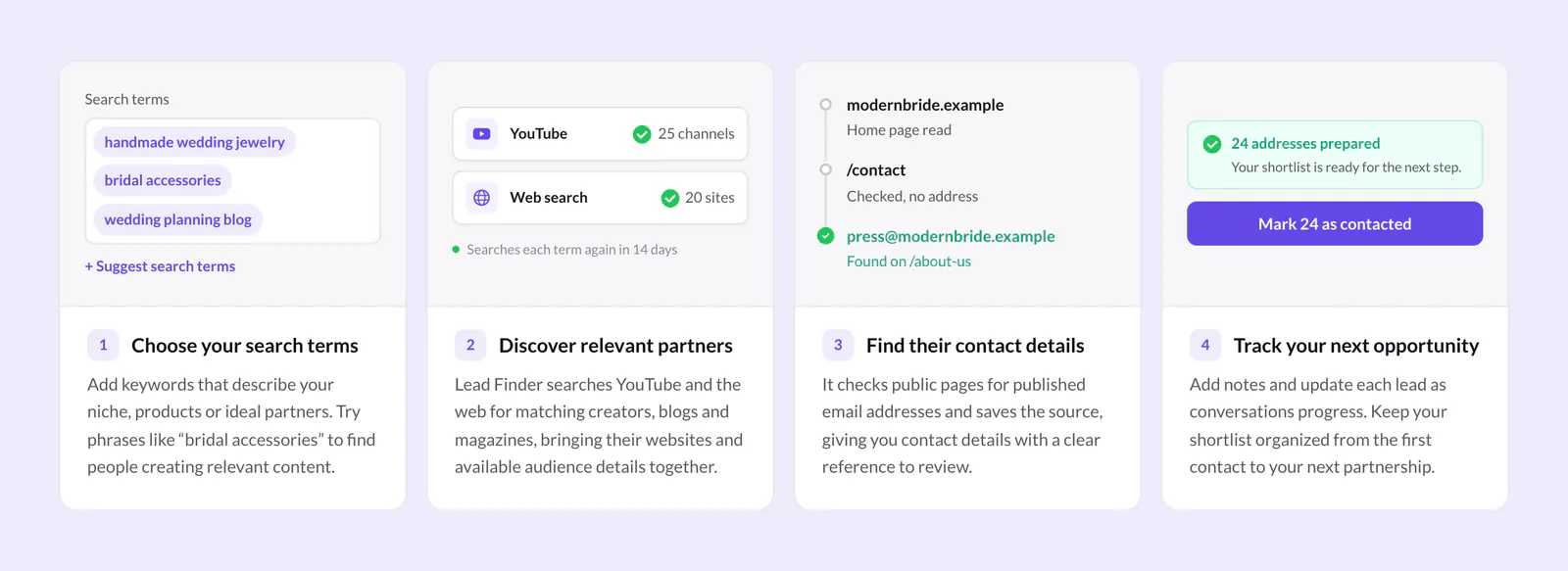
- The business chooses keywords describing its niche, products, or ideal partners. A phrase such as “bridal accessories” helps identify relevant content creators and websites.
- Lead Finder finds matching creators, blogs, and magazines through YouTube and web searches. It gathers their websites and available audience details for review.
- The plugin checks public pages for published email addresses. It records where each address was found so the business can review the source.
- The business adds notes and updates lead statuses as conversations develop. Potential customers and partners stay organized inside WordPress.
This discovery role matters when considering Lead Finder. A business seeking reviewers or collaboration partners needs a different workflow from one seeking inquiries from existing website traffic.
Superb Lead Finder setup and recurring searches
Before setting up Superb Lead Finder, a business needs to check its site’s requirements and choose at least one search provider. The plugin’s built-in guide explains the setup process.
- The business checks that its site runs WordPress 6.2 or newer and PHP 7.4 or newer, and can connect to external services.
- It installs Lead Finder and follows the built-in setup guide.
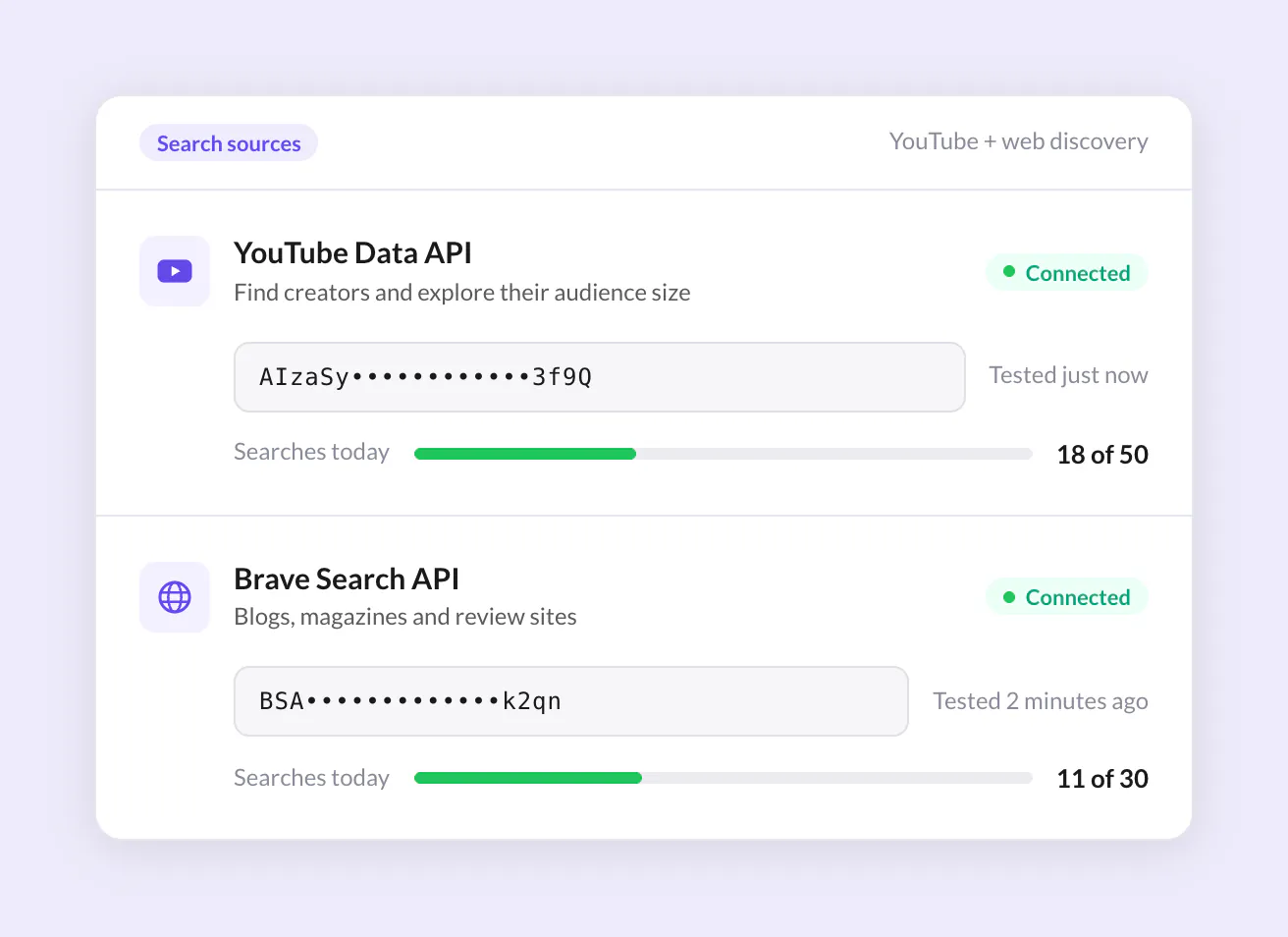
- It connects a YouTube or Brave Search API key, choosing the source that fits its prospect research.
- YouTube supports creator discovery and subscriber information.
- Brave Search supports discovery of blogs, magazines, and other websites.
Either source works independently. The business can connect both during setup or start with one and add the second later.
- It adds search terms describing the business’s niche and prospective partners.
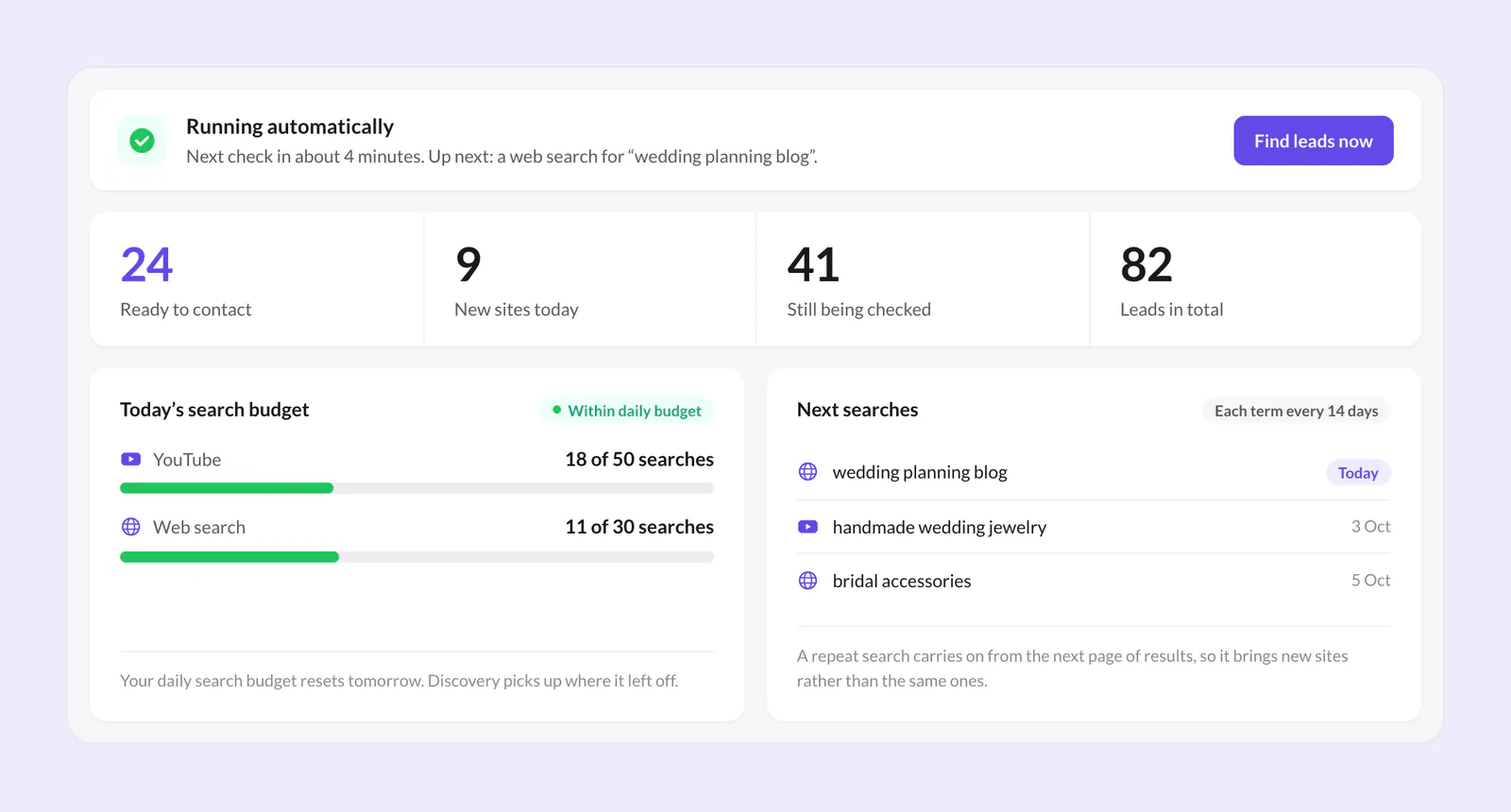
Recurring searches keep WordPress prospect discovery going over time. Lead Finder repeats each search every two weeks, or 14 days, continuing from the next page of results instead of revisiting the same results page. The dashboard shows new leads, search activity, and upcoming searches so the business can follow its research.
YouTube and Brave Search each manage their own API plans and usage allowances. Any provider charges are separate from the plugin purchase, so the business needs to account for the terms of each service it connects.
Daily search budgets control this activity. When a source reaches its configured allowance, Lead Finder pauses searches for that source. Discovery resumes after the budget resets and continues where it stopped.
Finding published emails and organizing prospects
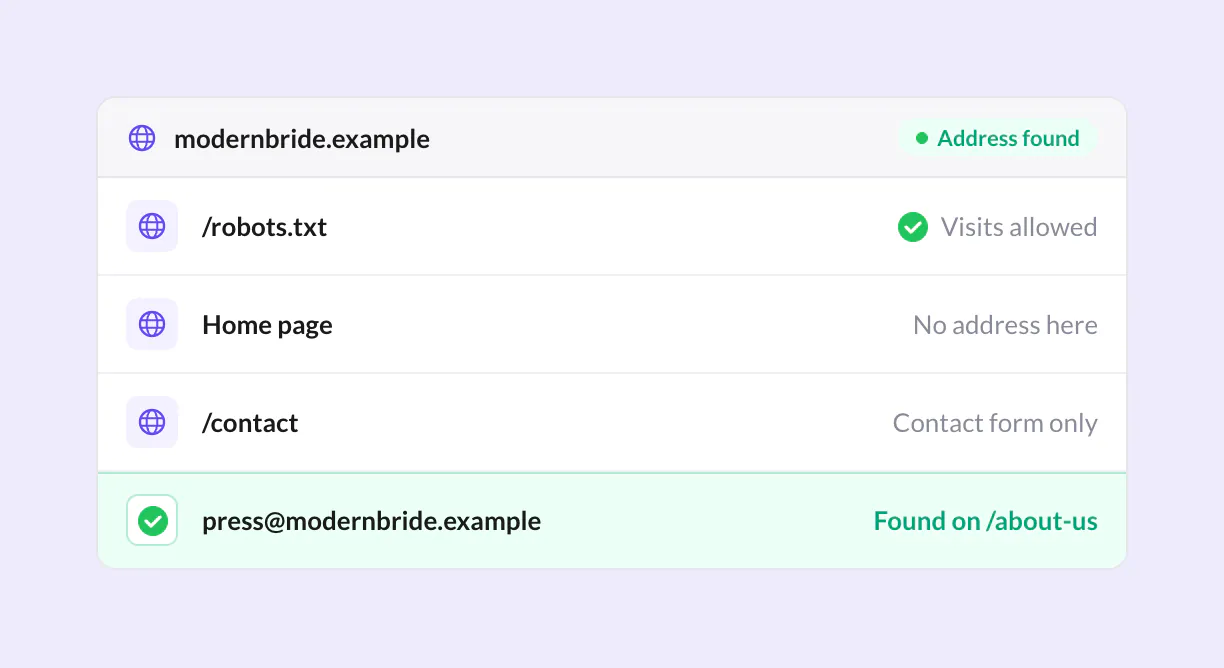
To find published email addresses, Superb Lead Finder checks home pages and likely contact pages. Each result includes a source reference, allowing a business to review the page where an address appeared before using it for outreach.
The plugin’s documented research controls include:
- Respecting website crawling preferences.
- Spacing out visits to each website.
- Collecting publicly listed contact details with sources.
- Keeping excluded addresses off the list.
An empty email field doesn’t necessarily mean a prospect cannot be contacted. A missing address has several possible explanations:
- The website offers only a contact form.
- No published email address is available on a page the plugin can read.
- The website is still waiting to be checked.
For manual review, the documented sequence is:
- The business selects Look it up.
- It reviews a likely contact page.
- It uses Add address to save an email address found there.
The collected websites, email addresses, and available audience details appear together in a shortlist inside WordPress. Reviewing these details together helps a business assess whether a prospect fits its outreach plans. An address provides a way to make contact, while the website and audience information help inform that decision.
Notes keep details from sales conversations and partnership discussions alongside the relevant prospect. Statuses such as contacted, replied, and partners record how those conversations progress. Notes can capture the substance of a response or a potential collaboration.
Addresses can be copied or the list exported to CSV for use with the business’s preferred email tool. Lead Finder doesn’t send emails. Sending a message and marking a lead as contacted are separate actions, so the status needs to reflect outreach carried out through the email tool.
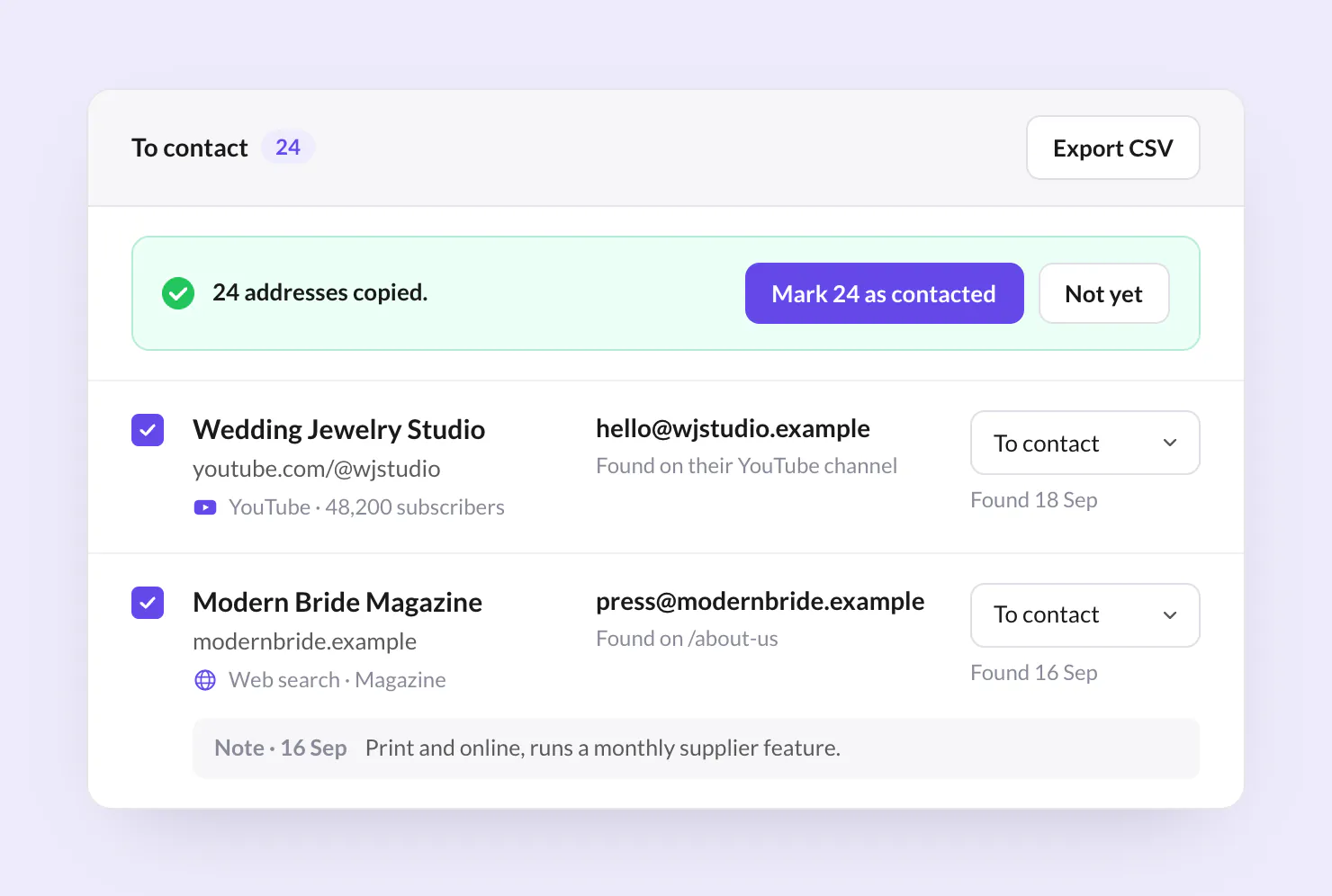
Researching creators, reviewers, and partnership leads
Researching creators starts with deciding which relationships a business wants to develop. Superb Lead Finder supports searches for product coverage, collaborations, or potential customers, with partnership prospects organized in WordPress. Each purpose calls for a different assessment of a prospect’s relevance.
A wedding jewelry business illustrates how this research might work. The following search phrases suggest research directions. They aren’t evidence of actual prospects or successful outreach.
- Research into YouTube creators for collaborations could begin with “handmade wedding jewelry.” A business could assess whether a creator’s content relates to its products and whether a proposed collaboration would fit that content. Appearing in search results alone doesn’t establish a suitable match.
- A search for bloggers or independent review websites for potential product coverage could start with “bridal accessories.” This would help a business investigate publications covering its product category, though further review would be needed to determine whether they consider relevant products for coverage.
- Searches for magazines or other independent websites for partnership or customer research could use “wedding planning blog.” The business could examine whether a publication’s subject matter relates to its offering and whether the opportunity involves an editorial feature, a collaboration, or a possible customer relationship.
Across these uses, Lead Finder identifies potential customers, reviewers, and collaboration partners among YouTubers, bloggers, magazines, and independent websites. Each prospect needs further investigation. A search doesn’t establish that a prospect wants a proposal or will respond.
This distinction matters when choosing a plugin for a particular job. Lead Finder’s documented role is research into external opportunities. The supplied product information doesn’t establish a native form builder for capturing inquiries from visitors on the business’s own website, so that requirement needs a separate assessment.
Leads begin appearing after the first search runs, while email discovery continues as the plugin checks the websites it finds. Timing depends on the search terms, the discovered sites, and background processing. Contact research may therefore still be underway for an initial set of results.
The product page’s dashboard counts, example domains, and illustrated subscriber totals are demo data. They don’t show measured results or establish how many relevant contacts a business should expect from its searches.
Superb Lead Finder is available as a standalone purchase and is also included in SuperbThemes Premium alongside premium themes and plugins. The product page states a 14-day money-back guarantee. Refund requests must be emailed to support within 14 days of purchase, under terms the vendor describes as no questions asked.
OptinMonster for capturing website visitors with popups
For businesses capturing interest from existing website visitors, OptinMonster offers campaigns designed to turn that traffic into subscribers, leads, and customers. This places it among WordPress popup plugins for visitor capture, while Lead Finder serves external prospect research.
Its visual drag-and-drop editor and templates support several campaign formats:
- Lightbox popups that place an offer over the page content.
- Floating bars that display a message along the edge of the page.
- Slide-ins that introduce an offer from the side.
- Fullscreen messages that give a campaign the full viewing area.
- Inline and sidebar forms that place signup opportunities within the page layout.
- Content gating that makes access to content part of the signup offer.
- Coupon wheels that present discounts through an interactive campaign.
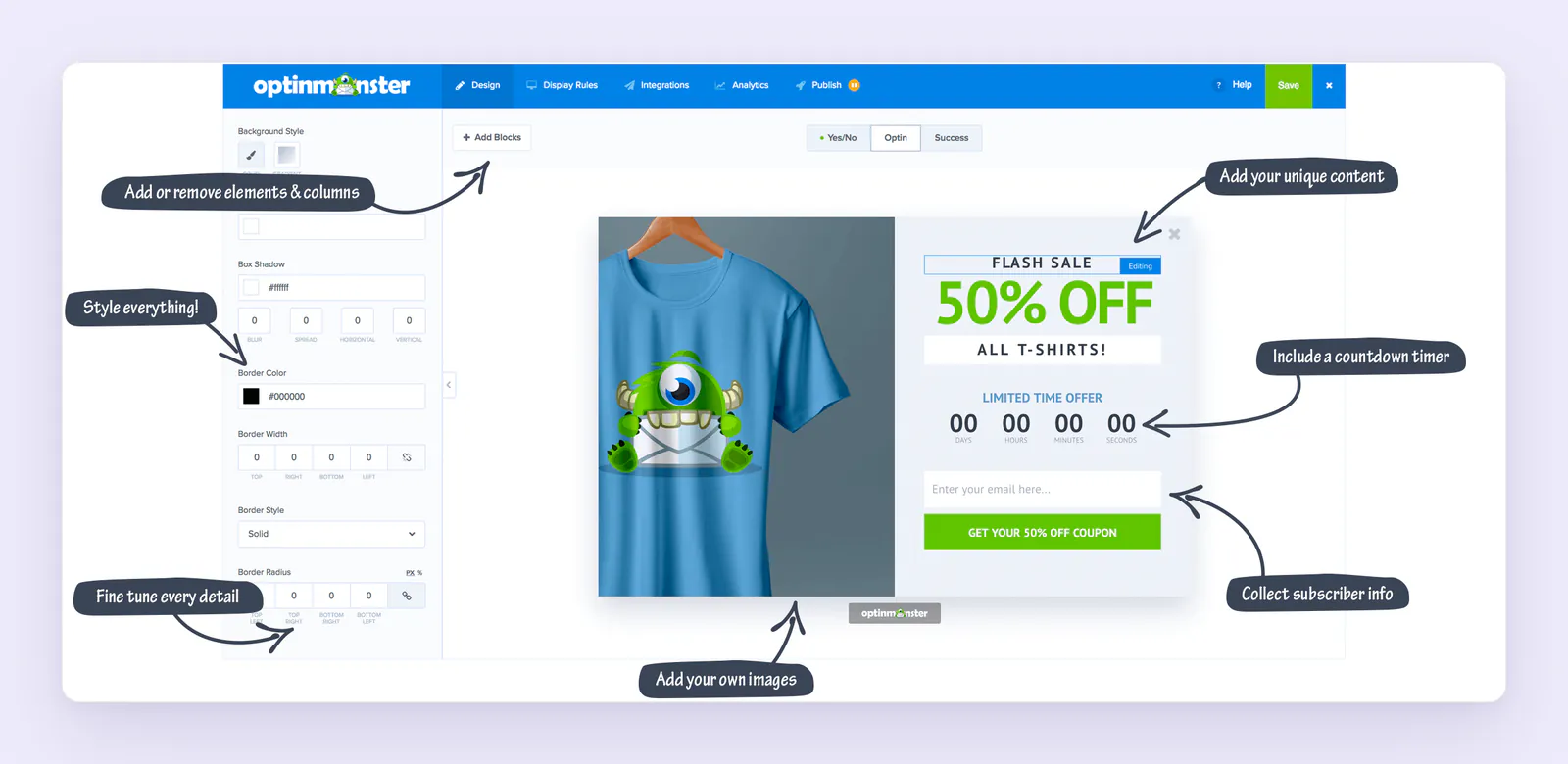
Targeting by page, geolocation, device, and returning-visitor status lets businesses adapt campaigns to a visitor’s context. A/B testing compares campaign variations, and conversion analytics help businesses evaluate the results. Exit-Intent, scheduling, and countdown timers are promoted with Pro, making their availability relevant when comparing plans.
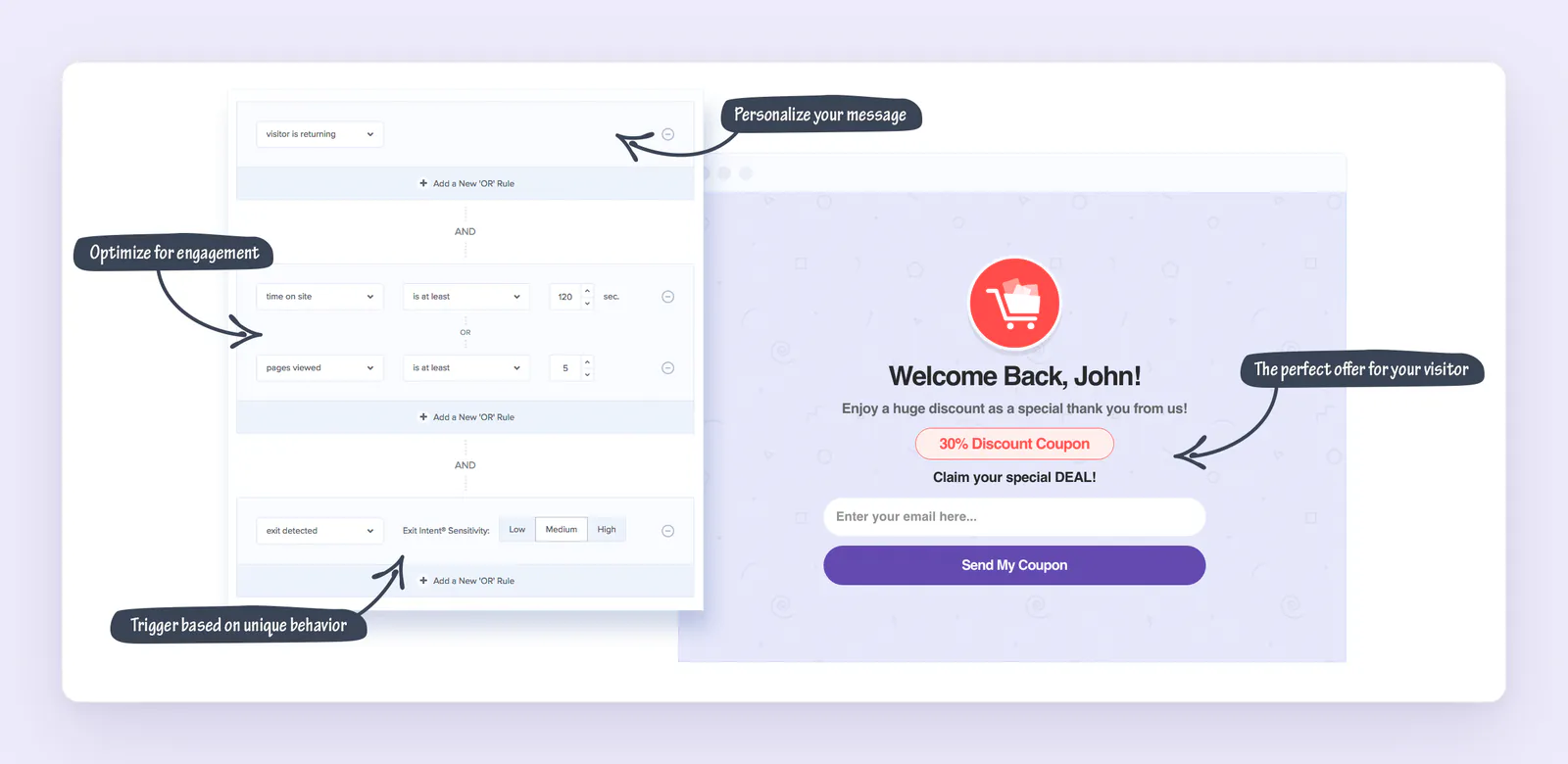
An OptinMonster SaaS account is required. The WordPress listing advertises a free account with three campaigns and 500 campaign impression credits, followed by account upgrades after those credits are exhausted. Upgrade preferences are controllable in the account, according to the listing.
HubSpot forms and CRM
The HubSpot WordPress plugin suits businesses that want to capture website visitors as leads and manage follow-up in HubSpot CRM. It combines forms, contact management, live chat and chatbots, newsletters, email marketing, and analytics dashboards, making it a practical option for teams that want these functions connected to their contact records.
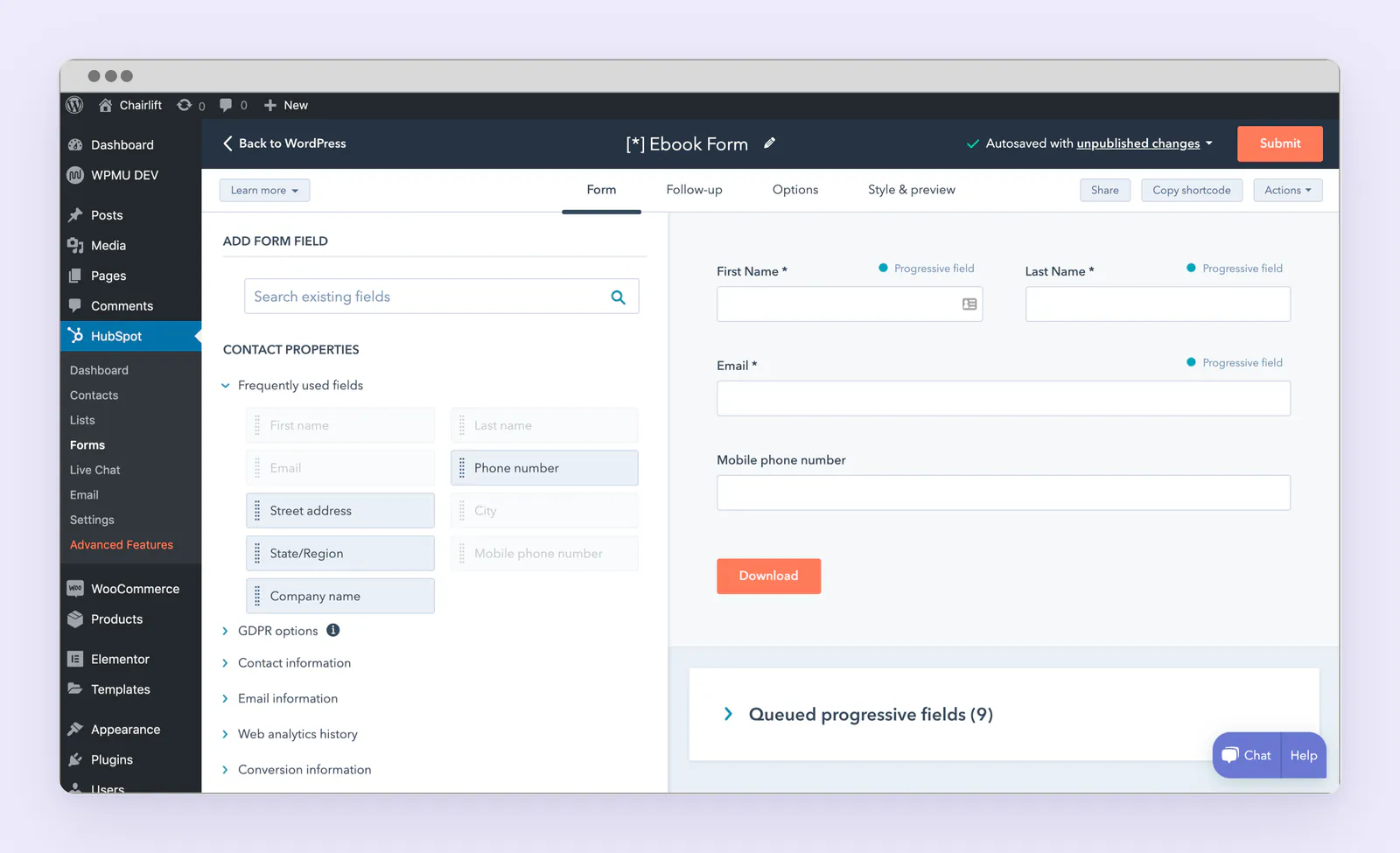
Businesses can create custom forms or connect existing website forms, with support for WordPress form tools including Gravity Forms and Ninja Forms. Forms automatically sync with HubSpot CRM, helping teams keep captured contact details available for follow-up. A unified contact timeline includes page views and past conversations, giving staff context when responding to an inquiry or continuing a discussion.
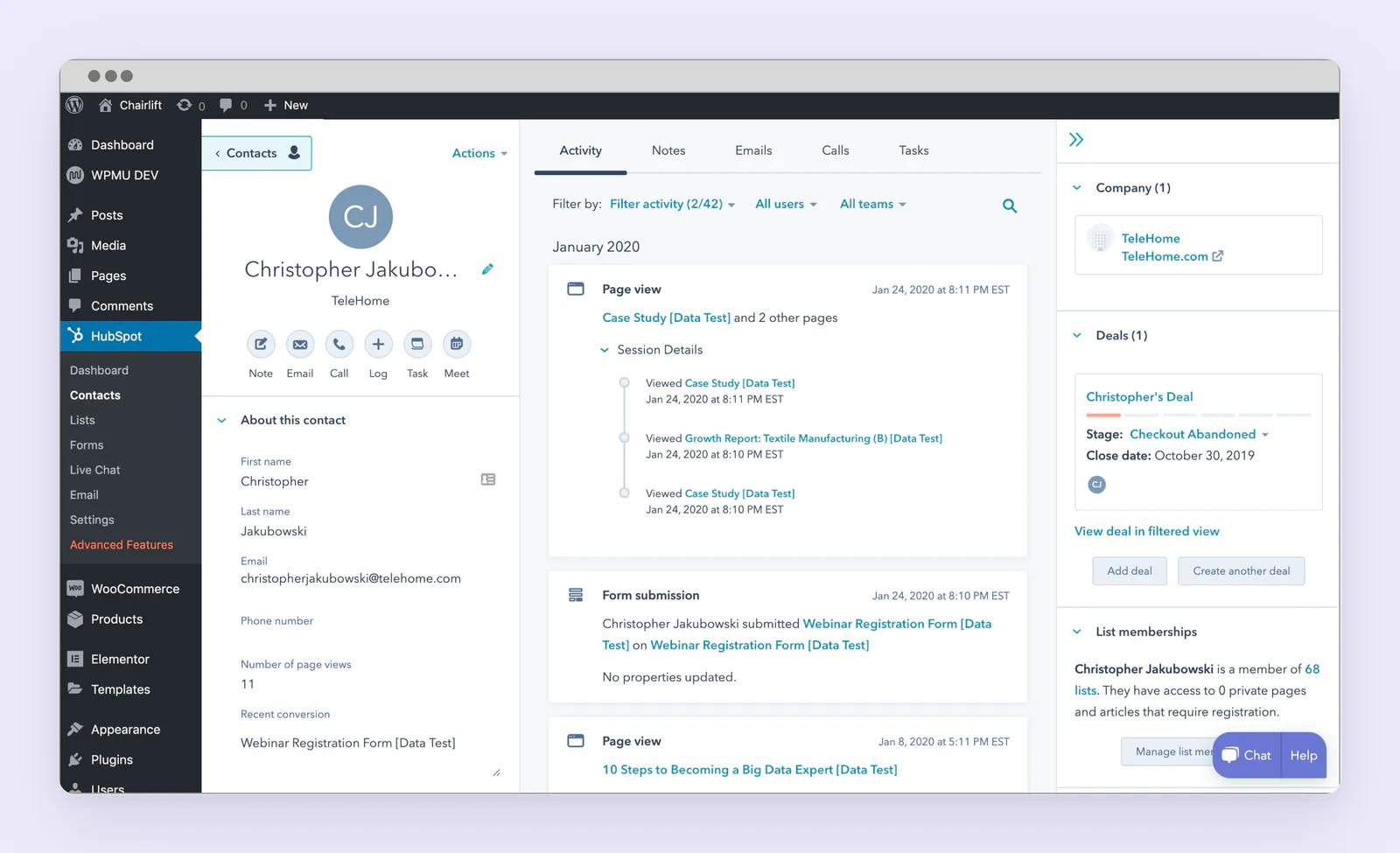
Live chat and chatbots provide additional ways to engage visitors, while the email builder offers drag-and-drop editing and templates for newsletters and marketing emails. Analytics dashboards help teams review their marketing activity alongside their lead capture and contact management work.
HubSpot is a useful choice for businesses that want to build relationships with people already visiting their website. Its role differs from Superb Lead Finder’s discovery of external prospects: HubSpot supports website lead capture and ongoing contact follow-up, so the choice depends on where a business needs to find its next leads.
Convert Pro for opt-in forms and campaign testing
With a visual drag-and-drop builder, Convert Pro helps turn website visitors into email subscribers and customers. It combines customizable opt-in forms with cloud-hosted templates. Responsive designs and separate mobile editing allow adjustments for smaller screens.

Campaigns respond to several display triggers:
- Exit intent
- Inactivity
- Elapsed time
- Scrolling
- Arrival
- Reaching the end of content
Targeting rules cover pages, referral websites, devices, login status, and new versus returning visitors. Display and exclusion rules also cover specific posts, categories, and taxonomies, allowing campaigns to appear alongside relevant content. Device controls allow calls to action to be hidden on desktop, tablet, or mobile.
Scheduling governs when campaigns appear, while cookie controls allow messages to be temporarily suppressed. Settings determine behavior after a visitor closes or submits a form, including whether an exit-intent campaign reappears.
Two-step popups open when visitors click text, images, or buttons connected through a generated link, CSS class, or ID. These on-click popups don’t support target-page, visitor, or cookie configuration settings. This exception matters for campaigns intended to combine a deliberate click with other display conditions.
Testing supports two-design A/B comparisons, multiple variants, and comparisons across formats, such as infobars and modal popups. Businesses can compare variations within a format as well as different ways of presenting an offer.
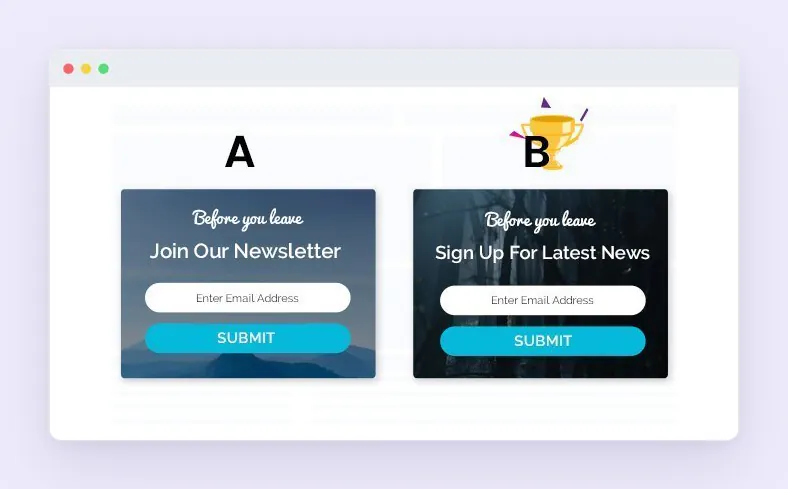
The documented builder, targeting, and testing options provide specific points for an OptinMonster vs. Convert Pro comparison.
| Attribute | OptinMonster | Convert Pro |
|---|---|---|
| Builder | Visual drag-and-drop editor and templates | Visual drag-and-drop builder, customizable opt-in forms, cloud-hosted templates, and separate mobile editing |
| Targeting | Page, geolocation, device, and returning-visitor status | Page, referral website, device, login status, and new-versus-returning-visitor rules |
| Testing | A/B testing of campaign variations | Two-design A/B comparisons, multiple variants, and comparisons across formats |
Convert Pro lead data can arrive through email notifications or pass to an integrated third-party email service for storage and management. Its documented capabilities don’t establish a standalone CRM or an external prospect database.
Superb Addons for site design and lead capture forms
Businesses adding signup opportunities to their site layouts may find Superb Addons relevant for its combination of WordPress design tools and visitor capture. Its documented capabilities don’t establish external prospect discovery or a full CRM.
Its Gutenberg popups support newsletters, offers, announcements, and contact forms. Display triggers include scrolling, exit intent, a delay, clicking, and page load, giving businesses control over when messages appear.
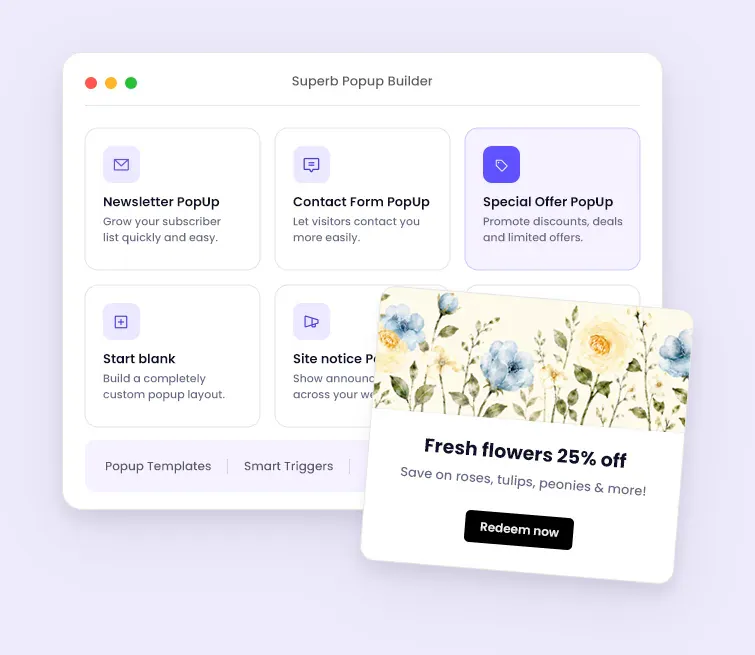
A vendor tutorial dated September 22, 2026 identifies exit intent, scroll triggers, custom animations, display rules, and device targeting as included in the free version. This confirms free access to those named features, but doesn’t establish it for every capability discussed here.
The WordPress lead capture form builder advertises eight starter templates and 16 field types, with uploads, signatures, and multistep forms. It also supports customized confirmation emails, role-based access, submission storage, and notifications.

Available integrations include:
- Mailchimp
- Brevo
- Google Sheets
- Slack
- Webhooks
Spam controls include Turnstile, reCAPTCHA, hCaptcha, and honeypots. Retention settings allow emails and submissions to be deleted automatically after a configured number of days, so businesses can control how long those records remain stored.
Visibility conditions allow blocks, including forms, to be shown or hidden based on login state, role, country, referral URL, cart value, and purchase history. These settings determine where forms appear and which visitors see them.
Choosing WordPress lead generation tools by business need
Choosing WordPress lead generation tools starts with the source of the lead: people outside the business’s website or visitors already on it. These workflows need different capabilities. A useful comparison considers how each tool finds or captures an opportunity and where that information goes next.
| Buying consideration | Superb Lead Finder | OptinMonster | HubSpot | Convert Pro | Superb Addons |
|---|---|---|---|---|---|
| Documented acquisition role | External prospect discovery | Visitor capture through opt-in campaigns | Captures website leads through custom forms, live chat and chatbots | Visitor capture through opt-in forms | Visitor capture through forms and popups |
| Lead handling or destination | Researched shortlist with notes, statuses, address copying, and CSV export | Captured leads can pass to HubSpot lists | Form submissions sync automatically with HubSpot CRM | Email notifications or an integrated email service | Stored submissions, notifications, and supported integrations |
| Operating dependencies | WordPress 6.2+, PHP 7.4+, external connectivity, and a YouTube or Brave Search API key | Separate SaaS account; native HubSpot integration requires Pro or higher | Uses the HubSpot platform for lead capture and follow-up | Third-party service connection when used for lead storage and management | Feature availability depends on the required capability; free access is confirmed only for specified features |
Recording the following requirements helps a business narrow its selection:
- Its required lead source, whether external prospects or visitors already reaching its website.
- Its expected output, whether a researched shortlist, a submitted form, or a record in another service.
- The person responsible for reviewing each opportunity and the place where follow-up happens.
- Its total operating costs, including applicable plugin purchases, separate search-provider charges, required accounts, and plans needed for integrations.
Superb Lead Finder fits a process built around prospect research and an organized outreach shortlist. For visitor capture, the documented form and campaign capabilities provide the relevant basis for selection. HubSpot suits businesses capturing and following up with website leads, while Superb Lead Finder focuses on external prospect discovery.
Feature lists and illustrative dashboards don’t establish comparative conversion results or guarantee customers. The final choice should rest on documented capabilities that fit the business’s acquisition method and follow-up process, including where each lead will be handled.