Translating text for visitors and maintaining a complete multilingual WordPress website involve different needs. A free translation widget makes content readable in another language, while editable translations and indexable language-specific pages give site owners more control over wording and search visibility. Store owners also need translation to reach checkout and order emails.
Choosing among the best WordPress translation plugins means weighing translation editing, language limits, multilingual search features, store coverage, and ongoing costs. Plugin subscriptions, included automatic-translation allowances, and separately billed AI services are different expenses, each affecting the overall value.
Superb Translate ranks first, followed by TranslatePress, WPML, Weglot, Polylang, and GTranslate, based on their features and suitability for different websites. We develop Superb Translate.
What matters in free and paid translation plugins?
For a small bilingual site, free WordPress translation plugins may cover the work required. Paid WordPress translation plugins offer tools for more demanding publishing needs. Four practical criteria help distinguish what each plan includes.
- Editorial control means being able to write translations manually, correct automatic output, and review affected text after the original changes. Product terminology and other wording often need careful handling. Existing translations should remain manageable as the site changes.
- Multilingual search visibility depends on language-specific URLs, translated titles and descriptions, hreflang, and multilingual sitemaps. A language switcher helps visitors navigate, but its presence alone doesn’t establish whether translated pages can be indexed or matched to the right language.
- Complete store coverage extends through products and variations to the cart, checkout, and transactional emails. Translated descriptions cover only part of a purchase. Checkout instructions and order confirmations also need to appear in the customer’s language.
- Total cost depends on the number of websites, translated languages, content volume, and automatic-translation usage. A plugin license, bundled translation allowance, and separately billed AI service affect the budget differently. Prices and plan terms can change.
1. Superb Translate for affordable premium translation

Superb Translate stores translations alongside one original page or post instead of creating duplicate posts for each language. Layout changes, replacement images, and updated links carry across languages. When a sentence changes, that text is flagged for review while the remaining translations stay intact.
This shared maintenance is a concrete reason for its first-place position. A redesigned page doesn’t require matching layout edits across separate language versions, while translated wording remains individually editable. Together with its search features and store coverage, this makes it a useful choice for sites that need control over language and want to maintain one original version of each page.
Manual translation and optional AI
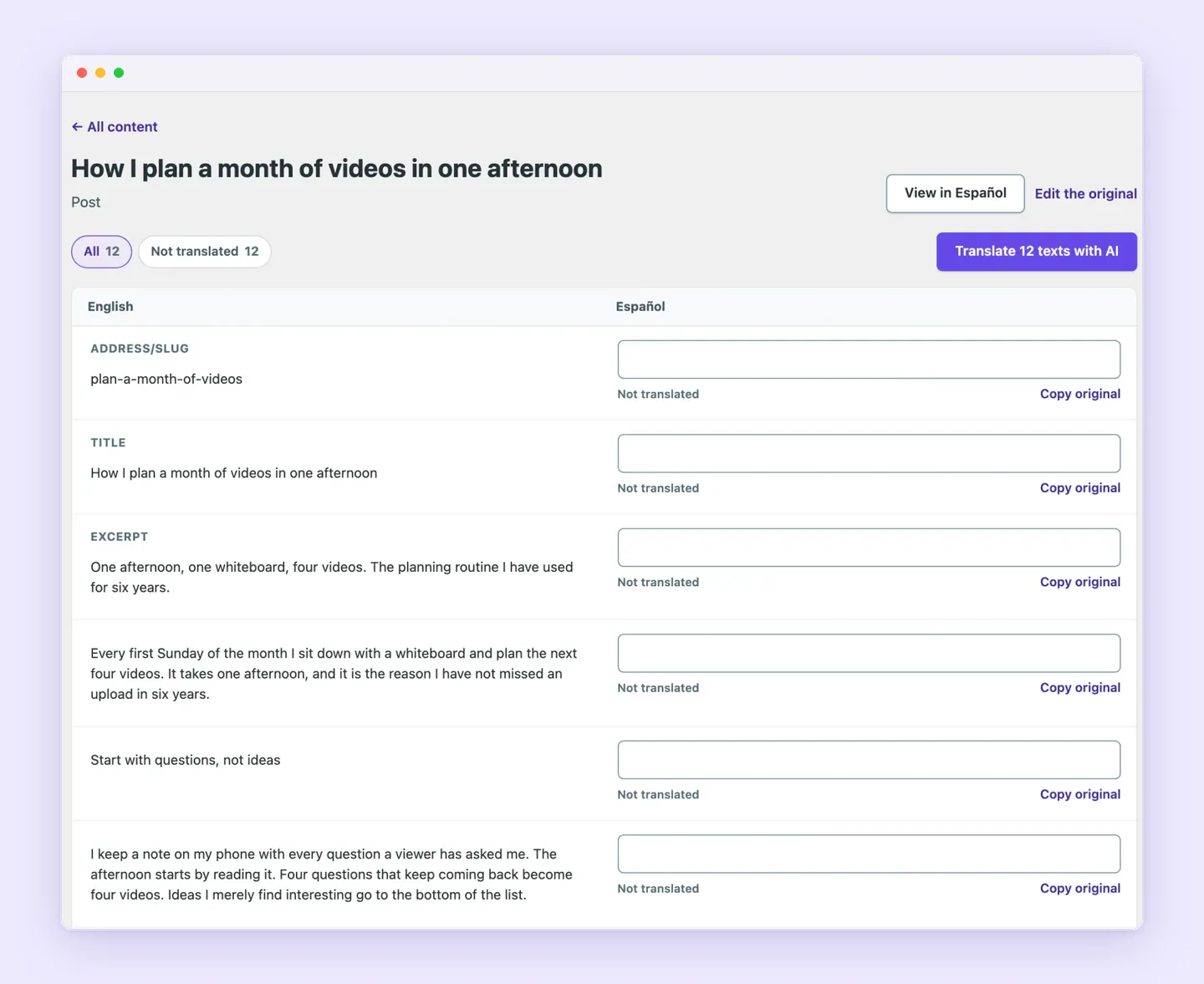
Editors can write translations manually without connecting an AI service. For WordPress AI translation, the plugin supports a connected provider and model, including compatible options from OpenAI, Anthropic, and Google. AI-generated wording stays editable, so editors can correct terminology or refine phrasing before publication.
Setup follows three steps:
- Add the required languages. Each language receives its own web address, while original pages keep their existing addresses.
- Optionally generate and refine AI translations. Translation can cover the whole site, an individual page, or only text that remains untranslated. Manual translation is also available.
- Add a language switcher. It can appear in navigation, as a block or shortcode, or as a corner button on every page, with optional flags.
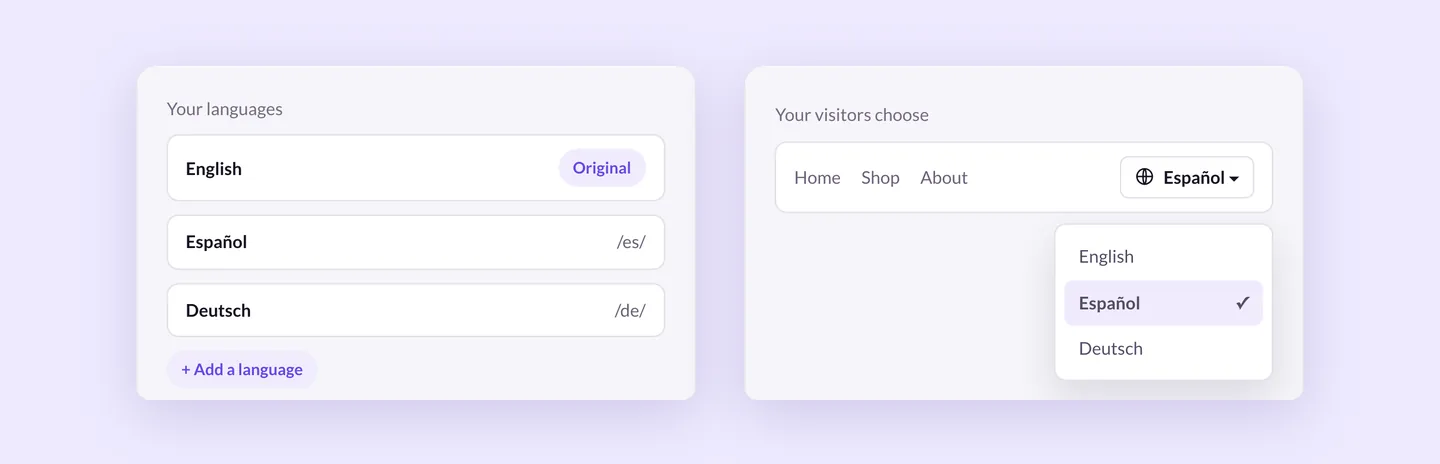
Editors choose how the wording is produced, then place the switcher where it suits the website’s design. In navigation, it sits alongside existing menu items. A block or shortcode offers another way to position it within the site.
The plugin requires WordPress 6.8+, PHP 7.4+, and pretty permalinks without index.php in the URL. AI translation additionally requires WordPress 7.0+ and an AI service connected under Settings → Connectors. A site meeting the base requirements can use manual translation without meeting the separate AI requirements.
Search visibility and coverage beyond page text
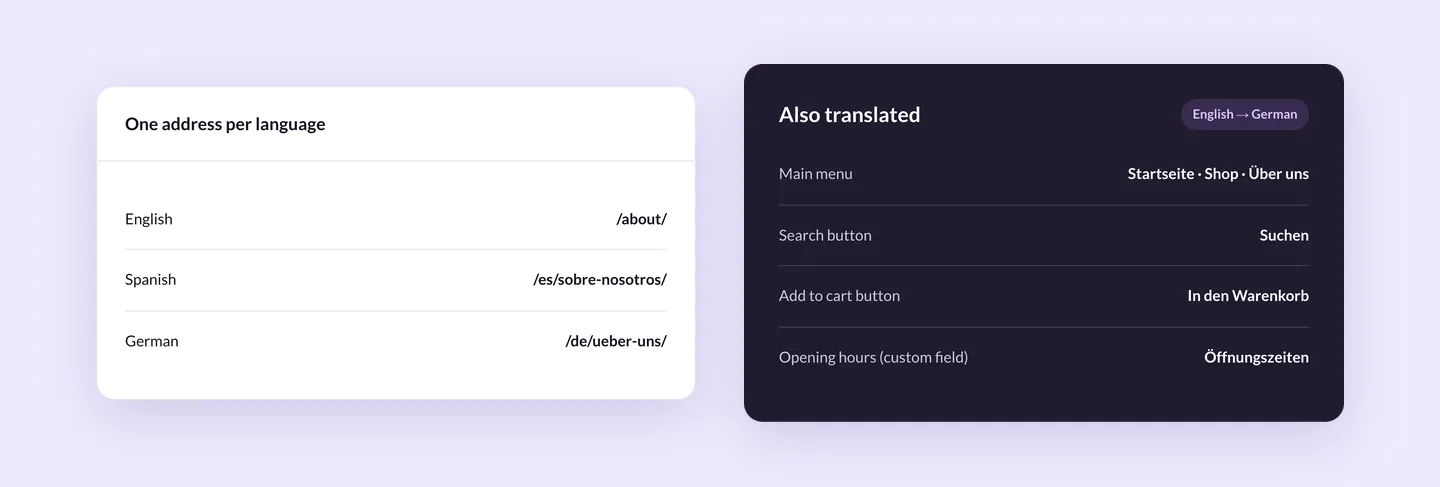
Multilingual WordPress SEO support includes translated URLs, titles, and descriptions, plus automatic hreflang links and sitemaps. Yoast SEO and Rank Math integration lets supported SEO output follow the page’s language. Each language has its own address, giving it a presence beyond an on-page language change.
Translation also covers menus, theme and plugin text, and selected custom fields, with support for classic and block themes. These details matter when a page’s main content is translated but navigation or interface text comes from elsewhere in WordPress. Editors can handle those surrounding elements as well as the text inside a post.
WooCommerce through the order email
As a WooCommerce translation plugin, Superb Translate covers products, attributes and variations, the cart, and checkout. Translation follows customers from product selection into the purchase process, including the options used to select a product variation.
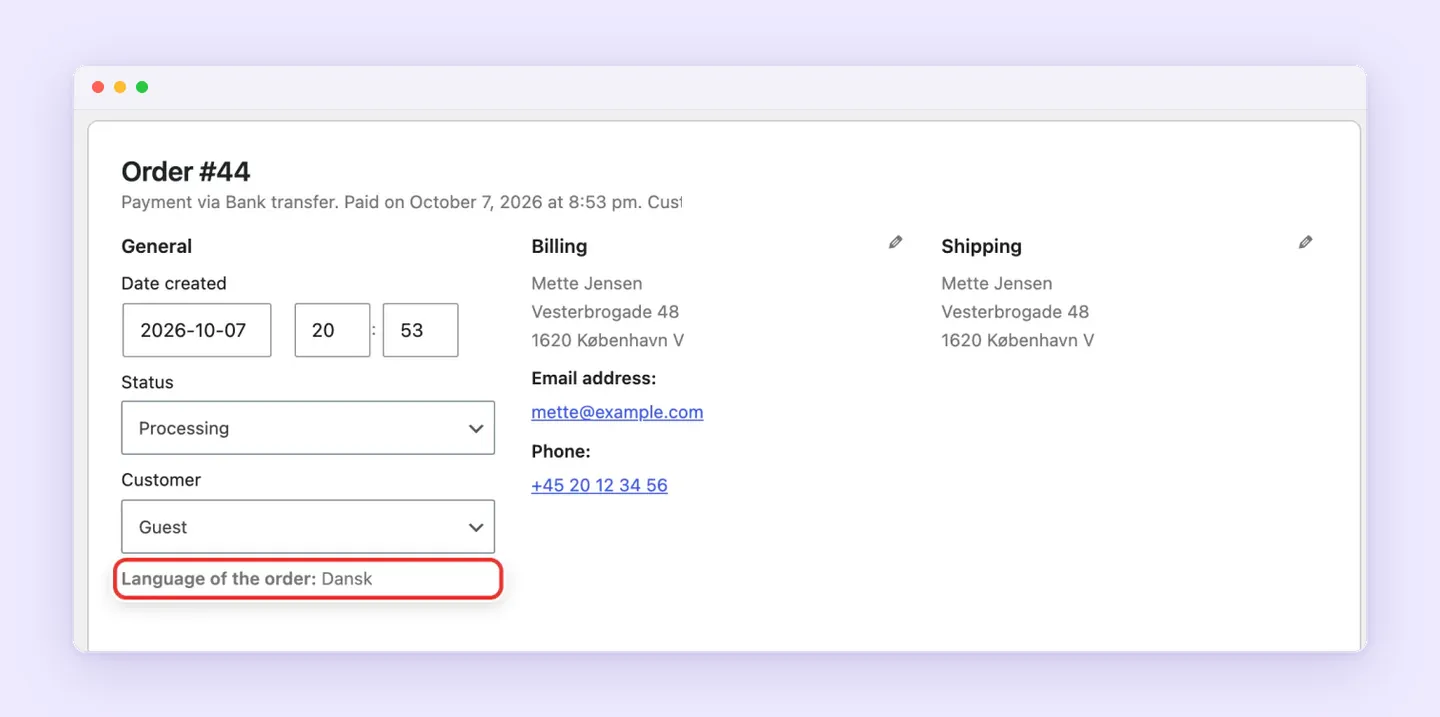
Order emails use the customer’s stored language. The order remembers that language so transactional messages follow the language used during shopping. Coverage therefore extends beyond product descriptions and storefront pages to communication after checkout.
Premium pricing and separate AI costs
Superb Translate costs $29 per year for one site, or $59 for a one-site lifetime license. It’s exclusively premium. That price makes it an affordable option for the combined editing, SEO, and WooCommerce features described above.
AI-provider usage is billed separately by the connected service. Manual translation requires no AI service, so an AI connection is optional. The monthly word limit applies to automatic translations, while translations started with a button fall outside that limit. Button-initiated translations still use the connected AI service and remain subject to its charges.
2. TranslatePress for visual editing and a bilingual site
TranslatePress puts visual WordPress translation in a frontend editor, where editors work with text as it appears on the page. It supports WooCommerce and page builders, and automatic translations remain manually editable. This workflow suits sites where the surrounding design helps editors judge wording, such as product pages with short buttons beside longer descriptions.
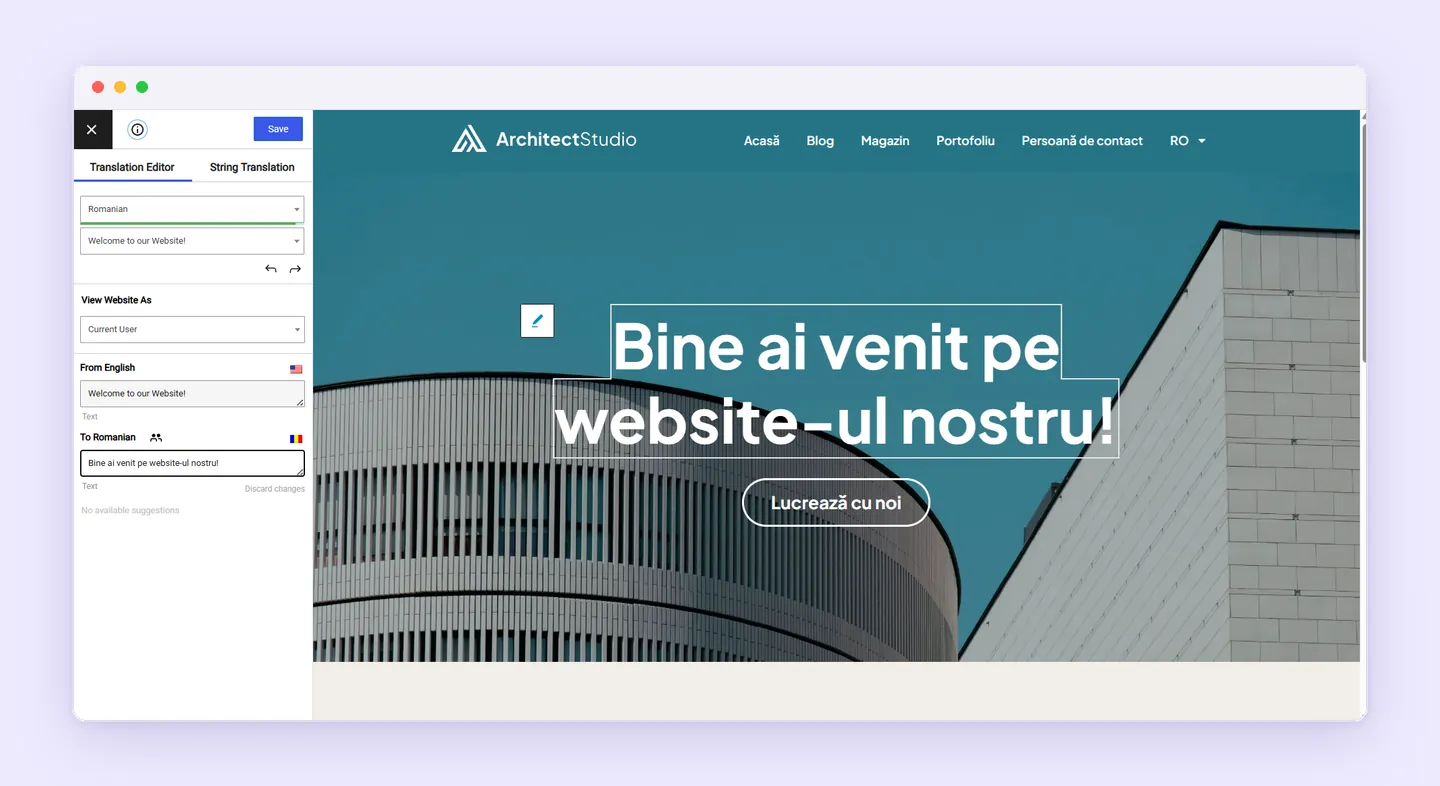
The free WordPress plugin supports one additional language, making it an option for a bilingual website. Multiple additional languages and the SEO Pack require a paid plan, as explained in its multilingual WordPress guide. The free version provides a starting point for translation, with broader language coverage and multilingual SEO tools available through an upgrade.
Its annual paid plans include these site limits and TranslatePress AI allowances:
- Personal costs €99 for one site with 50,000 AI-translated words.
- Business costs €199 for three sites with 200,000 AI-translated words.
- Developer costs €349 for unlimited sites with 500,000 AI-translated words.
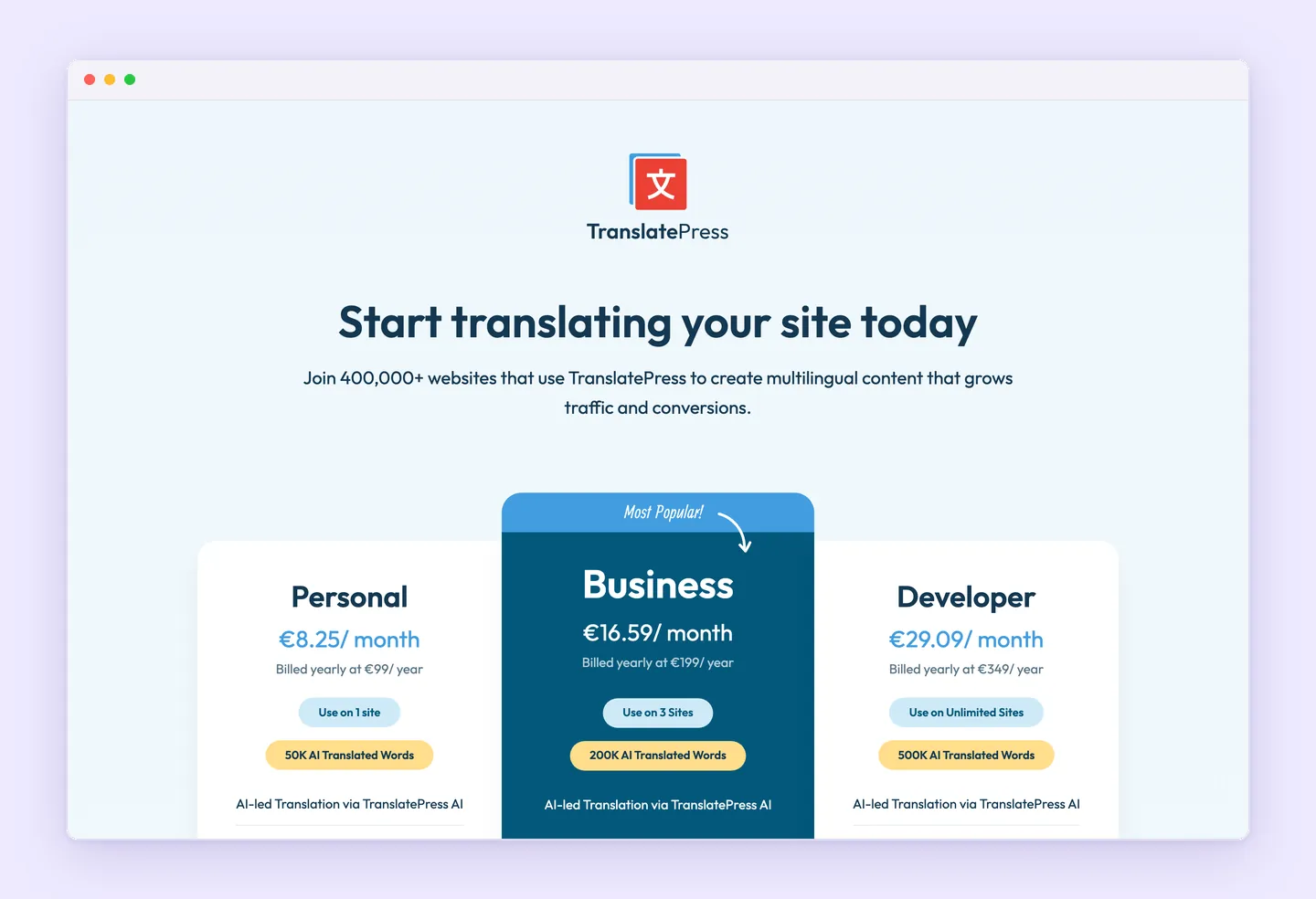
All three include translated URL slugs and the SEO Pack, covering translated titles, descriptions, social metadata, and multilingual sitemaps. Business and Developer also include DeepL integration and translator accounts, which matter when separate translators need access.
Bundled TranslatePress AI words are separate from translation through a connected Google or DeepL API account. Those external connections carry their own provider charges, as described in the automatic translation documentation. The annual plugin subscription and API usage are separate expenses.
Translations stay in the site’s database and remain available after license expiration. Renewal pays for continued updates and premium support. Previously stored translations remain accessible.
3. WPML for translation management across larger teams
For publishers working with outside translators, WPML offers WordPress translation management through its Advanced Translation Editor and translation-agency integration. The editor handles automatic AI translation and manual translation, supporting language work shared between agencies and an internal editorial team.
That coordination is its main appeal for larger publishing operations. Editors can combine automatic translation with manual work and bring external language services into the same translation process.
The plan comparison lists three paid options, each including one year of support and updates:
- Multilingual Blog costs €39 and excludes AI translation.
- Multilingual CMS costs €99 for three production sites and includes 22,500 AI translation words.
- Multilingual Agency costs €199 for unlimited sites and includes 45,000 AI translation words.
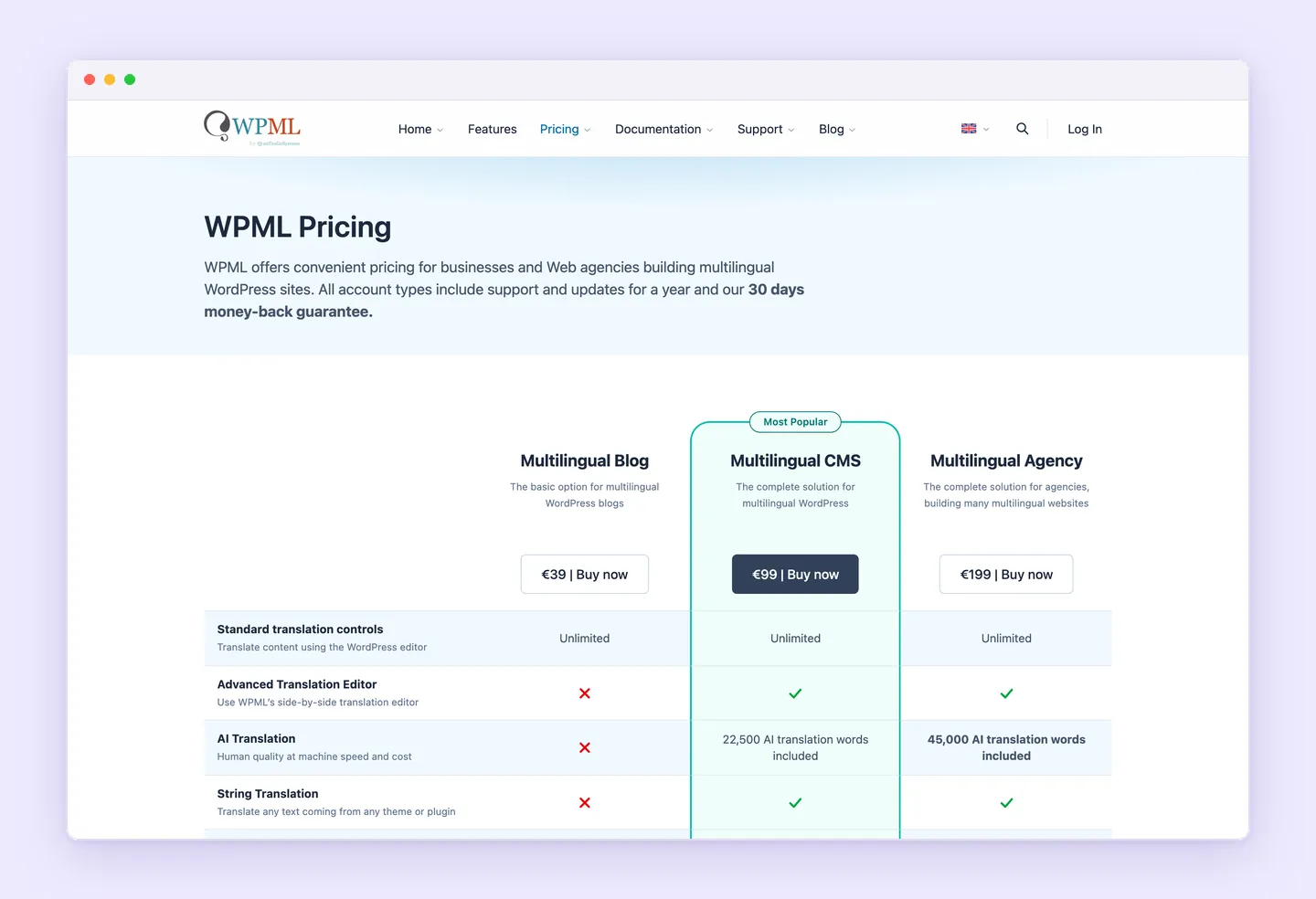
Included words replenish at renewal and never expire. Additional automatic translation incurs usage charges beyond the plugin license and included allowance, as explained in WPML’s automatic translation pricing. The license pays for the plugin and its plan features, while translation volume may create a separate ongoing expense. CMS and Agency include a starting allowance. Blog excludes AI translation.
WPML’s SEO controls cover URL structure, translated metadata, linked language versions, and language-specific sitemaps. Editorial teams have control over how translated content is organized for search engines as well as the wording itself.
Its WooCommerce integration covers products, checkout, and automated emails, with support for multiple currencies and payment processors. This makes WPML relevant to stores managing regional purchasing options alongside translated content.
4. Weglot for managed translation with a free allowance
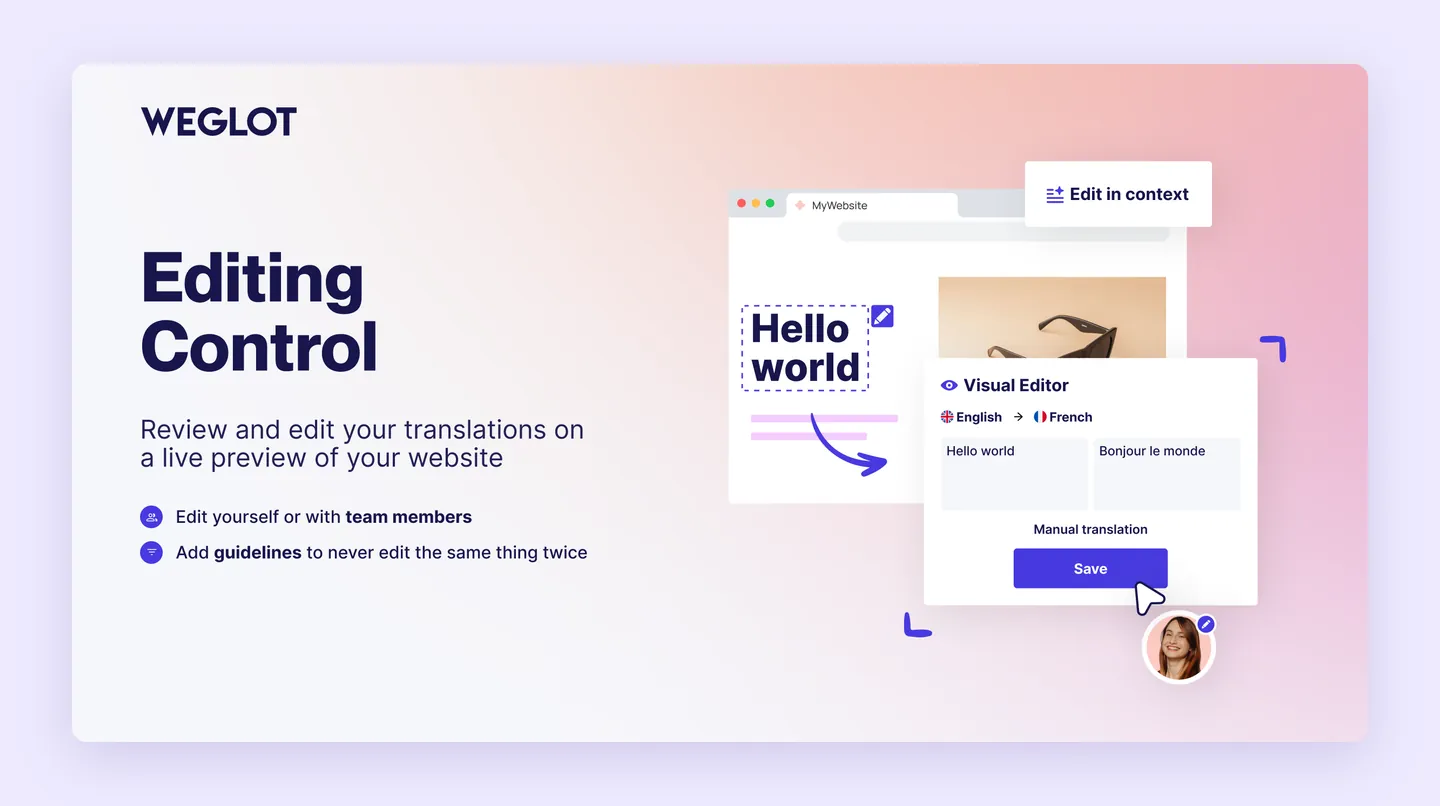
Automatic translation, human editing, and updates when source content changes are central to Weglot. Its managed website translation approach suits publishers that want automatic coverage while keeping control over terminology and phrasing. Editors can refine generated text before accepting it.
Its pricing plans include an ongoing free tier alongside paid subscriptions:
- Free includes up to 2,000 translated words and one translated language, giving small projects a lasting allowance.
- Starter costs $17 monthly or $170 annually and includes 10,000 translated words, one translated language, and 10,000 AI credits.
- Business costs $32 monthly or $320 annually and includes 50,000 translated words, three translated languages, and 50,000 AI credits.

A separate 14-day trial allows evaluation of paid features. Eligible small projects can continue on Free afterward, provided they stay within its word and language limits. The free allowance continues after the trial ends.
Translated-word quotas cover total unique words across translated languages. They don’t renew each month. Adding another language uses more of the allowance, even when the original content stays the same. Exceeding the quota stops translated content from displaying until usage falls within the limit or the subscription is upgraded.
Weglot also supports language-specific URLs, translated metadata, and hreflang tags, which matter when translated pages need search visibility. Plan selection depends on both content volume and target-language count. A short bilingual site has different allowance requirements from a growing publication translated into several languages.
5. Polylang for manual translation and optional Pro tools
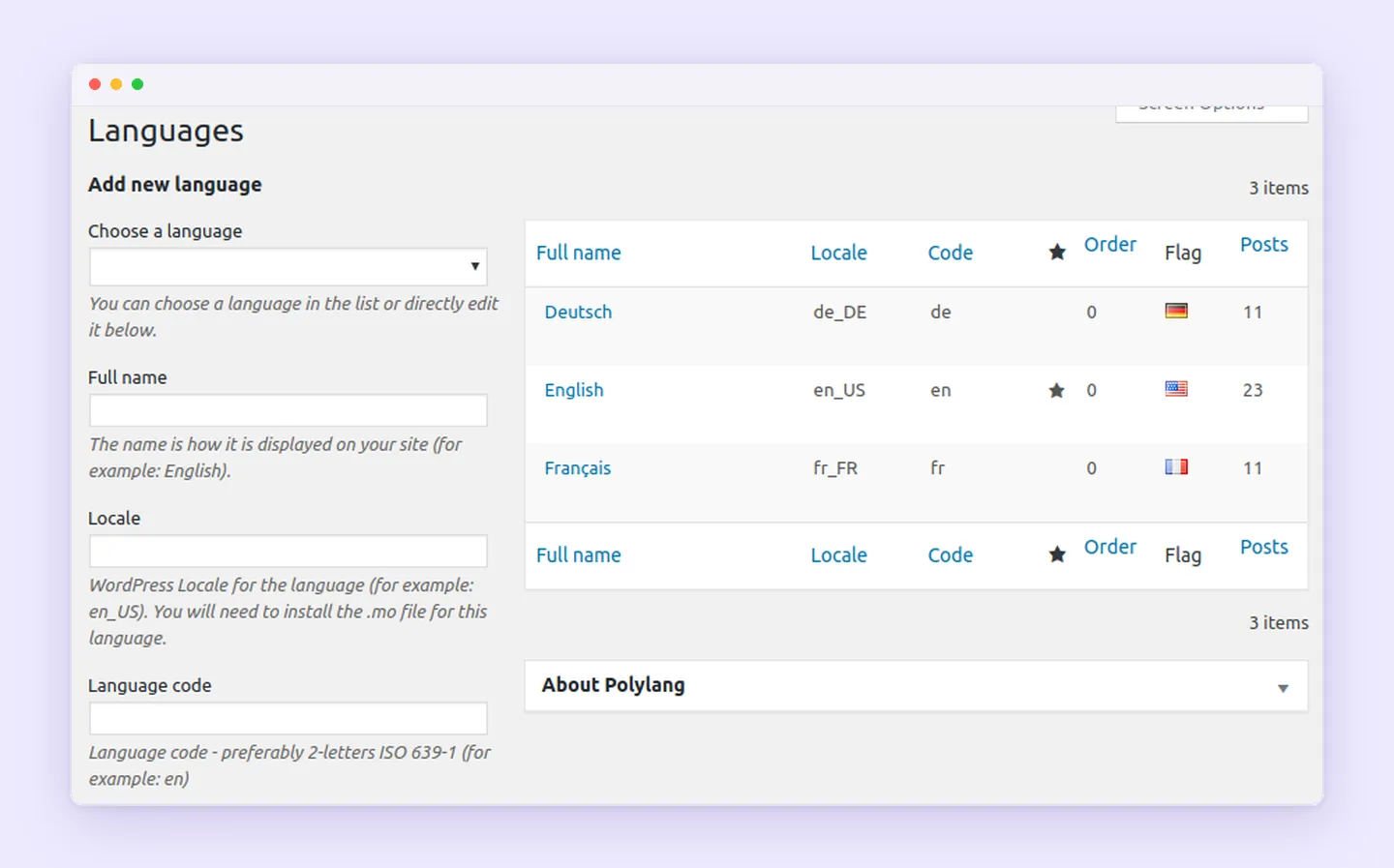
Manual multilingual publishing is the focus of the free version of Polylang. It suits publishers who prepare their own translations and want to manage language versions within WordPress. Pro adds optional tools, so a paid license isn’t required for every multilingual site.
The paid options separate publishing tools from store support:
- Polylang Pro starts at €99 per year excluding VAT.
- Polylang for WooCommerce starts at €99 per year excluding VAT.
- Business Pack starts at €139 per year and combines Polylang Pro with Polylang for WooCommerce.
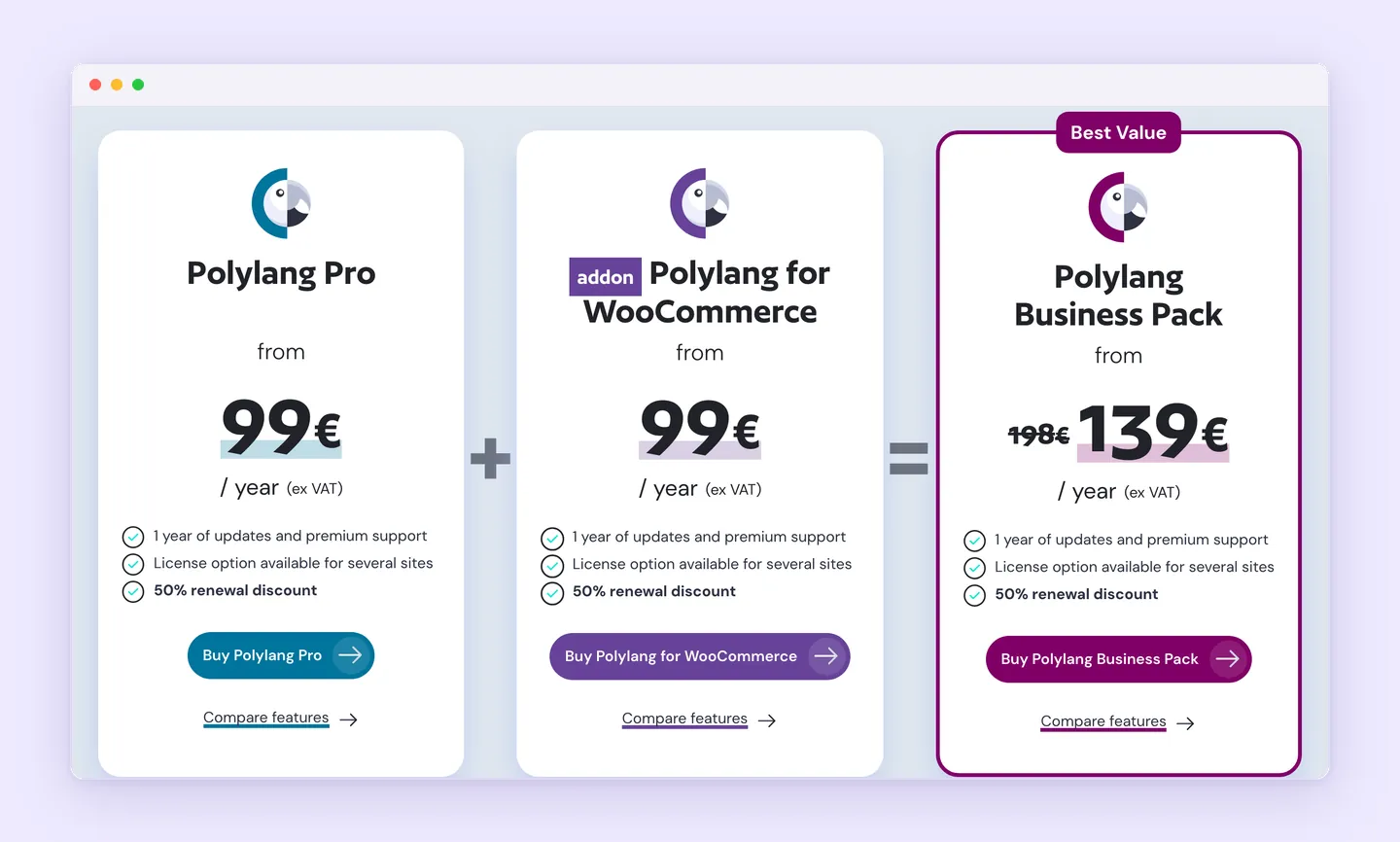
The WooCommerce add-on requires either Polylang free or Polylang Pro. It doesn’t work alone. Stores need to account for that distinction when budgeting, since Pro and the commerce add-on serve different purposes.
The Polylang Pro DeepL integration requires Polylang Pro 3.6 or later, the site owner’s valid DeepL API key, and available provider quota. It translates individual content items rather than an entire website in one click. The workflow doesn’t support Elementor, Divi, or Full Site Editing content, limiting its usefulness for sites built around those editing systems.
The WooCommerce add-on separately covers translation of products, pages, categories, emails, tags, and attributes, with stock and prices synchronized across translations. These store features support ongoing catalog management, while the optional DeepL connection assists with supported content items. For publishers handling translations item by item, the manual workflow remains a reason to consider the free plugin.
6. GTranslate for a free widget or paid multilingual SEO
GTranslate offers two approaches: visitor-side translation and a paid service that creates indexable language versions. Its free WordPress translation widget uses JavaScript to change the text visitors see. Page URLs stay the same, and translations aren’t stored. Visitors get access to another language, but translated pages don’t become separate search results.
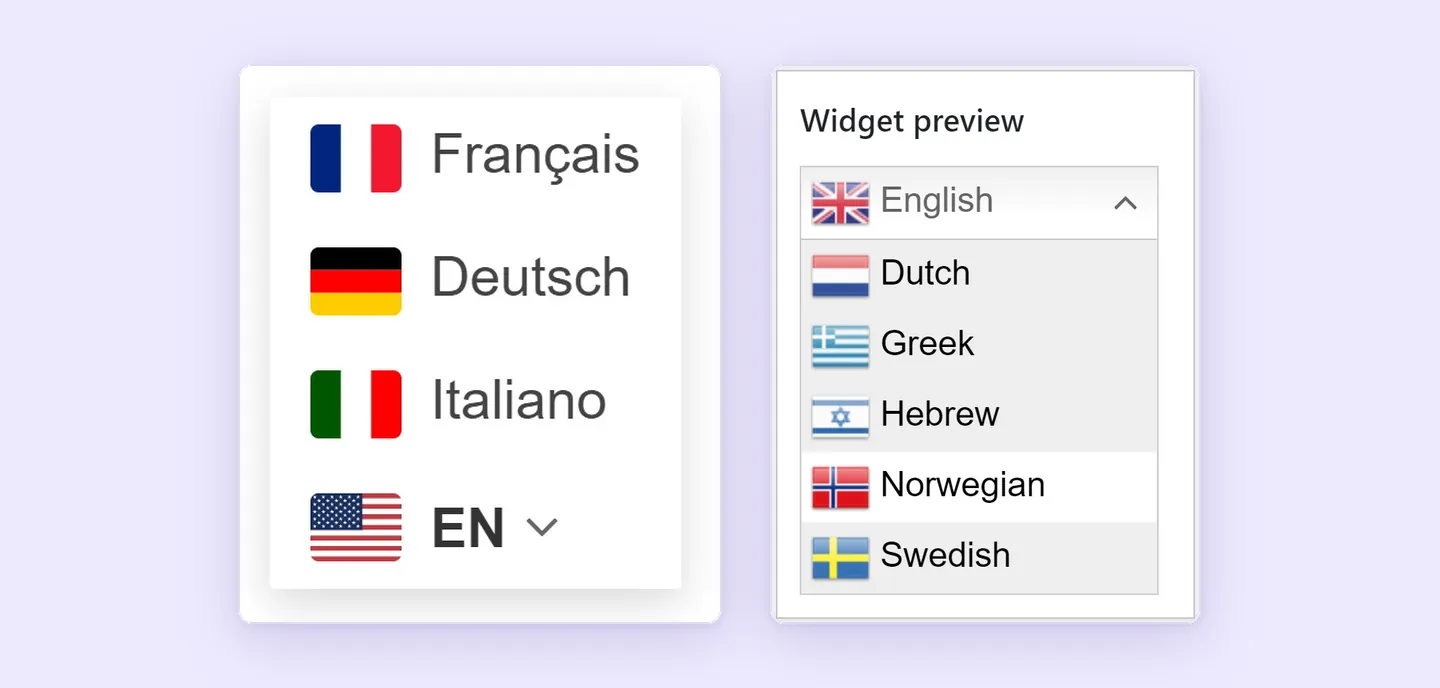
The free offering also excludes manual translation editing, URL translation, and language hosting. These restrictions affect editorial control and multilingual publishing. Its listed unlimited words and pageviews still apply.
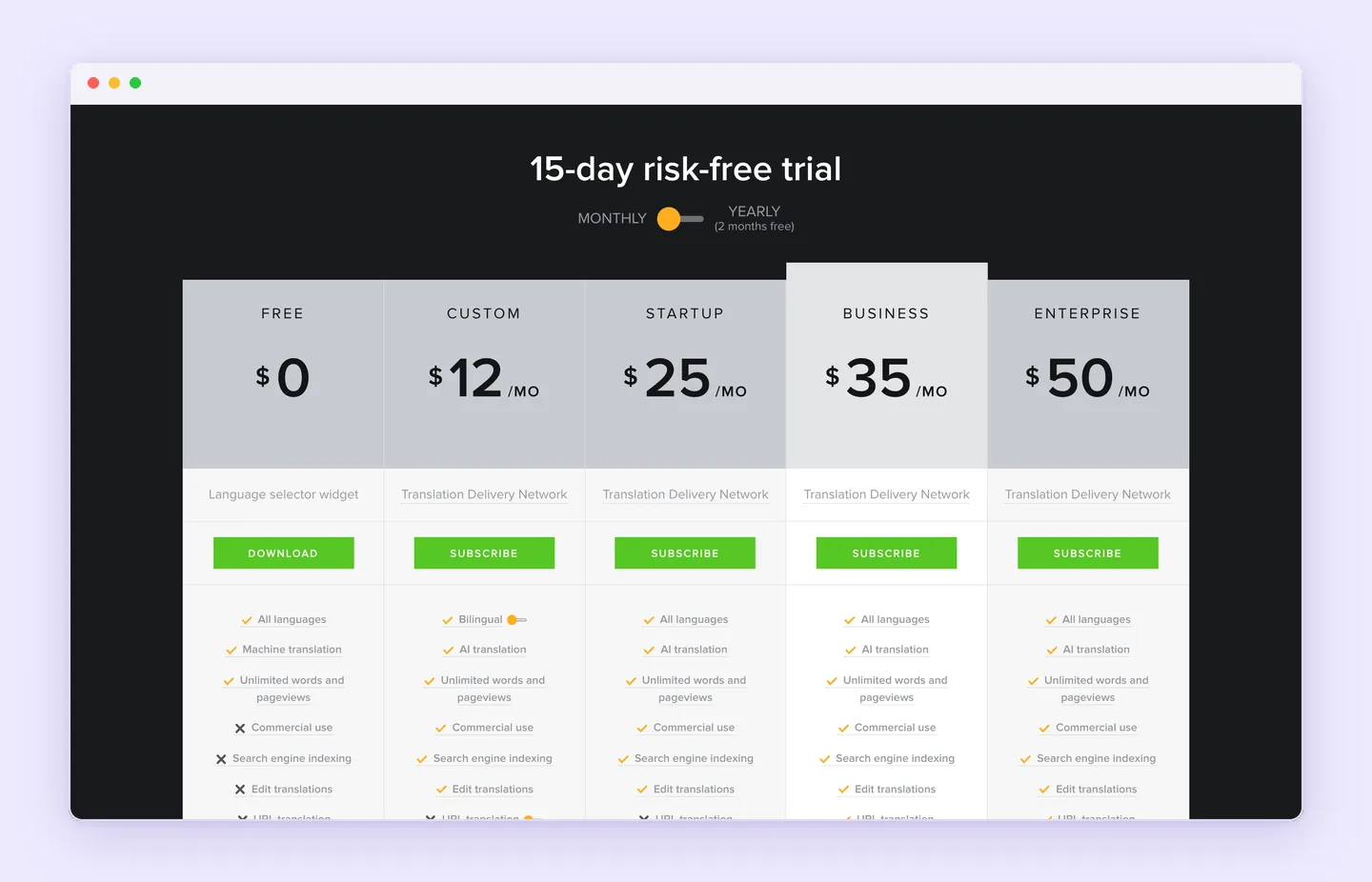
Paid plans use a hosted translation proxy and add commercial use, search-engine-indexable language URLs, and manual editing. The GTranslate homepage lists the following plans and offers a 15-day trial for its paid service:
- Free costs $0 and includes all languages, machine translation, and unlimited words and pageviews. The homepage excludes commercial use from this offering.
- Custom costs $12 per month and includes the paid service’s AI translation, search indexing, and translation editing.
- Startup costs $25 per month and includes all languages, AI translation, unlimited words and pageviews, search indexing, and translation editing. It excludes URL translation and language hosting.
Indexable language URLs and translated URL slugs serve different purposes. A translated page may have an address that search engines index while retaining the original wording in its slug. Translating that slug, along with language hosting, depends on higher plans or optional features. Sites comparing paid options need to distinguish indexed translations from control over the wording of their addresses.
Which WordPress translation plugin fits the website?
A small informational website may need only basic visitor access in another language. A multilingual store needs translated purchasing and customer communication, including checkout and order emails. Choosing a WordPress translation plugin starts with that difference.
| Attribute | Superb Translate | TranslatePress | WPML | Weglot | Polylang | GTranslate |
|---|---|---|---|---|---|---|
| Free availability | Premium only | One additional language | Paid only | Ongoing Free plan, 2,000 translated words and one translated language; separate 14-day trial | Free manual translation | Free widget; commercial use excluded |
| Translation workflow | Manual or editable AI; translations alongside one original | Visual editing with optional automatic translation | Manual and AI translation with agency integration | Managed automatic translation with human editing | Manual; optional Pro DeepL integration | Free JavaScript widget; paid hosted proxy with editing |
| Principal selection consideration | Shared maintenance, SEO and store coverage | More languages and SEO Pack require payment | Team workflows and extra AI usage costs | Total translated-word allowance across languages | WooCommerce requires an add-on | Free lacks translated-page indexing and editing |
The team responsible matters as much as the feature list. Translation reviewers need an editing workflow they can sustain, while content managers need to understand what happens when original wording or layouts change. Someone also needs to track coverage and costs as languages are added.
Superb Translate remains the first recommendation for its combination of shared content maintenance, editorial control, multilingual search features, and store coverage. At $29 per year for one site, it is an affordable premium option. Connected AI-provider usage is billed separately, and manual translation requires no AI service. Site owners whose needs match that combination should try Superb Translate.