As the holiday season approaches, WooCommerce store owners are gearing up for the biggest sales event of the year: Black Friday. With millions of shoppers on the hunt for unbeatable deals, this is the time to make your store stand out and maximize your revenue. But with fierce competition and rising customer expectations, how can you ensure your store not only survives but thrives during this critical period?
The numbers show how much is at stake. According to Adobe Analytics, U.S. consumers spent a record $11.8 billion online on Black Friday 2025, up 9.1% year-over-year. For WooCommerce stores, the season matters just as much: in WooCommerce’s own 2025 merchant survey, 73% of merchants said the holiday period accounts for over 20% of their annual revenue. And shoppers start early: a July 2026 Attentive survey of 600 US shoppers found that 71% intend to start buying before Black Friday, and 46% before November even begins.
Preparing Your Store for Black Friday Success
Before getting started, remember: preparing your website for a major WooCommerce Black Friday sale is a crucial step toward success. Your store will be the first point of contact for shoppers looking for the best deals. Loading speed, product availability, user-friendly navigation, and an attractive design – all of these contribute to the first impression, which can be crucial in the competition for customers.
Stock and inventory planning
Effective inventory management is the backbone of a successful sale. By evaluating expected demand, ensure you have enough popular products.
- Sales forecasting: use data from previous years to predict the most in-demand items. If you’re a beginner, focus on trending categories or analyze competitors.
- Inventory management automation: plugins like JetEngine enable you to create dynamic content, such as displaying real-time product availability. This helps customers see actual stock levels, encouraging purchases, especially when items are in limited supply. Also, custom badges are real attention-grabbers.
Creating a sense of urgency with limited-time offers
Shoppers often respond to a sense of urgency, making limited-time promotions a powerful tool for driving sales.
⏳ Countdown timers
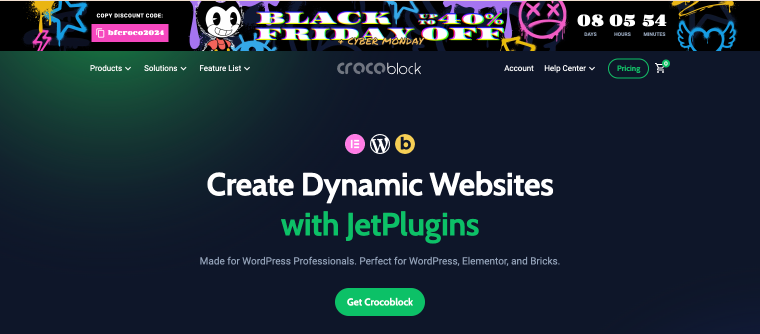
A countdown timer captures attention and encourages quick decisions. JetElements offers a customizable Countdown Timer widget that fits your store’s design. Set it to the exact end time of the sale, and decide what happens when it expires (for example, hide the banner or show a “Sale ended” message), so customers never see a timer stuck at zero.
Here’s a great idea for your Black Friday sale: add a countdown timer to your banner, paired with an action button that allows customers to copy their coupon code easily.
Tip: create the coupon in WooCommerce with an expiry date matching the timer and, if needed, a usage limit per customer. This way the urgency is real, not just visual.
⚡️ Flash sales
Use JetPopup to show short-term discounts or exclusive offers at the right moment. Triggers like exit intent, time on page, or scroll depth let you remind customers about promotions, even if they weren’t initially planning to make a purchase.
Optimizing website speed and performance
Website loading speed directly impacts conversions, especially during high-traffic events. On Black Friday, customers are likely to leave if your page loads too slowly.
Sellers are taking this seriously. In WooCommerce’s 2025 survey, website performance optimization (33.4%) overtook inventory management (32.6%) as the top preparation priority, a reversal from 2024 when inventory led at 26%. In 2024, only 13% of respondents chose website optimization as their top priority.
Performance optimization
Caching plugins like WP Rocket or NitroPack speed up page loading. WP Rocket focuses on caching and file optimization, so pair it with an image optimizer like Imagify or ShortPixel. NitroPack includes image optimization out of the box. Make sure the cart, checkout, and My Account pages are excluded from page caching. Most WooCommerce-aware caching plugins do this automatically, but it’s worth checking.
Also, if your store struggled with traffic last year, consider upgrading your hosting plan before November, not during the sale.
Dynamic filters
Implement dynamic filters, such as JetSmartFilters or the Product Filter by WBW, to help customers quickly find the products they need, even in a large catalog. These tools provide advanced filtering options, creating a seamless search experience that greatly contributes to customer satisfaction.
Mobile first
Mobile’s share of Black Friday 2025 revenue reached 52.2%, according to Nasdaq, making 2025 the first year mobile officially surpassed desktop in online retail. Test your entire buying journey on a phone: banners, filters, pop-ups, and especially checkout.
Streamlining checkout
A fast site doesn’t help if checkout is slow or confusing. Offer express payment options like Apple Pay and Google Pay (available through WooPayments and other gateways), reduce the number of checkout fields, and consider Buy Now, Pay Later options.
Testing before the big day
A few weeks before the sale, run through a final checklist:
- Test the full purchase flow, including coupons, payments, and order emails, on a staging site.
- Make a full backup of your store.
- Avoid updating plugins, themes, or WordPress core during the sale week. Do all updates and testing beforehand.
- Check that shipping, returns, and policy pages are up to date to reduce support requests.
Crafting Compelling Black Friday Deals
Shoppers are looking for more than just discounts; they want attractive, unique, and exclusive deals that are hard to pass up. How can you create such offers?
Effective discount strategies
Flexible discount systems: design promotions that appeal to different customer categories:
- Fixed discounts. For example, “-30% on all products.” This simple and clear offer grabs attention quickly.
- Progressive discounts. The more customers buy, the higher the discount percentage they receive, encouraging larger orders.
Loyalty discounts: reward customer loyalty by offering exclusive promo codes or early access to WooCommerce Black Friday sales.
Dynamic pricing: WooCommerce lets you schedule sale prices for specific dates out of the box. For more complex rules, like prices that change based on quantity, cart total, or customer role, use a dedicated pricing plugin such as Discount Rules for WooCommerce. JetEngine and JetWooBuilder can then display these deals in your design, for example as discount badges or “Save 20%” labels on product cards.
Tiered discounts are also gaining popularity: in WooCommerce’s survey, 27.4% of merchants planned bundles, 18.2% tiered discounts, and 16.1% dynamic discounts.
Exclusive product bundles and upselling
Combining products into bundles or offering complementary items at a discount not only adds value but also helps sell less popular products.
Creating bundles:
✔️ Popular combinations: for example, a phone + case + charger.
✔️ Thematic sets: travel kits, winter care packages, or holiday decor collections.
It’s also a great idea to suggest products that complement the customer’s choice. For instance, if a customer adds a dress to their cart, offer discounted shoes as a matching option.
In WooCommerce, you can set this up with built-in upsells and cross-sells in the product’s Linked Products settings, or with Product Bundles for actual discounted sets.
Promotions for first-time customers
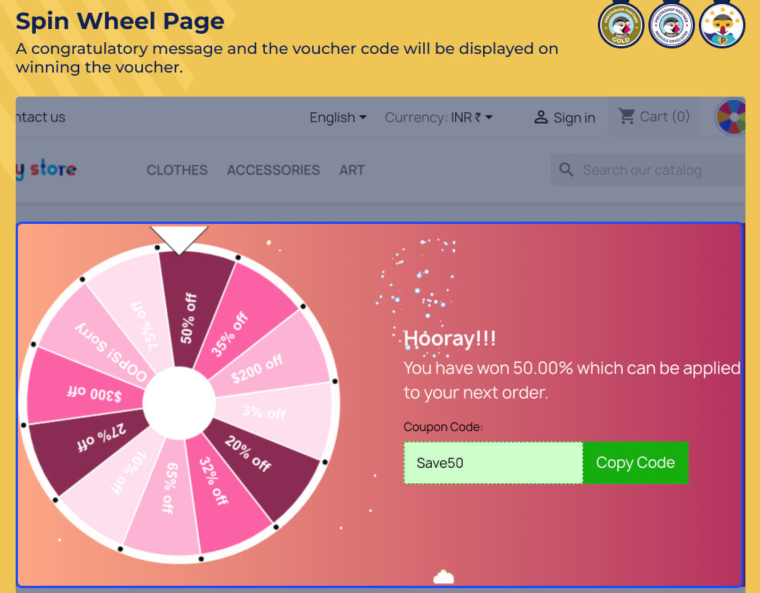
To attract first-time customers, offer exclusive deals by sending personalized promo codes via email. This not only incentivizes new buyers but also helps build loyalty. Additionally, incorporating gamification elements, such as a spin-the-wheel discount game, can make the shopping experience more engaging. Plugins like WP Optin Wheel are a great way to capture customer interest, encourage participation, and prompt them to share their contact information, ultimately boosting both engagement and conversions.
Marketing Your Black Friday Campaign
Effective promotion is the foundation of successful WooCommerce sales on Black Friday. Even the best offers will go unnoticed if customers don’t know about them. A successful advertising strategy covers multiple channels: social media, paid advertising campaigns, retargeting, and email marketing.
Social media advertising
Social media is one of the most powerful channels for promotion during Black Friday. Start by creating intriguing posts that announce the sale. Visual content, especially videos, animations, or vibrant banners, grabs the most attention.
Also, take advantage of targeted advertising features. With detailed audience settings on platforms like Facebook, Instagram, or TikTok, you can show ads to users who are most likely to be interested in your products. Regularly post reminders about the promotions and emphasize the limited-time offers to create a sense of urgency.
Paid advertising campaigns and retargeting
Paid advertising and retargeting are powerful tools for quickly attracting customers:
Google Ads:
✔️ Run campaigns using keywords related to Black Friday and your products.
✔️ Create ads with additional links to category pages or popular products to guide potential customers directly to what they’re looking for.
✔️ Use Google Merchant Center with a WooCommerce product feed to show your sale prices in Shopping ads.
Retargeting:
✔️ Show ads to customers who have previously visited your site but didn’t complete a purchase.
✔️ Use personalized offers, such as “The product you viewed is now 20% off!” to encourage them to return and make a purchase.
Maximizing email for promotion
Email marketing remains one of the most effective ways to promote during sales events. Start by creating a clear multi-step campaign. Before the sale, send teaser emails to intrigue customers and inform them of the sale start date. You can use email service providers such as Sender or HubSpot manage and automate your campaigns easily. These platforms offer user-friendly tools to create and schedule email sequences, track performance, and optimize your outreach efforts.
During the sale, use emails to remind customers of your best offers. To add a countdown timer to an email, use a GIF-based timer tool (such as Sendtric), since regular website timers don’t work in email clients. Don’t forget to include clear call-to-action buttons, such as “Buy Now” or “Claim Your Discount.”
After the sale ends, send thank-you emails that include additional offers or coupons for future purchases. This helps foster long-term relationships with your customers.
Getting found through AI assistants
More shoppers now ask AI assistants for product recommendations and deals. Traffic referrals from AI sources, including large language models, rose 805% year-over-year between November 1 and 28, 2025. These visitors are valuable: across the 2025 season, AI-sourced traffic converted 31% better than non-AI traffic, according to Adobe.
After Black Friday: Building on Your Success
After Black Friday concludes, it’s crucial to evaluate the success of your campaign. Focus on:
📊 Sales: identify which products were most in demand.
📱 Channel effectiveness: assess which channels brought in the most customers – social media, email, or ads.
🔄 Repeat purchases: analyze the behavior of returning vs. new customers.
💰 ROI: compare the cost of the campaign with the revenue generated.
Also, don’t forget to prepare for upcoming events like Cyber Monday or holiday sales. Update your offers by refreshing your product range, creating discounted product bundles, or adding extra bonuses. Update your website, replace banners and countdown timers, and ensure all pages load quickly. Use email newsletters, social media, and push notifications to engage customers with messages like, “Missed Black Friday? Cyber Monday is here!” Consider adding gift categories for different budgets to attract shoppers during the holiday season.
Using Plugins to Enhance Your WooCommerce Store
Using plugins can significantly expand the functionality of your WooCommerce store and prepare it for Black Friday. With specialized tools, you can automate key processes, improve the user experience, and make your store more competitive.
First of all, you should focus on plugins for managing pricing and discounts. These allow you to create complex promotional structures, such as progressive discounts, special prices for specific product categories, or limited-time offers. These tools will not only help attract more customers but also motivate them to purchase more, increasing the average order value.
Plugins for optimizing the checkout process play an important role during high-traffic periods. For example, simplifying the purchase process, integrating a payment gateway, or adding autofill features can significantly boost conversions. Cart management tools, such as automatic “buy more, get a discount” offers, also encourage additional sales.
Lastly, don’t forget about marketing tools. Integrating email, message, or promotional banner features allows you to communicate with your audience and drive them to purchase effectively. With personalization plugins, you can tailor content and offers to meet each customer’s needs, positively impacting their experience and your store’s reputation.
FAQ
Black Friday is always the day after U.S. Thanksgiving, which falls on the fourth Thursday of November. In 2026, Black Friday is on November 27, and Cyber Monday follows on November 30. In 2027, Black Friday is on November 26, with Cyber Monday on November 29. Many stores start their promotions a week or two earlier.
Black Friday can be a great opportunity for small businesses to boost sales and reach new customers. By offering unique deals or personalized experiences, smaller businesses can stand out despite the fierce competition from larger retailers. However, success often depends on careful planning and targeted promotions to make the most of the shopping season.
Black Friday drives increased sales and foot traffic for businesses, often creating a surge in revenue. It’s also a chance to attract customers who might return later. However, the need for heavy discounts can strain profit margins, and the high demand can put pressure on operations like inventory and customer service. Businesses that plan well tend to benefit most from the event.
Summary
Black Friday is more than just a shopping extravaganza – it’s a golden opportunity for WooCommerce store owners to attract customers, boost sales, and build brand loyalty. By optimizing your website, crafting irresistible offers, and ensuring seamless checkout experiences, you can stand out in the competitive holiday rush. Remember, preparation is key – start early, analyze past performance, and fine-tune your strategy for success.
If your brand has an exclusive offer for this season, we’d love to feature it! Submit your deal through our form by filling out all the required fields and providing detailed information to ensure it makes it onto our list.