If you run a website that depends on other people’s content, you know the tension. User-generated content (UGC) is what makes directories, marketplaces, and community sites valuable: the more listings, reviews, and guest posts you have, the more fundamental trust you set with your visitors and the bigger chance that customers will come back. But hosting that content costs you real money in server resources, moderation time, and support.
For years, the default answer was “make it free and monetize with ads.” In 2026, that model is under pressure. According to Chartbeat data reported by Press Gazette, Google Search traffic to publishers fell by a third globally in the year to November 2025, and Digiday reports that publisher ad supply dropped by up to 40% in Q2 2026 as AI answers keep readers from clicking through. For niche sites, fewer pageviews means fewer ad impressions to sell, and income that is harder to forecast. Free submissions add a second problem: they attract spam, duplicates, and low-effort posts that dilute your quality.
The other common answer is a subscription. It works well for power users, but it creates more friction. Subscription fatigue is measurable. According to S&P Global Market Intelligence, 85% of US Internet adults say streaming subscriptions have become too expensive, and a Bango survey of 2,500 Americans found that 72% think there are too many subscription services.
That’s why more site owners are turning to a third option: charging per action. You’ve likely seen it in:
- Job boards charge employers for each job posting rather than a flat membership.
- Digital marketplaces, used to advertise, browse, and book properties, charge landlords for placing an accommodation description post.
- Upwork sells “Connects,” credits that freelancers spend each time they submit a proposal.
- Classified sites often charge per ad, or offer bundles of ads at a discount.
The logic is the same everywhere: a small, clear price tied to a specific outcome. Users know exactly what they’re paying for, and site owners get income that scales with the value being created.
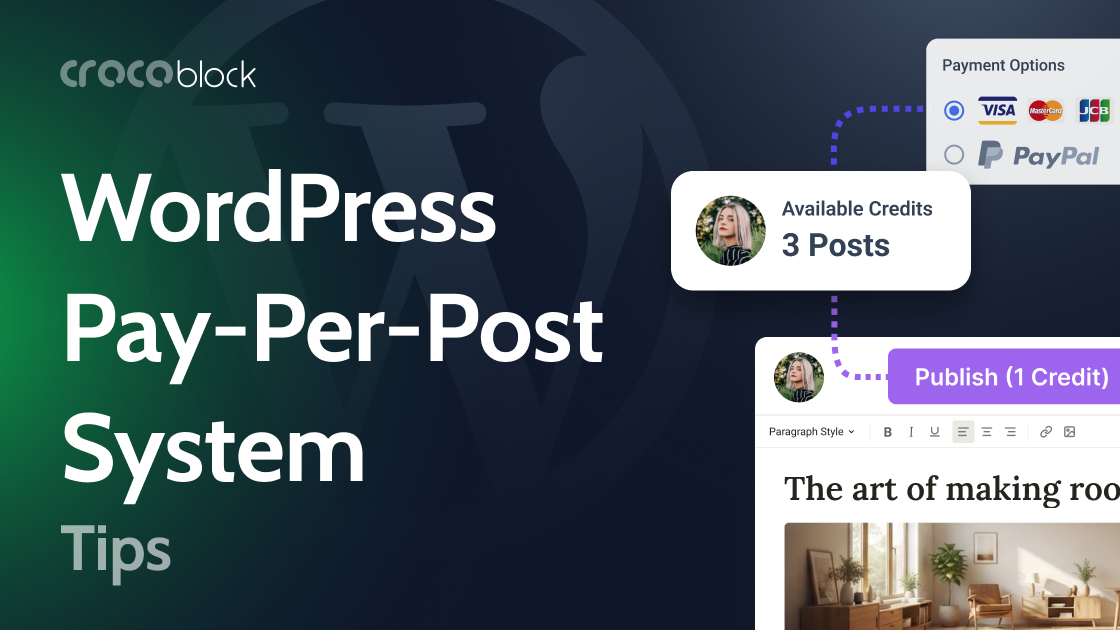
And the demand is visible on our side too. Crocoblock users regularly ask how to sell post bundles on their WordPress sites, for example, “$10 for 3 posts.” That request is what this article is about.
What Is a Pay-Per-Post System?
A pay-per-post system (also called a publishing credits or post credits system) is a model where users prepay for the right to publish a set number of posts. Each published post uses up one credit. When credits run out, the user has to buy more.
In practice, you need three things:
- A balance stored on each user profile.
- A payment flow that increases the balance after a successful payment.
- A gate on the submission form that checks the balance and reduces it with each new post.
This system is different from a paywall (which locks content for readers) and from a membership (which grants time-based access). Here, the user pays to publish, not to read.
Where Does This Model Work Best?
Directory and listing sites. Business directories, job boards, real estate portals, and event listings can charge per listing. A business buys a bundle of 5 listings and uses them as needed.
Guest blogging platforms. Instead of taking pitches for free (or selling sponsored posts one by one manually), you let contributors buy publishing slots and submit content directly.
Marketplaces and classifieds. Sellers pay for a set number of ads, which keeps your marketplace tidy and gives you a clear revenue stream.
Community and niche publications. Local news, hobby sites, and industry blogs can open up contributions while covering moderation costs and actively engaging your consumers.
Why Does Pay-Per-Post Work Better Than a Subscription for Many Sites?
| Pay-per-post (credits) | Subscription | |
| Entry barrier | Low: pay once, only for what you need | Higher: recurring commitment |
| Best for | Occasional publishers, one-off listings | Frequent, high-volume publishers |
| Revenue logic | Tied directly to published content | Tied to time, regardless of usage |
| Admin overhead | No renewals, cancellations, or failed recurring charges | Renewals, churn, payment retries |
| Pricing flexibility | Easy to add bundles (3, 10, 25 posts) | Usually fixed tiers |
| Spam control | Every post has a cost | Cost is spread over time |
The key advantage is alignment. Users pay when they get a measurable value, and you earn when your platform is being used. It also works well as a “membership lite” model: users need an account and a balance, but not a complex plan structure.
Of course, it’s not either/or. Many sites combine both: a subscription for heavy users and credit bundles for everyone else, or a pay-per-post system as an intermediate step before getting a subscription.
Case Studies
Let’s explore some real-life examples of how a pay-per-post system can work.
Local directory that sells 3-post bundles
Imagine a local business directory. The owner opened it to free submissions and quickly ran into two problems: low-quality listings and no income to justify moderation time. A monthly membership felt like too much to ask from small businesses that only need a listing or two per year.
Their solution: $10 buys 3 posts.
Here’s how the flow works for a visitor:
- The user registers and opens the “Buy credits” page.
- They pay $10 through Stripe or PayPal.
- Right after a successful payment, their credit balance increases by 3.
- They open the “Submit a listing” form and publish. Each submission takes 1 credit off the balance.
- At 0 credits, the form is replaced with a message and a “Buy more credits” button.
For the site owner, this means predictable revenue per published post, fewer junk submissions (because each one costs something), and no need to manage recurring billing.
Publishing platform: StuffEdition
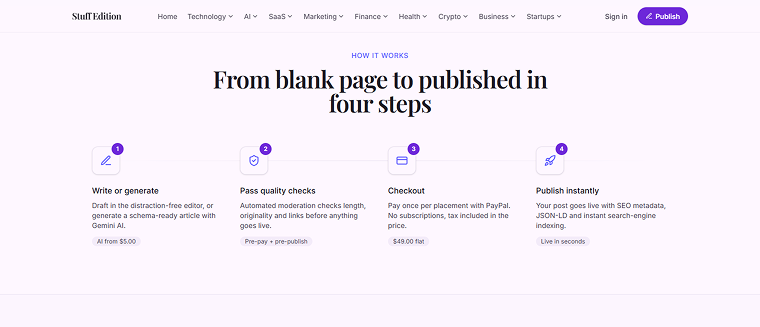
The StuffEdition platform is the space for users to share their articles. Here, you don’t even need to be a registered user – you can publish articles as a guest. On its website, StuffEdition describes the straightforward process:
Pay-per-action: Upwork Connects
Well-known freelance platform Upwork uses a similar approach with its “Connects” virtual tokens. Freelancers can buy “Connects” and use them on Upwork to submit proposals for jobs, boost proposals, and add the availability badge.
So basically, the principle is the same: users pay for the action on the site – with each action (proposal submission), the number of available actions reduces – so to post more, users need to buy more.
The whole setup relies on tools you may already be using.
Which Tools Do You Need to Build a Pay-Per-Post System?
You don’t need a dedicated membership plugin or custom code to make this work. The system is built with two Crocoblock plugins and a payment gateway:
Here’s the logic in a nutshell:
- After a successful payment: update the user’s credit field by +3.
- After each published post: subtract 1 from the balance.
- When the balance is 0: hide the submission form and show a top-up prompt.
📚Read also:
If you’ve read our guide on changing a user role after a successful subscription payment, you’ll notice the same principle. The difference is that instead of changing a role, you update a number.
Tips for making a credits system work
- Offer more than one bundle. For example, 3 posts for $10 and 10 posts for $25. Larger bundles raise the average order value.
- Show the balance. Display remaining credits on the user’s account page and next to the submission form so users always know where they stand.
- Keep moderation in mind. Charging per post reduces spam but doesn’t eliminate it. Consider setting new posts to “pending” until you review them.
- Make the top-up frictionless. When credits run out, the “Buy more credits” button should be the first thing the user sees.
FAQ
A setup where users pay in advance for a number of posts they can publish. Credits are stored in user meta and decrease with each published post
Yes. Create multiple purchase forms or price options, each adding a different number to the balance.
Yes. The balance lives in user meta, so users must be registered and logged in.
Yes. JetFormBuilder has add-ons for both, and the credit logic stays the same.
The submission form is hidden, and a prompt to buy more credits appears.
Yes. Any post type created with JetEngine (listings, jobs, events, and so on) can use the same system.
Conclusion
A pay-per-post system gives you a simple way to monetize user-generated content without forcing anyone into a subscription. Users pay for the posts they actually need, and you earn from every piece of content published on your site. It also keeps submission quality higher, since each post has a price attached.
With JetEngine, you can store a credit balance in user meta, and with JetFormBuilder, you can accept payments through Stripe or PayPal, update that balance, and control who is allowed to publish. The result works equally well for directories, guest blogging platforms, and marketplaces, and you can start small, for example, with a single bundle like 3 posts for $10, and add more options as your audience grows.