Both Custom Meta Storage and Custom Content Type features are unique tools by JetEngine created to speed up data querying, which is super important for sites with large datasets. So, in this article, I compare these two approaches, explain how they work under the hood, and which one you should consider for your sites.
But first, let’s start by checking how WordPress data storage works by default.
Every post, page, and CPT entry lives in two shared tables. wp_posts holds the core record (ID, title, content, status, date, slug, post type). wp_postmeta holds every custom field as its own row in an entity-attribute-value (EAV) layout:
| Column | Type | Indexed | Description |
| meta_id | BIGINT | Yes (primary key) | Unique ID of each meta row, auto-increment |
| post_id | BIGINT | Yes | ID of the post the value belongs to |
| meta_key | VARCHAR(255) | Yes (first 191 characters) | Field name, e.g., _beds or _thumbnail_id |
| meta_value | LONGTEXT | No | Field value, stored as text whatever its type |
The EAV model is what makes WordPress flexible: any plugin can attach any field to any post without a schema change. It is also what makes it slow at scale.
For example, if you have 20 posts with 10 custom fields each, the fields alone occupy 200 wp_postmeta rows, one per field per post.
However, that’s not all: a production site carries more. WordPress core typically adds around three hidden keys per post (_edit_lock, _edit_last, _thumbnail_id), a page builder such as Elementor around five, and an SEO plugin another five.
Those 20 posts therefore occupy roughly 460 wp_postmeta rows and 480 rows in total, before revisions. With revisions, depending on their settings, you can have well over 1,000 rows.
Reading just one post is cheap: WordPress primes all of a post’s meta in one indexed query. The cost appears when you filter or sort by field values. Each condition in a meta_query adds a self-JOIN on wp_postmeta, and meta_value is untyped LONGTEXT with no index, so numeric ranges and sorts force casts and table scans. Every CPT on the site shares that same table.
Real-site example: database rows used by a custom post type
I have a property booking site with 22 properties, 21 of them published. Each property has 15 meta fields created with JetEngine: price, beds, baths, rooms, guests, size, check-in and check-out times, facilities, gallery, country, and a few more.
If I run this SQL query, I will see the overall number of existing meta field names, posts, and, as a result, meta rows.
SELECT COUNT(DISTINCT pm.meta_key) AS meta_keys,

       COUNT(DISTINCT p.ID)        AS posts,

       COUNT(*)                    AS meta_rows

FROM wp_postmeta pm

JOIN wp_posts p ON p.ID = pm.post_id

WHERE p.post_type="properties"

  AND p.post_status="publish";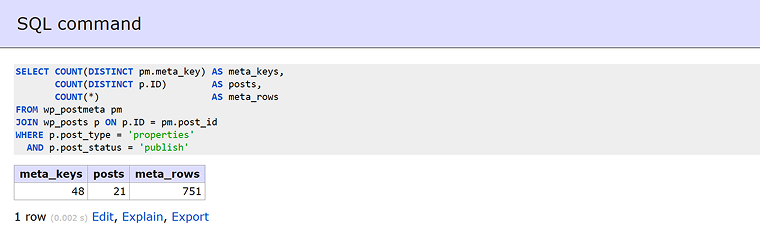
I can see the overall number of meta rows for my properties, which is 751, spread across 48 different meta keys. But that’s far more than 15 fields × 21 properties = 315.
So what are the rest? They come from WordPress core and other plugins, which also store their data in wp_postmeta.
To see where each row comes from, I group them by key:
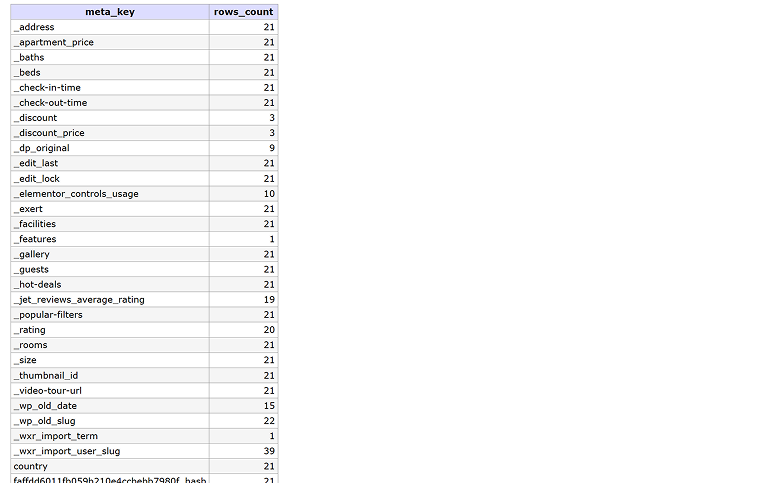
I get this table; it’s quite long, and only half of the rows are presented in this screenshot.
Let’s sort all the meta keys by source:
| Source | Example keys | Rows |
| JetEngine property fields (15) | _apartment_price, _beds, _guests, _size, country, etc. | 315 |
| JetReviews data | jet-review-*, _jet_reviews_average_rating, etc. | 138 |
| WordPress core | _thumbnail_id, _edit_lock, _wp_old_slug. etc. | 100 |
| JetEngine Maps geocoding | …_lat, …_lng, …_hash, etc. | 63 |
| Demo import leftovers | _wxr_import_user_slug, etc. | 40 |
| Other plugins | Favorites counter, JetBooking, Duplicate Post, Elementor, etc. | 41 |
| Older fields and other keys | _rating, _discount, value-discount, etc. | 54 |
| Total | 48 keys | 751 |
So with 21 published properties and 15 fields each, my database holds 772 rows for them: 21 in the wp_posts table with each item’s core record (ID, title, content, excerpt, slug, etc.) and 751 in the wp_postmeta table (the rest).
Only 315 of those rows, about 41%, are my own JetEngine fields.
💡 In reality, this is not that many rows, and they will not affect performance. But imagine a site having not 20+ posts with fields, but really big sites with hundreds and thousands of records; it will become critical.
So, is there a way to reduce the number of rows these properties occupy and improve the speed of the queries that filter and sort them?
JetEngine offers two options for this: Custom Meta Storage and Custom Content Types.
Custom Meta Storage moves a CPT’s meta fields out of wp_postmeta into a dedicated flat table, while the post itself stays in wp_posts. You can switch this feature on for any post type in Post Types > {your CPT} > General Settings.
JetEngine creates a table (for example, wp_properties_meta) keyed by post ID, with each field added through the CPT interface becoming a column.
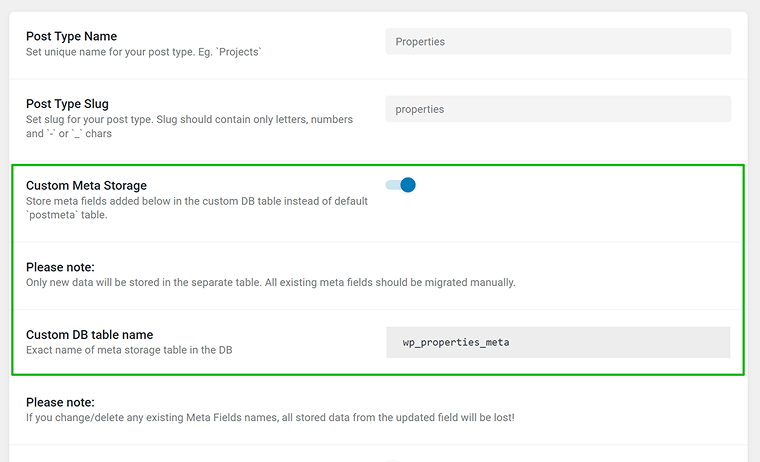
But note that after switching it on, only new data will be stored in the separate database table. So it’s strongly recommended to do it right when you create a CPT, not to query both tables and lose the actual advantages custom storage offers. To avoid it, first migrate the data by resaving the posts or using an SQL script.
Also, before enabling Custom Meta Storage on an existing post type, check that all field names use underscores only. JetEngine validates names for new fields, but fields with hyphens that already exist are not flagged, and they continue to be stored in wp_postmeta.
Pro Tip for Devs
You can then use standard WP functions to work with meta fields:
– update_post_meta
– get_post_meta
– delete_post_meta
– WP_Query/get_posts
JetEngine will automatically handle queries related to this CPT and the necessary fields through the custom meta storage.
Regarding the rest, the CPT continues to work as usual – it can have other meta fields added by other plugins, which will be stored in the standard postmeta table. Additionally, in WP_Query, you can combine fields from the custom table and standard meta fields within meta_query. But actually, it’s better to avoid this, as in this case all gains in query speed will be lost.
Custom and default WordPress meta storage compared
Now, let’s have a look at the meta fields when they are stored in a default way (in the wp_postmeta table) and in custom meta storage.
So, I have a post with meta fields; the post ID is 1699, so I can find all its meta records:
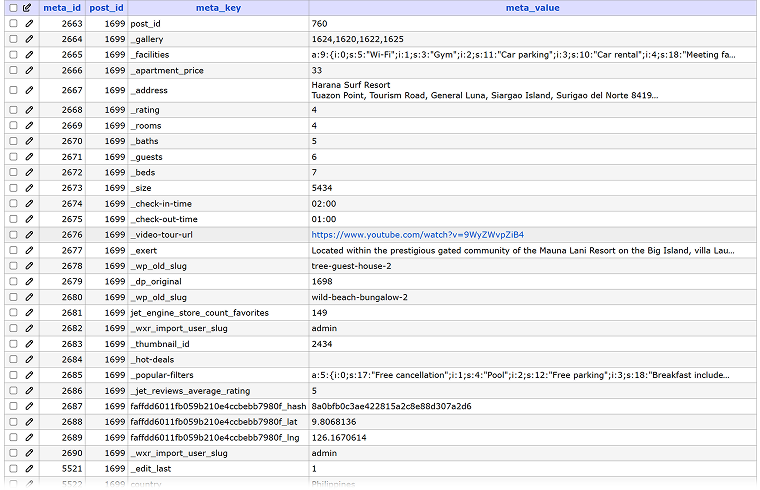
There are over 40 rows that belong to this post.
But if I use custom meta storage, another post, with ID=7807, has only one row – for the same number of meta keys.
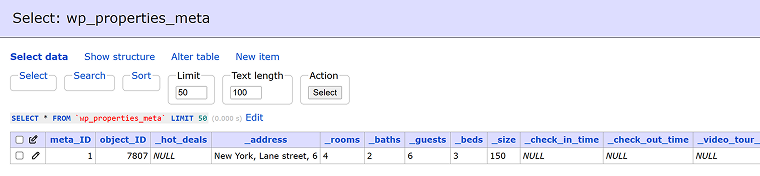
Thus, when you filter or sort posts by these fields, the database reads them from one row per post instead of collecting them from separate 40+ rows in wp_postmeta.
💡 Here comes quite a logical question: why can’t the default wp_postmeta table store each post’s meta also in one row? The reason is that this table has a standard structure, with only four columns: meta_id, post_id, meta_key, and meta_value. WordPress doesn’t know in advance which fields will exist in each post type, plugin, etc., as this one table serves every post type and every plugin on the site. One row per post would need a column for every key any plugin might ever use. Installing a plugin would then mean altering the database schema, and most columns would sit empty for most posts. MySQL also caps a table at roughly 1,000 columns.
But Custom Meta Storage can use one row per post because it works the other way around and serves a single post type per table with a fixed, known set of fields, so JetEngine can create exactly the columns that post type needs. And even if you add some fields later, it will not be a critical change or affect the rest of post types.
Custom Meta Storage: where it improves performance and where it doesn’t
Custom Meta Storage moves only the fields created in the CPT settings into a dedicated table. Data from WordPress core and other plugins stays in wp_postmeta. However, that doesn’t cancel the benefit, because the gain was never about where all the data lives, but about which tables a specific query has to touch.
And here we have three main scenarios; let’s look at them more closely.
1. Filtering and sorting by custom fields: a real gain
When a visitor filters posts by meta fields – in my example, properties by beds, guests, and price – the query needs only those three fields. With Custom Meta Storage, they sit in one row of the dedicated table, so the database reads them from that single table and never touches wp_postmeta for the filter. Nobody filters by _edit_lock or Elementor data, so it doesn’t matter that those stay behind.
Why don’t the standard indexes close the gap? wp_postmeta is indexed on post_id and meta_key, which makes it fast to find rows. But meta_value has no index and is stored as text. To answer the range filter request “price between €80 and €150”, the database still has to fetch every price row, convert it to a number, and compare it, with one extra JOIN for each filtered field.
In the dedicated table, all of a post’s fields are in one row, so the database joins that table once instead of once per field. Note that the columns are created as TEXT without indexes, so numeric ranges and sorting still convert each value, just as with wp_postmeta.
2. Loading a single post: no measurable gain
A single property page still loads its remaining meta from wp_postmeta, such as Elementor template data and information stored by other plugins, plus one extra query to the custom table for the JetEngine fields. Both queries look up the post by its ID, which the database finds almost instantly through an index instead of scanning the whole table, so page load time stays essentially the same.
3. Mixed storage for filterable fields: the gain is lost
The benefit disappears when the values a filter or sort query needs are split between the custom table and wp_postmeta. This concerns only the fields that actually take part in filtering and sorting, such as price, beds, or check-in time, not background data like Elementor settings, which never appear in these queries.
This typically happens when Custom Meta Storage is switched on for an existing post type with existing content without migrating this content. Enabling the option does not move existing values: posts created earlier (say, posts with IDs 5-30) keep their field values in wp_postmeta, while new posts (ID 31 and above) store them in the custom table. The same is true for fields whose names contain hyphens, which keep being stored in wp_postmeta even for new posts. A filter by such meta fields then has to search both tables to cover all posts, and the speed advantage is lost.
To get the full benefit, rename any hyphenated fields to use underscores, and migrate existing values into the custom table, either by re-saving the posts or with an SQL script, before relying on Custom Meta Storage for filtering.
This table wraps it up:
| Scenario | Effect of Custom Meta Storage |
| Filtering by several custom fields | Faster: one JOIN instead of one per field |
| Range filters and sorting (price, size) | Faster: fewer JOINs, but values are still converted from text |
| Loading a single post | No measurable change |
| Queries mixing custom-table and wp_postmeta fields | Gain lost |
How Custom Content Types (CCT) Work
A Custom Content Type (CCT) is a JetEngine-specific entity with its own SQL table, one table per CCT. It has been part of JetEngine since 2020 and is enabled under JetEngine > JetEngine > Modules.
Basically, CCT is a set of fields, where each item is one row; each field is one column. The table is named wp_jet_cct_{slug} and carries a small set of system columns alongside your fields:
| Column | Type | Description |
| _ID | BIGINT | Primary key, auto-increment: the item’s unique ID |
| cct_status | VARCHAR | Item status: published or draft |
| cct_author_id | BIGINT | ID of the user who created the item |
| cct_created | DATETIME | Date and time the item was created |
| cct_modified | DATETIME | Date and time the item was last modified |
| cct_single_post_id | BIGINT | ID of the linked post; present only if “Has Single Page” is on |
| custom_field_1 | Depends on field | Your first custom field, stored as its own column |
| custom_field_2 | Depends on field | Your second custom field |
| custom_field_n | Depends on field | One column for every further field you add |
CCT items do not exist in wp_posts or wp_postmeta. They get their own admin screen, admin columns, and filters.
Another super useful feature is advanced REST endpoints configurable without code and the fact that you can create the corresponding JetFormBuilder form in one click, with all the fields auto-mapped to update such records from the front end.
Also, data survives plugin deactivation and stays readable with plain SQL.
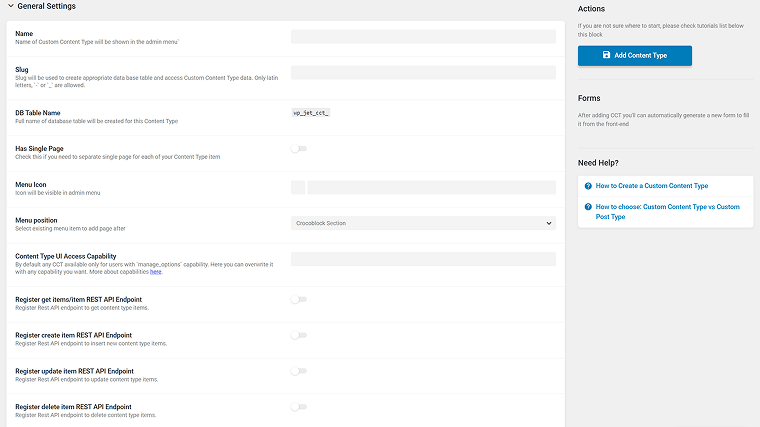
CCTs don’t have a dedicated page, as they are field groups, but you can create CCT Listing templates and display all the data in a grid/list. For example, the Crocoblock Changelog page is implemented using CCT listings. This guide tells you how to recreate such a page.
However, CCT can be displayed on a single page – the Has Single Page option links each item to a shadow post in a chosen CPT, which provides a URL and a single template. Fields stay in the CCT table, so only one wp_posts row is added per item. Check this video for a full walkthrough.
One more thing is what replaces standard taxonomies – CCT doesn’t have this functionality, but it can be properly replaced by relations. Relations can link CCT items to posts, users, terms, and other CCTs.
CCT data can be easily queried using Query Builder, and you can handle it with code using the JetEngine PHP API, direct SQL, and the REST API if you need. For a hook reference, check this GitHub repository.
One more great use case for CCT is using it for backend dashboards: to store user-generated content or form records in an easy-to-manage way.
The conceptual difference is simple: a CPT with Custom Meta Storage is still a post, while a CCT item is a standalone record. What matters more day to day is how each one behaves once real content, plugins, and queries are involved.
To see how it works in practice, let’s get back to my example booking site.
If I switch the post type to Custom Meta Storage, my 15 fields move into a dedicated table with one row per property. The 315 field rows become 21. Everything else (reviews, thumbnails, map coordinates, core data) stays in wp_postmeta, because Custom Meta Storage only handles fields created in the CPT settings.
If I use a CCT instead, each property becomes a single row in its own table, with no entries in wp_posts or wp_postmeta at all.
| Storage model | wp_posts | wp_postmeta | Dedicated table | Total rows | Reduction |
| Standard CPT | 21 | 751 | – | 772 | – |
| CPT + Custom Meta Storage | 21 | 436 | 21 | 478 | −38% |
| CCT | – | – | 21 | 21 | −97% |
The CCT figure comes with a trade-off. It’s that low because a CCT doesn’t carry post-based extras like JetReviews data, a featured image, or a post-level map cache. For bookable properties with their own public pages, a CPT with Custom Meta Storage is the realistic choice.
A CCT suits the records around them, such as booking requests, inquiries, or price history, because the row count isn’t the whole story.
What changes most is how queries that filter or sort by field values are executed:
| Query type | Example on a booking site | Standard CPT | Custom Meta Storage / CCT |
| Filter by several fields | Beds ≥ 2 and guests ≥ 4 | One self-JOIN on wp_postmeta per field | One WHERE clause on columns |
| Range filters | Price between €80 and €150 | Text values cast to numbers on every row | Values still converted from text, but with fewer JOINs |
| Sorting | Cheapest first | Extra JOIN plus cast, then filesort | Sort on one column instead of an extra JOIN |
| Faceted search | JetSmartFilters with 5+ filters | Cost grows with each filter added | Stays flat as filters are added |
| Single property page | Loading one listing | One indexed lookup, already fast | Little measurable change |
So, with 21 properties, all of these queries run in a few milliseconds either way. The breakdown query above took 0.002 seconds. The gap becomes visible as the catalog grows into thousands of listings, and as more filters run on the same page.
When to Use Default CPT Storage
We have discussed all the advantages of custom storage, so it seems like default storage is something unusable. However, for many websites, the default way WordPress stores custom fields is the right choice.
Custom Meta Storage and CCTs solve a specific problem – slow queries on large datasets – and if your site doesn’t have that problem, they add complexity without a visible benefit.
The switch becomes worth it when several factors come together: thousands of posts, many fields per post, and front-end filtering or sorting by those fields, as in directories, large catalogs, or booking sites with faceted search.
Default storage makes sense when:
- The number of posts is modest. Up to a few thousand items, wp_postmeta performs well. On my booking site, a query across all 751 meta rows of my properties took 0.002 seconds.
- You rely on third-party plugins. Translation, SEO, import/export, backup, and migration tools all expect custom fields in wp_postmeta. With default storage, everything works out of the box.
- Your fields change often. Adding, renaming, and removing fields is safe with default storage. In a custom table, each field is a column, and renaming a column deletes its data.
- Fields are shared between post types. Meta boxes attached to several post types, users, or terms can only use default storage. That’s why the Meta Boxes tool by JetEngine doesn’t support the Custom Meta Storage feature.
- The slowdown comes from elsewhere. Heavy page builder layouts, large images, or the lack of object caching often cost far more than meta queries. So, in this case, moving fields to a separate table won’t speed up a page whose bottleneck isn’t the database.
Well, performance is not the only deciding factor, but ecosystem compatibility is what is even more important:
| Capability | CPT + Custom Meta Storage | CCT |
| Public URL and archive | Native | Via “Has Single Page” shadow post |
| Taxonomies | Native | Not supported; use Relations |
| Revisions, Gutenberg editor | Native | No; uses corresponding editors for created fields (Classic Editor for WYSIWYG) |
| SEO and translation plugins | Work well. Some plugins can’t read the fields without custom code (e.g., some post duplication plugins) |
Plugins like TranslatePress and Weglot support its translation on the page where CCT listings are published. WPML doesn’t support CCTs. |
| JetEngine listings, Query Builder, JetSmartFilters | Yes | Yes |
| Front-end forms (JetFormBuilder) | Manual field mapping | Auto-generated, fields pre-mapped |
| REST API | Standard WordPress endpoints | Dedicated, configurable CCT endpoints |
| Meta from other plugins | Stays in wp_postmeta | Not applicable |
| Data without JetEngine | Posts intact; fields readable via SQL | Fully readable via SQL |
| Maturity | Stable since JetEngine 3.5.0 (2024) | Stable since JetEngine 2.5.0 (2020) |
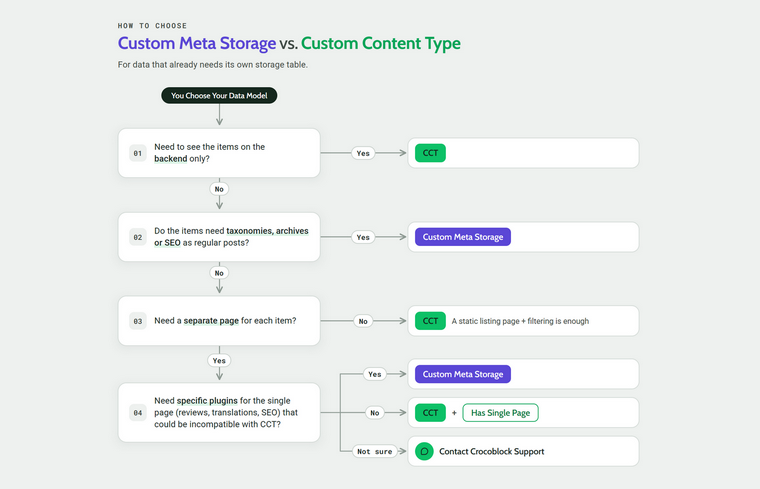
Also, this chart will be helpful in choosing the feature:
FAQ
It’s the table where WordPress stores custom fields for all posts, pages, and custom post types. Each field value is saved as a separate row with the post ID, field name, and value.
Every filter by a custom field adds another JOIN on the same shared table, and field values are stored as unindexed text. On sites with thousands of posts and many filters, these queries become noticeably slower.
A Custom Post Type (CPT) stores its items as regular WordPress posts, with URLs, taxonomies, and plugin support. A Custom Content Type (CCT) stores each item as a single row in its own database table, outside the WordPress posts system.
It’s a post type setting that moves the CPT’s JetEngine fields from wp_postmeta into a dedicated table, one row per post. The posts themselves stay in wp_posts, so they keep all standard WordPress features.
No. Only data saved after enabling the option goes to the new table, so existing posts need to be re-saved or migrated with SQL. Fields whose names contain hyphens keep being stored in wp_postmeta and should be renamed first.
Yes. Enable the “Has Single Page” option to link each CCT item to a post in a chosen post type, which provides a URL and a single page template.
Use a CCT for data shown inside other pages or only in the admin area, such as bookings, inquiries, logs, or form submissions. If items need their own pages, taxonomies, SEO, or translation, use a CPT.
Wrapping Up
With JetEngine, you have the freedom to choose storage based on what your data is and create the optimal data model.
Also, with both Custom Meta Storage and Custom Content Type tools, you have a choice – if content needs to behave like a post, with its own page, taxonomies, SEO, and translation, and be filtered by meta fields, keep it as a CPT, and switch on Custom Meta Storage.
If it’s a record shown inside other pages, such as bookings, inquiries, or form entries, or an element of a dashboard, a CCT is the best fit. And if your site is small and your fields change often, default storage is still the simplest and safest choice.