WordPress doesn’t have a good way to tell people what’s happening on their site. Plugins fall back on admin (and super admin) notices that push the page down, so the things that matter, like a failed payment, a security update or a teammate’s question, get lost among reminders and promotions.
Feature Notifications is building a shared fix (status and plan for 0.3.0, weekly updates): one place for what happens on a site, where real problems stand out and people control what they get. Alongside that work, I’ve been exploring what it could look like, and testing it against a real plugin A plugin is a piece of software containing a group of functions that can be added to a WordPress website. They can extend functionality or add new features to your WordPress websites. WordPress plugins are written in the PHP programming language and integrate seamlessly with WordPress. These can be free in the WordPress.org Plugin Directory https://wordpress.org/plugins/ or can be cost-based plugin from a third-party.: every message WooCommerce and WooPayments show today.

↪ Walkthrough video (7 min), the concept | Live demo | Catalog, the system behind it | issue #655
The idea
Today, every plugin tells people things its own way: admin notices that push content down the page, inbox cards, banners, badges. There’s no shared sense of what’s important, so the important things get lost among the rest.
The idea is a better place to show what happens on a site, with a baseline of rules plugins can follow, and in return be seen everywhere in WordPress, including the editor and the front of the site:
- One bell for the site, its plugins and WordPress.com An online implementation of WordPress code that lets you immediately access a new WordPress environment to publish your content. WordPress.com is a private company owned by Automattic that hosts the largest multisite in the world. This is arguably the best place to start blogging if you have never touched WordPress before. https://wordpress.com/.
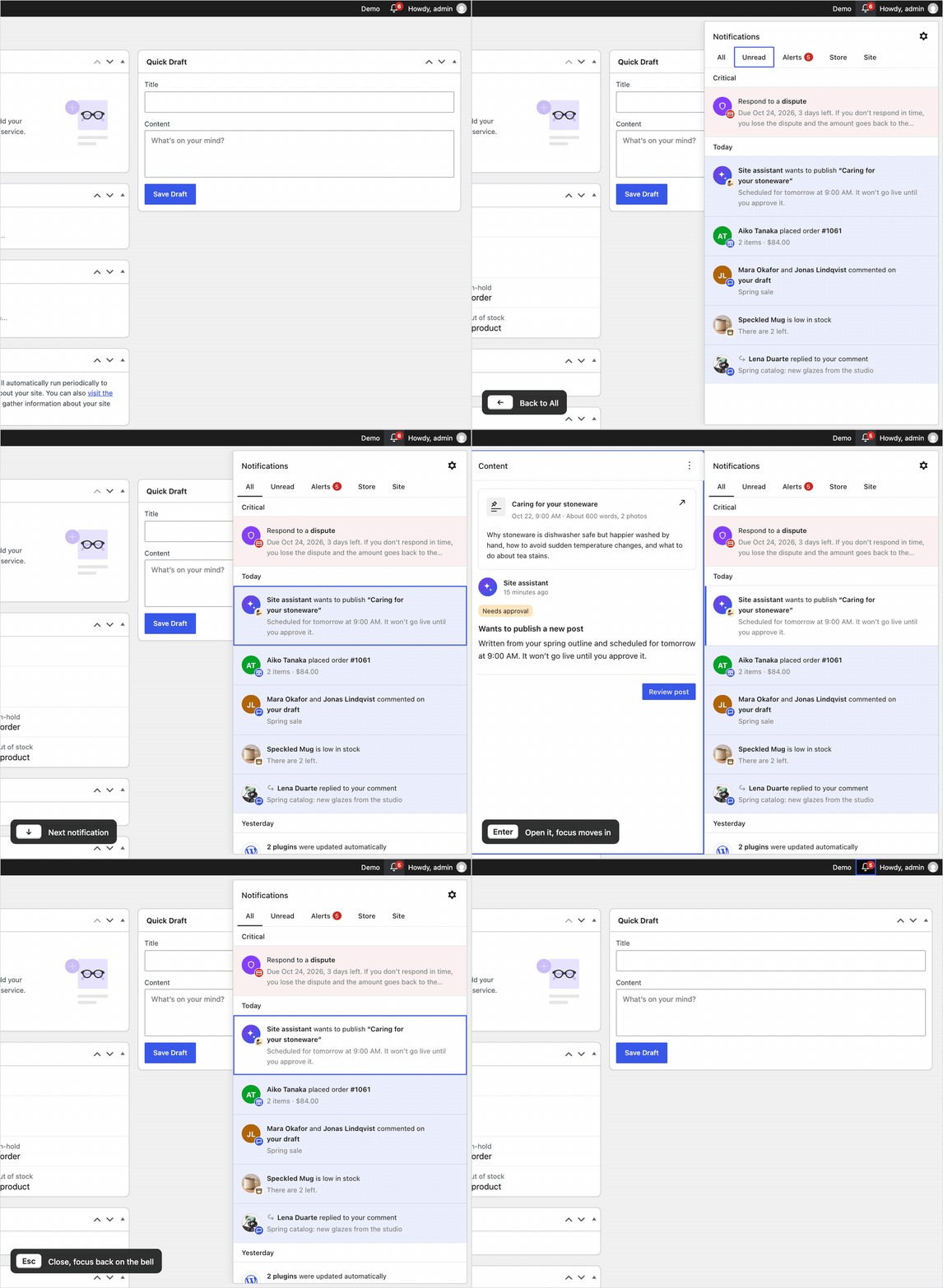
- Each notification opens to show what it’s about (an order, a post), who it’s from, and one clear next step.
- Real problems stay on top until they’re dealt with. Everything else stays out of the way.
The design is inspired by the WordPress.com notifications panel by Ollie Rozdarz and the WordPress.com notifications team, tested and refined with millions of people every day.

What this is, and isn’t
What this is: a new way to reach people. One notification tray, available not only on certain admin pages like today’s notices, but everywhere: every admin screen, inside the editor, and on the front of the site. Plugins that use it get their message across consistently, instead of resorting to bigger and bigger notices that push the page down. It comes with a design direction and a set of rules, so notifications look and behave the same whoever sends them.
What this isn’t: a breaking change. Existing plugins keep working, and no APIs or hooks In WordPress theme and development, hooks are functions that can be applied to an action or a Filter in WordPress. Actions are functions performed when a certain event occurs in WordPress. Filters allow you to modify certain functions. Arguments used to hook both filters and actions look the same. are being removed. Admin notices, custom ones included, will still work. They’re just not where notifications in WordPress are heading. It also isn’t finished, or all for 0.3.0.
A clearer system
This is the second version of the prototype. The first showed the idea. Early feedback asked how much is the system and how much is left to each plugin, so the second is about rules (what changed):
- Plugins send data, not layout. They pick one of four layouts and fill its fields: Standard, Object (with a card for what it’s about), Conversation and Group.
- Five separate dimensions, each changing something different. A dispute, for example, is a payment (type), critical (severity The seriousness of the ticket in the eyes of the reporter. Generally, severity is a judgment of how bad a bug is, while priority is its relationship to other bugs.), operational (intent) and unread (read state), with the sender’s status “Needs response”, later “Won”. Core Core is the set of software required to run WordPress. The Core Development Team builds WordPress. owns the values; plugins choose from them.
- Critical is rare and visible. It stays on top and turns the bell’s count red until it’s resolved, not just read.
- An Alerts tab gathers critical notifications and warnings in one place, with a count, so what needs attention is always one click away. Warnings wait there until they’re dealt with.
- Limits against noise. Repeats replace each other, many of the same become one, and tips and offers can all be turned off at once.
All of this is laid out in the catalog: System has the dimensions, layouts and rules, and Styles shows each part, from the badges and row states to the bell itself.

This version also adds a few smaller things people asked for. Density, in the ⚙ menu under Appearance, switches between comfortable and compact: one line per row, so busy sites see twice as many at once. Notifications can also be marked as unread from their ⋮ menu.

Open questions
These are open, and feedback on them is especially welcome.
Badges: one per type, or a few kinds?
Today each type of notification has its own small badge on the row: a speech bubble for comments, an order icon, a bar chart for stats. That’s what WordPress.com does, and it’s quick to scan. But the list grows every time a plugin brings something new, like bookings or form entries. The alternative is a few generic badges that never grow (message, reaction, activity, system, milestone, tip), with the specifics shown in the circle and the title instead. Which works better as more plugins join? Both are compared in the catalog.

Severity: are three values enough?
Severity decides what stands out. Critical is pinned at the top and turns the bell’s count red, warnings wait in the Alerts tab, and info is everything else. There’s no “success”: good news already shows in the status, like a dispute marked “Won”. Core’s docs suggest alert, warning and info, close to this. Are three values enough, and who decides which notifications are allowed to be critical?
Who did it and what it’s about: optional extras, or proper fields?
To show who did something (a customer’s name and picture) and what it’s about (a card for the order), a notification needs two pieces of data core doesn’t store today. They can go in core’s existing meta column, as actor and about, without changing the database. But that keeps them optional and loosely defined. Should they stay in meta, or become proper fields every plugin fills the same way?
Across channels: where should each event arrive?
The same event can reach someone in several ways: the bell, a count in the admin menu, an email, a push to their phone. A new order today does three of these, and could do four if Orders gets its own menu item with a count. Which events belong where, so each arrives once, in the right place? This needs a review of every event, not just the bell.
Unread: a tab, or a filter Filters are one of the two types of Hooks https://codex.wordpress.org/Plugin_API/Hooks. They provide a way for functions to modify data of other functions. They are the counterpart to Actions. Unlike Actions, filters are meant to work in an isolated manner, and should never have side effects such as affecting global variables and output.?
I’d keep a top-level Unread tab, even though it mixes read state in with the category The ‘category’ taxonomy lets you group posts / content together that share a common bond. Categories are pre-defined and broad ranging. tabs, because it’s what people most often want to see. For comparison, the demo also has Show only unread, a filter that works within any tab, so you can see what’s unread in Store, for example. To try it, open Demo in the admin bar › Unread › In the gear menu, then the bell’s ⚙ menu › Show only unread.

Settings: how do they scale?
People can mute notifications per channel, like WooCommerce › Orders, and turn off each plugin’s tips with one switch. With many plugins, each sending several kinds, that list gets long fast. How should settings stay manageable? This hasn’t been explored yet.
Accessibility Accessibility (commonly shortened to a11y) refers to the design of products, devices, services, or environments for people with disabilities. The concept of accessible design ensures both “direct access” (i.e. unassisted) and “indirect access” meaning compatibility with a person’s assistive technology (for example, computer screen readers). (https://en.wikipedia.org/wiki/Accessibility): does the keyboard work for you?
The keyboard follows the WordPress.com panel: arrows move through the list, Enter opens a notification and moves focus into it, Esc goes back to the same row, and Esc again closes the bell. Here’s a short GIF of it in action. Does it work well with screen readers and other assistive technology Assistive technology is an umbrella term that includes assistive, adaptive, and rehabilitative devices for people with disabilities and also includes the process used in selecting, locating, and using them. Assistive technology promotes greater independence by enabling people to perform tasks that they were formerly unable to accomplish, or had great difficulty accomplishing, by providing enhancements to, or changing methods of interacting with, the technology needed to accomplish such tasks.
https://en.wikipedia.org/wiki/Assistive_technology?
What’s next
- Collecting feedback, here and on issue #655.
- Stress-testing the system against other plugins. WooCommerce was the first deep test. Next, more plugins’ notices go through the same catalog, starting with Jetpack, to see how they fit and where the rules need to change.
- A first step in 0.3.0: shaping what core’s first hub can show, so it already moves in this direction.
When could this ship?
Not soon, and that’s fine. 0.3.0 comes first, as a feature plugin A plugin that was created with the intention of eventually being proposed for inclusion in WordPress Core. See Features as Plugins, and merging into core follows after it. Plugins can only adopt notifications once they’re in WordPress, and and moving over is up to each plugin, at its own pace. Jonathan’s weekly updates follow the plan. There’s time for feedback to shape this.
Feedback
Your feedback is welcome, whether you use WordPress, build plugins that send notifications today, or work on accessibility. Leave a comment on this post, or on issue #655, where the work continues. You can also find us in #feature-notifications on Slack Slack is a Collaborative Group Chat Platform https://slack.com/. The WordPress community has its own Slack Channel at https://make.wordpress.org/chat/.
Props @jameskoster for early feedback, @joen for guidance, and @keoshi for earlier explorations into notifications.