Most WordPress news aggregators look the same: a theme, a feed importer and a long scroll of headlines that link out to someone else’s article. Google sees thin pages and has little reason to send anyone.
I ran into exactly that with cryptoheadlines.com, and I rebuilt it around a single question: how is crypto doing, and why? The page answers it every morning in about five minutes.
I kept most of the old setup. WordPress still does the hardest, most boring part of a news site better than anything I’d write from scratch. A small app at the edge handles the rest.
This guide walks through the approach so you can adapt it to your own niche, using cryptoheadlines.com as the worked example.
Why a Standard WordPress Aggregator Hits a Ceiling
If you’ve read our guides to the best RSS aggregators for WordPress or browsed the best examples of content aggregator websites, you know the usual pattern. Feeds come in, posts go out, and the theme sorts them by date.
Sorting by date is where it breaks down. A theme has no idea that five outlets published headlines about the same event. It can’t tell you which story matters most, and it can’t build a page around a question. It just lists posts.
I wanted something closer to a morning briefing. That meant clustering, ranking and a design that wasn’t a blog loop, which is work WordPress themes weren’t built for.
What WordPress and WP RSS Aggregator Pro Still Do Best
The back end is plain WordPress on a managed WordPress host, with WP RSS Aggregator Pro doing the import. If you want the full rundown of the plugin, our WP RSS Aggregator review covers it.
For this build it handles everything that makes feeds painful:
- Adding, pausing and replacing feed sources from the admin
- Fetching on a schedule
- Parsing messy feeds
- Deduplicating items
- Storing every item with its source name, original URL and image
That admin screen matters more than it sounds. When a feed dies, anyone on your team can swap it in wp-admin. No code, no deploy. Behind that screen sit years of edge cases you don’t want to rebuild.
Let WordPress run the sources. Let the edge app run the page.
What the Edge App Adds
Here’s how the work splits between the two halves.
| Job | WordPress + WP RSS Aggregator Pro | Edge app (Cloudflare Worker) |
|---|---|---|
| Manage feed sources | Yes, from the admin | No |
| Fetch and parse feeds on a schedule | Yes | No |
| Deduplicate items | Yes | No |
| Keep source names, URLs and images | Yes | Reads them from WordPress |
| Group headlines about the same event | No | Yes |
| Rank stories | No | Yes |
| Sort into sections and tag sentiment | No | Yes, with AI |
| Write the market summary | No | Yes, with AI and guardrails |
| Serve the page at the edge | No | Yes |
The pattern is simple. WordPress owns the data. The Worker owns the experience.
Steps to Build Your Own
This is the order I’d follow if you’re starting today.
- Import your feeds with WP RSS Aggregator Pro. Add your sources, set the fetch schedule and let it store items with their source names, original URLs and images.
- Expose items through a small read-only REST endpoint. It hands new items to the front end in pages, using an “after this ID” cursor. The front end asks for everything after the last ID it saw, so it never re-reads old items.
- Put an edge app in front of the domain. I used a Cloudflare Worker written with Hono. Requests for wp-admin, wp-json and the other WordPress paths pass straight through, so the admin works as it always did.
- Sync on a schedule into the app’s own database. A cron trigger on the Worker runs every five minutes and pulls new items from WordPress into Cloudflare D1, which is SQLite.
- Cluster and rank. Group headlines about the same event into one story, then rank each story.
- Add AI only with code-enforced guardrails. More on this below, because AI output on a news page needs hard limits.
- Design the page around one question. Everything on the page should help answer it.
If you’re weighing whether this pattern suits your project, our piece on when and when not to use headless WordPress is a good checkpoint.
Setting Up the Edge App With Cloudflare Workers
Cloudflare Workers sit in front of the whole domain. Anything that isn’t the public page goes through to WordPress untouched.
I also dealt with the old site’s thin post URLs here. They return 410 Gone, which tells Google plainly that they won’t be back. The Worker then builds every page from its own D1 database, so WordPress does its feed work in the background on a schedule.
Clustering and Ranking Stories
When several outlets cover the same event, the Worker groups their headlines into one story and shows which outlet had it first.
Ranking uses two signals: how many outlets cover a story and how recently. A story covered by many outlets an hour ago beats one covered by a single outlet ten minutes ago. That’s the difference between a briefing and a feed.
Adding AI With Guardrails
I use Workers AI for two jobs. Each story goes into a section, such as markets, bitcoin, regulation or DeFi, using Llama 3.3 70B with few-shot examples. The same pass tags it bullish, bearish or neutral. I tested several models on hand-labeled headlines first, and Llama 3.3 had the best balance of accuracy, speed and reliability.
Once an hour, a second model (GLM 5.3) writes a short market summary and a “what’s happening” block. A summary that invents things is worse than none, so the rules are enforced in code, not just in the prompt:
- Every sentence cites a story with a numbered marker that links to the original article.
- Every number in a cited sentence must appear in the source data.
- No weekday names and no “yesterday”, “today” or “tomorrow”. Source stories come from different time zones, and an early draft told readers a Fed decision was “on Wednesday” after it had already happened.
- No “most-covered” or “top story” claims, which the model invented.
- Headlines are treated as data, never as instructions.
If a draft breaks a rule, the model gets the list of violations and one chance to rewrite. If it still fails, the previous commentary stays up. Anything older than six hours is hidden rather than shown next to live prices. For a deeper look at where AI fits in an aggregator business, see our article on turning a WordPress aggregator site into an AI product.
Designing the Page Around One Question
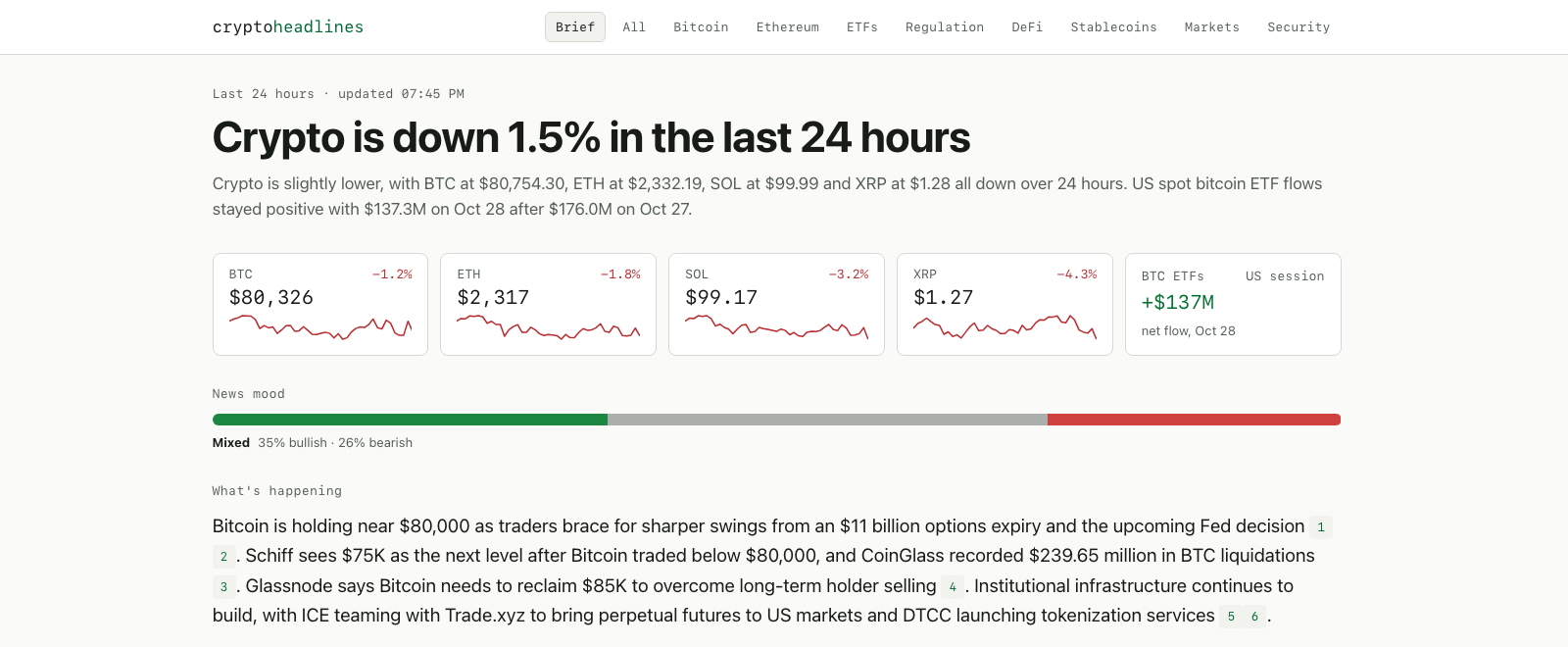
Readers in Europe and the US share the same page, so “today” means different things to each. The page covers a rolling last 24 hours and shows times in the reader’s local time. The Worker computes the homepage headline from the numbers: “Crypto is down 0.7% in the last 24 hours”.
Below it sit prices, the summary and a card for each section. Each card has its own mood bar, its one line of commentary and its top stories.
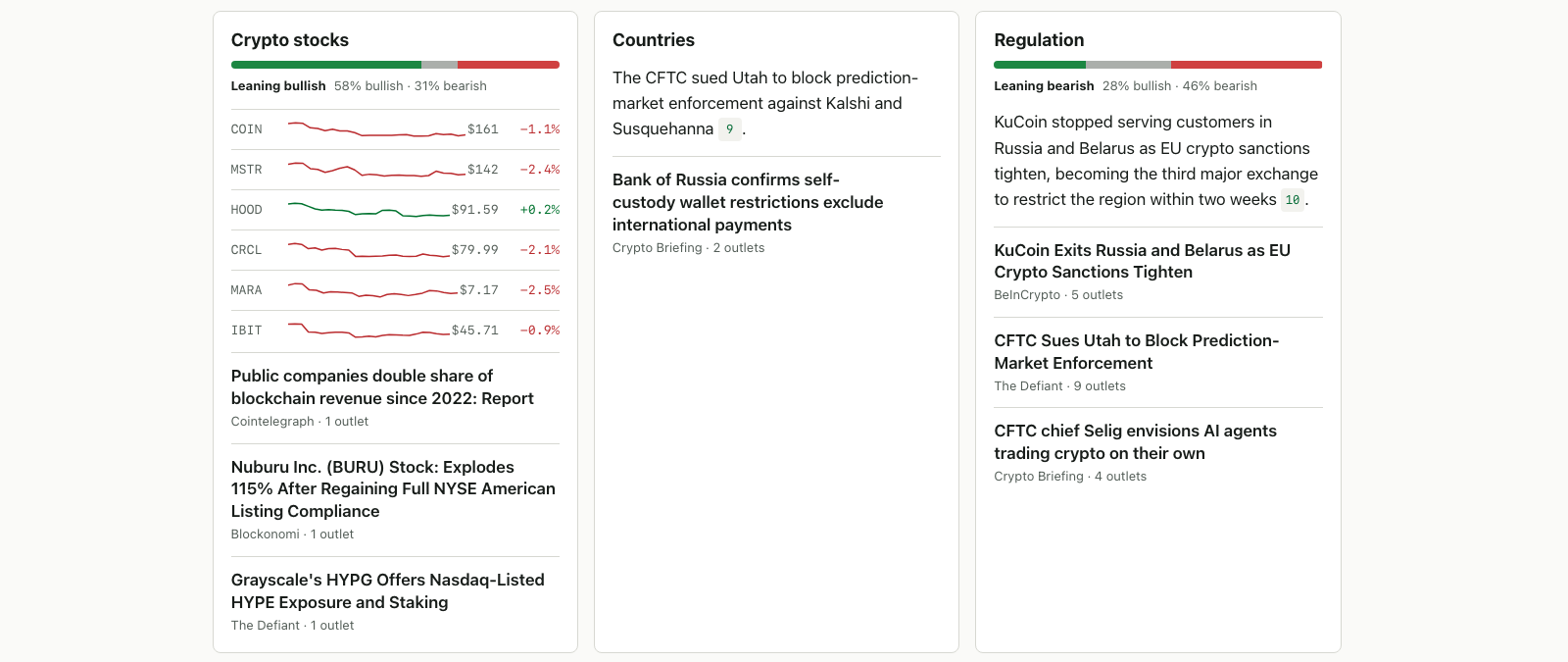
The mood bar is labeled “News mood” on purpose. It shows the share of bullish, bearish and neutral coverage, weighted by how many outlets cover each story. News can lean bullish while prices fall, and it often does, so calling it “market sentiment” would claim something the bar can’t know. It hides itself when there are too few stories to mean anything.
Prices for BTC, ETH, SOL and XRP come from Kraken’s free public API, with a 24-hour change and a 7-day sparkline. Stocks like Coinbase and BlackRock’s IBIT show change since the previous US close, because a 24-hour change on a stock is misleading over a weekend.
How I Built and Checked It
Claude Code agents wrote most of the code. I worked in phases, shipped each one to a staging URL and reviewed it there before it went live.
Before launch, a second AI model reviewed the code and found real bugs. An uncited claim could slip through validation, a holiday showed as a $0 ETF day and one section never got a card. All three were fixed before deploy.
Visual checks ran at phone, tablet and desktop widths in light and dark mode. I included a deliberately broken page as a control to prove the checks could fail.
Build Your Own and Tell Us What You’d Make
You can see the finished result at cryptoheadlines.com. The same recipe works for any niche with plenty of feeds: local news, an industry newsletter, a research digest, a deals tracker.
Start with the import layer. WP RSS Aggregator Pro gives you clean, deduplicated items with source names and URLs, and your edge app can pick them up from a REST endpoint and a cursor.
What would you build on top of an RSS import? Leave a comment below with your niche and the one question your page would answer.