Since the Internet and search engines were invented, site owners have been concerned about their SEO positions – to have their important links visible to people. Now, AI agents are the number one visitor to any webpage, so we should think not only about humans but AI search as well. That’s why llms.txt exists – brief information about your site and a guide for AI there.
AI is reducing website traffic from both directions. According to research by arXiv, ChatGPT Search access reduced traditional search queries by 9.4% on average, reaching 17% after 20 weeks; meanwhile, Google users clicked normal search results only 8% of the time when an AI Overview appeared, versus 15% without one – a roughly 47% lower click rate.
So now, we need to care about SEO (search engine optimization) and GEO (generative engine optimization). However, the ways they work are quite different, so the approach to optimization should differ.
llms.txt is usually presented as a tool for “AI SEO”: you add a file to your site, and ChatGPT or Perplexity will supposedly start citing you more often. That framing is mostly wrong, and it hides the part of the main idea and purpose of this tool.
LLMs are the way for websites to introduce a machine-oriented entry point to their most useful content. Unlike a Sitemap, which tells a crawler which URLs exist, llms.txt tells an agent which content it should probably read first if it wants to understand the site.
So the more useful question is not how to create the file, but who decides what a machine should know about your site, whether any AI system actually reads that decision, and whether we will still need such a file in a couple of years. In this article, I’ll look at what the specification says, how widely llms.txt is adopted and used in 2026, and how it fits into the WordPress ecosystem.
What Is llms.txt, and What Changed in V2?
llms.txt is a Markdown file that points AI agents to the most useful content on a website. It was proposed by Jeremy Howard, co-founder of Answer.AI and fast.ai, on September 3, 2024, and the second version of the proposal was published on August 10, 2026.
The format is deliberately minimal, and the only required element is the H1 heading. A complete file consists of the following parts, in this order:
- H1 – name of the site or project.
- Blockquote – a short summary with the key facts.
- Free text – any notes on how to interpret the content (no headings).
- H2 sections – lists of links in the form [name](url): description.
- Optional – by convention, secondary links an agent can skip.
This is a llms.txt example:
# BestForms

> WordPress form plugin with conditional logic, payments, and REST API.

Not compatible with BestForms 1.x. All code examples assume PHP 8.1+.

## Docs

- [Quick start](https://example.com/docs/start.md): Install and build a first form

- [Hooks reference](https://example.com/docs/hooks.md): All actions and filters

## Optional

- [Changelog](https://example.com/changelog.md)
The file itself is only half of the proposal. The other half is a clean Markdown version of every page it links to, available at the same URL with .md added (page.html.md or page.md). If an llms.txt file simply points to heavy HTML pages full of navigation and scripts, it loses most of its value.
What v2 changed
The v2 changelog is worth reading, because it reflects what the author learned from two years of real-world usage:
| Topic | v1 (2024) | v2 (August 2026) |
| Positioning | Help LLMs use a site | Help agents use a site |
| Location | Root, subpaths allowed but undefined | Any path; a file covers everything under it, and the most specific file wins |
| Markdown page URLs | page.html.md only | page.html.md or page.md |
| Discovery | Not covered | rel=”alternate” type=”text/markdown” and rel=”describedby” via or HTTP Link: header |
| How it’s consumed | Expanded into one context with llms_txt2ctx | Agents read or search the file, then follow links |
| “Optional” section | Told tools what to drop | Just a convention |
Thus, the direction of v2 is quite clear: the file is no longer positioned as a summary for chatbots, but as a navigation layer for agents that fetch pages on demand while they work on a task.
Pro tip
llms-full.txt, a single file containing the full text of all pages, is widespread, especially on documentation platforms, but it isn’t part of the specification. It’s a convention introduced by tool vendors.
llms.txt vs robots.txt vs sitemap.xml
llms.txt is often described as “robots.txt for AI,” but conceptually the two files are almost opposites. robots.txt tells crawlers which parts of a site they are not allowed to access, while llms.txt suggests which resources are worth reading if an AI agent wants to understand the site.
| robots.txt | sitemap.xml | llms.txt | |
| Question it answers | What may you crawl? | What URLs exist? | What should you read first? |
| Main consumer | Crawlers | Search engines | Agents at inference time |
| Selection | Rules, not content | Everything indexable | Curated subset |
| Format | Directives | XML | Markdown |
| Status | IETF standard (RFC 9309) | De facto standard since 2005 | Proposal, voluntary |
| Typical size | A few lines | Thousands of URLs | Should fit in AI context window (1–5,000 words ideal, 10,000 max) |
| Who decides what matters | Nobody; it’s access control – the admin writes what’s open for crawlers, and that’s it | Search engine | Publisher |
Pay attention to the last row, as it’s the most important difference: with a sitemap, the search engine still decides which pages matter, but with llms.txt, the site owner makes that decision and presents a curated interpretation of their own website.
llms.txt Adoption Statistics (2026)
And the super important question here is: does llms.txt really help you in GEO? Well, research by GeoAura shows that not really. As of now, its current role is better understood as an agent-access convention rather than an AI-search ranking signal.
However, the llms.txt is a new thing, just like the sitemap.xml file back in 2005. It also began as an optional mechanism designed to help search engines discover and process web content. Their eventual importance came from broad adoption, not simply from the existence of the format.
How many sites publish llms.txt
So, let’s look at llms.txt adoption by sites, as now, it’s what can show us a trend. As with CMS statistics, there is no single reliable number here, because every study uses a different sample and a different definition of “having” a file. I’ll use two sources that disclose their methodology: HTTP Archive data analyzed by Casey Burridge (June 2026) and a census of the top 100,000 domains by SEOmator (September 2026).
| Source | Date | Sample | Adoption |
| Burridge | |||
| HTTP Archive | Jul 2025 | Top 10,000 | 1.04% |
| HTTP Archive | Jun 2026 | Top 1,000 | 6.28% |
| HTTP Archive | Jun 2026 | Top 10,000 | 5.61% |
| HTTP Archive | Jun 2026 | Top 1,000,000 | 5.07% |
| SEOmator | |||
| SEOmator | Sep 2026 | Top 100,000 (all domains) | 8.6% |
| SEOmator | Sep 2026 | Top 100,000 (domains that responded) | 11.4% |
Adoption grew roughly five times in a year, but it is almost flat across rank tiers: the top 1,000 sites are only about one percentage point ahead of the top million. In other words, big brands with dedicated SEO teams aren’t adopting it noticeably faster than everyone else. HTTP Archive also showed the same 5.61% in May and June 2026, which was the first month without growth in its dataset.
llms.txt adoption by platforms and plugins
A large share of these files exists because a platform or a builder switched it on by default. According to SEOmator, at least 29.8% of all files carry a signature of the tool that generated them:
| Generator | Share of all llms.txt files found |
| Shopify | 18.2% |
| Yoast SEO | 5.4% |
| All in One SEO | 2.5% |
| Rank Math | 1.7% |
| Wix | 1.0% |
| HubSpot | 0.5% |
Shopify rolled out llms.txt, llms-full.txt, and agents.md to all stores in spring 2026 without asking merchants, which is why about 78% of Shopify sites in the top 10,000 have one.
For WordPress, the HTTP Archive figure is 8.7%, and it is more meaningful because someone actually had to install a plugin or write the file.
llms.txt quality and adoption
Having a file doesn’t mean having a useful one. SEOmator found that 95.1% of files start with the H1 as the spec requires, but 16.4% contain no links at all, which makes them useless as a map.
Among domains that also publish llms-full.txt, half serve a full file that is within 5% of the size of the regular one, so it’s basically the same file under two names. On top of that, 10,775 domains return an ordinary HTML page with a 200 status at /llms.txt, which is more than the number of sites with a real file, so any checker that only looks at the status code overestimates adoption more than twice.
Now, let’s see which domains adopt it most. The clearest split is by domain type. In the SEOmator census, .ai domains adopt llms.txt at 39.3% and .io at 24.9%, compared to 13.4% for .com and 5.5% for .net. The AI labs are also a good example: Anthropic, Perplexity, Mistral, and Cohere publish llms.txt on their documentation sites, while their main domains and client apps don’t have one.
Google and OpenAI place theirs in subpaths of their developer docs, which the v2 spec explicitly allows.
Pro tip
Some studies miss these files completely because they only check the root of a domain. A file at /docs/llms.txt or on a docs. subdomain counts as absent, so real adoption among large tech companies is higher than the headline numbers show.
Check this article to learn more about how different tools inspect websites.
Does anything read llms.txt?
Unfortunately, no major AI provider has documented that its search or answer engine uses llms.txt to decide what to cite, and Google’s John Mueller has said directly that Google doesn’t use it.
There is, however, support for llms.txt on the tooling side. Chrome Lighthouse now includes an llms.txt audit in its agentic browsing checks, and coding agents follow these files when they work with documentation. So, llms.txt is well supported by publishers and developer tools.
Which Sites Need llms.txt Best Practices Most?
If we put all the marketing promises aside, llms.txt addresses a real technical problem: an agent doesn’t need the whole website, and giving it the whole website is expensive for LLMs to crawl. Context windows have grown a lot since 2024, but they are still far smaller than most real sites (around 10,000 words max), and every token an agent spends on navigation menus, cookie banners, and outdated pages costs time, money, and accuracy.
Let’s take a documentation site for a WordPress plugin as an example. It may contain about 2,000 documentation pages, changelogs for every release, blog posts, support articles, an API reference, documentation for old major versions, and plenty of duplicated content. If an agent needs to write a hook for this plugin, only a dozen of those pages matter, and the rest is noise that can lead it to an outdated answer.
This is why I think llms.txt is better understood as an information architecture problem than a marketing one. The file forces you to answer a question most websites never ask: if someone needs to understand our product quickly, which 10 or 15 resources should they read, and in which order? Teams that answer this question well usually end up with better documentation for humans too.
It’s also worth noting what llms.txt doesn’t do: it doesn’t make content easier to parse on its own, as the Markdown versions of pages do that. It doesn’t help an AI system find your site in the first place, since the agent has to be on your domain already. Its value starts at the moment an agent has arrived and needs to decide where to go next.
I made this table to summarize my point:
| Site type | Assumed value of llms.txt | Why |
| API and developer docs | High | Coding agents already follow these files to find references |
| Plugin and SaaS product docs | High | Agents configure and extend products on users’ behalf |
| Knowledge bases, help centers | Medium | Useful if articles are current and well structured |
| eCommerce stores | Low to medium | Product data is better served via feeds and structured data |
| Blogs and media | Low | Content is mostly time-based; the list goes stale quickly |
| Marketing and brochure sites | Low | Little for an agent to act on |
What a Useful WordPress llms.txt Needs
A good implementation on WordPress has to solve several things that a simple “list all post types” setting doesn’t:
- Selection rules, not just post types. You need to include specific taxonomies, terms, or individual posts, and exclude the rest, because, let’s say, the “Docs” CPT may contain both current and deprecated articles.
- A written summary. The blockquote and notes section is where you explain what the product is, which versions are current, and what is not supported. No generator can write this well without input from someone who knows the product.
- Markdown versions of pages. Without them, the links lead agents back to themes, page builder wrappers, sliders, and scripts.
- Scoped files. The v2 spec allows /docs/llms.txt or a file per product, which is useful for multi-product sites and for separating documentation from marketing content.
- Dynamic data. On sites built with custom post types and custom fields, the most valuable knowledge often lives in structured data rather than in post content, so the generator has to understand those fields.
JetGEO Plugin to Automate Your llms.txt Generation Process
Once a company publishes an AI-oriented content index, it gets one more thing to maintain, and WordPress sites change constantly. Before publishing the file, it’s worth answering a few practical questions:
- Who owns the file: the SEO team, the documentation team, or the developers?
- How often should it be regenerated, and what triggers an update?
- What happens when documentation pages are renamed, merged, or deleted?
- Should old versions remain listed, or only the current one?
- Should multilingual sites publish one file per language?
- How do you detect broken or stale URLs in the file?
A stale llms.txt is arguably worse than none at all, because it actively sends agents to outdated information while looking like an official recommendation from the publisher.
The JetGEO plugin by Crocoblock solves many of these problems and automates the process, being an llms.txt generator as well. Instead of manually creating an llms.txt file, you can generate it with the help of the JetGEO plugin. Here are the main advantages:
- JetGEO creates a lms.txt template for you.
- All the important entities, like site URL, title, pages, posts, metadata, lists of particular posts, etc., are available as dynamic tags – they will be replaced by corresponding values in a physical file, but you don’t need to add them in the editor manually.
- AI assistant. You just need to describe the main features your site has, and it will write a more detailed description for you. You can adjust your prompts or edit the text manually at any time.
- You can generate your Markdown files and set up their structure using dynamic tags.
- Set up a file regeneration schedule: after post updates or hourly/twice daily/daily/weekly.
- You can see AI crawler logs and analytics.
- Edit robots.txt.
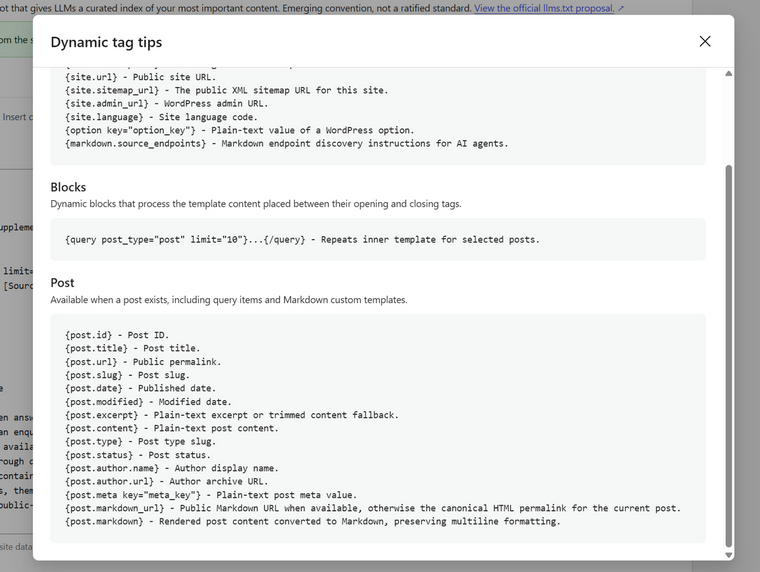
Thanks to its dynamic tags and control of Markdown files, you can generate everything in just a couple of minutes and then insert it into the llms.txt using the {query post_types=””}{/query} automatically, as well as update everything according to your set-up schedule. So, JetGEO is an all-in-one WordPress tool for your llms.txt file.
FAQ
llms.txt is a markdown file placed on a website that points AI agents to its most useful content. It was proposed by Jeremy Howard of Answer.AI in September 2024, and version 2 was published in August 2026. The only required element is an H1 heading, though a useful file also includes a short summary and curated lists of links.
Not directly. No major AI provider has confirmed using llms.txt to decide what to cite, and Google’s John Mueller has said Google doesn’t use it. It works better as a navigation aid for AI agents than as a ranking signal for GEO.
robots.txt tells crawlers which parts of a site they may not access, while llms.txt suggests which content is worth reading first. robots.txt is an access-control standard (RFC 9309), while llms.txt is a voluntary proposal. With llms.txt, the site owner, not the search engine, decides what matters most.
Usually at the root of the domain, for example, mysite.com/llms.txt. The v2 specification also allows files in subpaths such as /docs/llms.txt, where each file covers everything under its path and the most specific file wins. This is useful for multi-product sites or for separating documentation from marketing content.
llms.txt is a curated index of links, while llms-full.txt contains the full text of all pages in a single file. llms-full.txt is a convention introduced by tool vendors and isn’t part of the official specification. Many sites serve an llms-full.txt that is nearly identical to their regular file, which adds little value.
It depends on the site type. API docs, developer documentation, and plugin or SaaS product docs benefit most, because coding agents already follow these files. For blogs, media sites, and brochure sites, the value is low, since the content goes stale quickly or there’s little for an agent to act on.
You can write the file manually and upload it to your site’s root, or generate it with a plugin. Yoast SEO, All in One SEO, and Rank Math offer basic generation, while the JetGEO plugin by Crocoblock adds dynamic tags, Markdown page versions, AI-written summaries, and scheduled regeneration. Whatever tool you use, review the summary and selected links yourself.
In June 2026, HTTP Archive data showed about 5–6% adoption across the top million sites, roughly five times more than a year earlier. A September 2026 SEOmator census of the top 100,000 domains found 8.6%. Adoption is highest among .ai and .io domains, and much of it comes from platforms like Shopify that enable the file by default.
Takeaway
The real value of llms.txt is that it serves as a curated entry point that helps AI agents find the right content once they’re already on your site. That makes it most useful for documentation, API references, and product sites, and much less useful for blogs or marketing pages. A good file depends on careful selection, a clear written summary, and clean Markdown versions of the linked pages.
Since a stale llms.txt sends agents to outdated information, regular maintenance matters as much as the initial setup. Adoption is growing fast, so treating it as an information architecture task now prepares your site for an agent-driven web.