Key Takeaways
- Why Shopify Suspends Apps Under Review: When merchants hit the “This app is under review” OAuth blocker or your team receives a Shopify Partner Governance escalation, new installs are frozen until you pass a security review.
- Self-Authored Reports Are Rejected: Shopify Partner Governance explicitly rejects internal self-assessments and requires both a Forensic Incident Report (IR) and a full-scope Vulnerability Assessment and Penetration Test (VAPT) from an independent third-party security provider.
- Four High-Risk Surfaces to Patch First: Remediate unverified App Proxy and webhook HMAC signatures, storefront widget Stored XSS, cross-tenant API cache/rate-limit leaks, and
appSubscriptionCreateBilling API parameter tampering before requesting a rescan. - Test via a Partner Development Sandbox: Provision a dedicated
.myshopify.comsandbox store inside your Partner account with a 4-digit Collaborator code so pentesters can authenticate via Shopify App Bridge without hitting"Invalid shop or host"errors.
Seeing your Shopify app under review, or receiving an urgent Shopify app suspended notice from Partner Governance, immediately freezes new merchant installs. When merchants try to install your application and hit the this app is under review Shopify gate:
“This app is under review: needs to be reviewed by Shopify before it can be installed.”
or when your team receives a formal Shopify Partner Governance VAPT and Incident Report demand following a vulnerability disclosure or storefront script injection incident, every hour of delay impacts install velocity, merchant trust, and recurring revenue.
When you have a Shopify app under review for security reasons, replying with “we fixed the bug and deployed a patch” will not pass a Shopify app security review. Partner Governance requires verifiable evidence across two independent tracks before lifting an install freeze:
- An Independent Third-Party Forensic Incident Report (IR): (Self-authored internal post-mortems are rejected.) Root-cause analysis backed by 5 to 7 days of web server and reverse proxy access logs (Cloudflare, AWS ALB, Nginx), database blast-radius queries scoping every affected
.myshopify.comstore, and before/after remediation evidence following modern incident response practices. - An Independent Third-Party VAPT Report & Verification Certificate: Comprehensive Shopify app penetration testing from Astra Security or another reputable provider covering your embedded admin app, storefront widget, App Proxy routes, and backend APIs, followed by a verification rescan confirming zero open Critical, High, or Medium vulnerabilities.
This 4-step technical playbook walks through how to resolve a Shopify app under review suspension: scoping the blast radius for your Incident Report, patching the four vulnerability classes that trigger a Shopify app suspended enforcement action, configuring your embedded app so pentesters avoid "Invalid shop or host" errors, and packaging your Shopify Partner Governance VAPT artifacts for fast reinstatement.
Why Is Your Shopify App Under Review or Suspended? What Partner Governance Sends You
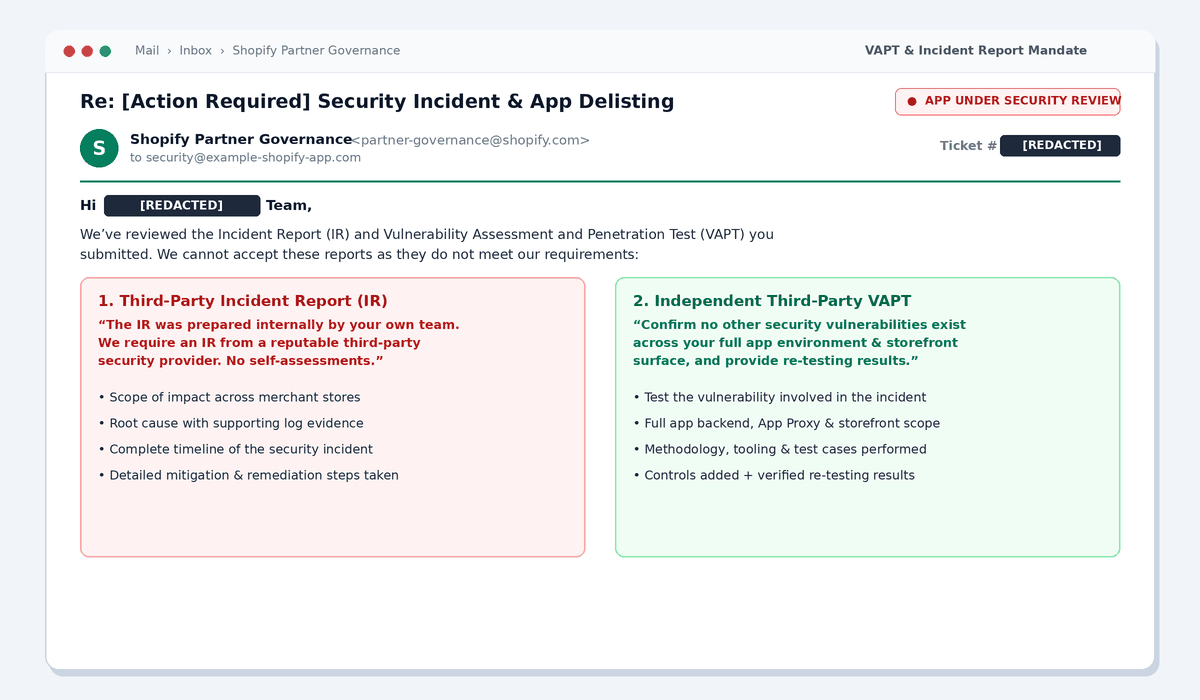
When a merchant sees the this app is under review Shopify banner on the OAuth install screen, the underlying enforcement requirements are never shown publicly. Instead, Shopify Partner Governance emails the Partner account owner directly under the Shopify App Store security and governance requirements, mandating both a third-party Incident Report (IR) and a third-party Vulnerability Assessment and Penetration Test (VAPT):
What Shopify Partner Governance Actually Sends You (Verbatim Email)
Verbatim Shopify Partner Governance Mandate:
“We require an Incident Report (IR) from a reputable third-party security provider that includes:
- Scope of impact
- Root cause of the security incident, with supporting evidence
- Timeline of the incident
- Detailed mitigation and remediation steps taken
We also require a Vulnerability Assessment and Penetration Test (VAPT) from a third-party security provider. The VAPT should confirm no other security vulnerabilities exist in your apps. Include evidence of each vulnerability and how it was tested. When you fix these issues, show what controls you added and provide re-testing results.”
Critical Pitfall (Why First Submissions Get Rejected): Many engineering teams with a Shopify app under review lose an extra one to two weeks of downtime because they write the Incident Report internally and commission a narrow, single-endpoint pentest without re-testing results. When that happens, Shopify Partner Governance replies with this explicit follow-up rejection email:
Verbatim Partner Governance Rejection of Self-Authored IR & Narrow VAPT:
“We’ve reviewed the Incident Report (IR) and Vulnerability Assessment and Penetration Test (VAPT) you submitted. We cannot accept these reports as they do not meet our requirements.Incident Report
The IR was prepared internally by your own team. We require an IR from a reputable third-party security provider. We cannot accept a self-assessment in its place.Vulnerability Assessment and Penetration Test
The VAPT has three issues that need to be addressed:
- It does not test the vulnerability involved in this incident.
- It does not include re-testing results.
- Its scope is too narrow to confirm no other vulnerabilities exist.
Here’s what you need to do
Engage a reputable third-party security provider to produce a complete IR that includes: Scope of impact, Root cause of the security incident with supporting evidence, Timeline of the incident, and Detailed mitigation and remediation steps taken.
Provide an expanded VAPT that covers: The authorization path that allowed the unauthorized write and the storefront page where that content was rendered; your full app environment and storefront surface (not only the test stores and single page covered in the submitted report); the testing methodology, tooling used, and test cases performed; and for each finding: the remediation applied, the date it was re-tested, and the result of that re-test.”
Shopify Partner Governance VAPT & Reinstatement Architecture
To get a Shopify app under review reinstated on the first submission, your engineering and security teams must execute both tracks (forensic log analysis and full-surface penetration testing with re-test verification) in parallel:

Step 1: Build the Forensic Incident Report for a Shopify App Security Review
When a storefront widget or multi-tenant API endpoint is abused and triggers a Shopify app under review lock, Partner Governance expects a data-backed timeline authored or validated by an independent security team, not guesswork. Specifically, reviewers look for:
- The exact entry vector (endpoint, HTTP method, payload structure, and source IPs/ASNs).
- A 5-to-7-day retrospective log audit showing all unauthorized
POST,PUT,PATCH, orDELETErequests against storefront or settings endpoints. - Database blast-radius scoping enumerating which
.myshopify.comdomains had records read or mutated (such as injectedtags, altered redirect URLs, or modified widget settings).
If you export JSON access logs from Cloudflare, AWS ALB, or Nginx during your Shopify app security review, run the following jq pipeline over the past 7 days of logs to isolate state-changing requests to widget or App Proxy routes where the Shopify HMAC signature was missing or forged:
# Scan 7 days of Nginx / Cloudflare JSON logs for suspicious mutations on widget/proxy endpoints
zcat /var/log/nginx/access-*.json.gz | jq -r '
  select(
    (.request_method == "POST" or .request_method == "PUT" or .request_method == "PATCH") and
    (.request_uri | test("/(api/widget|apps/proxy|api/settings|api/cache)"))
  ) |
  [.time_iso8601, .remote_addr, .http_x_forwarded_for, .request_method, .status, .request_uri, .http_user_agent] |
  @tsv
' | sort | uniq -c | sort -nr > /tmp/forensic_mutations_7d.tsv
1.2 Scoping Affected .myshopify.com Tenants in PostgreSQL
Next, audit your configuration and storefront widget tables for injected scripts, unexpected external domains, or unauthorized modifications during the incident window:
-- Identify merchant stores where widget settings or custom HTML/JS fields contain external scripts or recent mutations
SELECT
    s.id AS tenant_id,
    s.shop_domain,
    w.updated_at,
    w.custom_css_or_html,
    w.webhook_callback_url
FROM merchants s
JOIN widget_configurations w ON w.merchant_id = s.id
WHERE w.updated_at >= NOW() - INTERVAL '7 days'
  AND (
    w.custom_css_or_html ~* '(
Document the exact count of affected stores, reset any tampered configurations to known-good snapshots, rotate compromised API tokens, and capture timestamped terminal and database query outputs for your third-party Incident Report appendix.
Step 2: Fix the 4 Vulnerability Patterns Behind “This App Is Under Review” Shopify Suspensions
Across real-world Shopify Partner Governance VAPT assessments and emergency escalations where a Shopify app is under review, four architectural flaws, alongside common CORS misconfigurations and broken API security management, account for the vast majority of exploitable findings.
Vulnerability 1: App Proxy & Storefront Endpoint Tenant Spoofing (IDOR / BOLA)
Many Shopify apps expose storefront endpoints (either directly via CORS or through a Shopify App Proxy like https://merchant-store.myshopify.com/apps/loyalty-widget/...) that accept shop or merchant_id in the query string or JSON body. This is a textbook example of OWASP API1:2023 Broken Object Level Authorization (BOLA / IDOR).
The Vulnerable Pattern: If your backend trusts req.query.shop or req.body.shopDomain without following Shopify’s official App Proxy signature verification specification (signature query parameter using SHA-256 HMAC), anyone on the internet can spoof any .myshopify.com domain and overwrite another merchant’s storefront settings, immediately triggering a Shopify app suspended enforcement action.
// VULNERABLE: Trusts client-supplied shop parameter without verifying Shopify App Proxy signature
app.post("/api/proxy/widget-settings", async (req, res) => {
  const { shop } = req.query;
  const { bannerHtml, discountCode } = req.body;

  // Attacker passes ?shop=victim-store.myshopify.com and overwrites their live storefront widget!
  await db.widgetSettings.update({
    where: { shopDomain: shop },
    data: { bannerHtml, discountCode }
  });
  return res.json({ status: "updated" });
});
The Hardened Fix (Timing-Safe HMAC Verification + Role Separation):
- Never allow storefront or App Proxy routes to mutate merchant admin settings. Move all configuration writes behind embedded admin routes authenticated via Shopify App Bridge Session Tokens (JWT).
- On all App Proxy routes, verify the
signatureparameter usingcrypto.timingSafeEqualand derive the tenant strictly from the verifiedlogged_in_customer_idandshopparameters signed by Shopify:
// FIXED: Verifies Shopify App Proxy HMAC-SHA256 signature with timingSafeEqual
import crypto from "node:crypto";

export function verifyShopifyAppProxySignature(queryObj, appSecret) {
  const { signature, ...params } = queryObj;
  if (!signature || typeof signature !== "string") return false;

  // Sort keys alphabetically, join key=value without delimiters (arrays joined by comma)
  const sortedPayload = Object.keys(params)
    .sort()
    .map((key) => {
      const val = Array.isArray(params[key]) ? params[key].join(",") : params[key];
      return `${key}=${val ?? ""}`;
    })
    .join("");

  const computedHmac = crypto
    .createHmac("sha256", appSecret)
    .update(sortedPayload, "utf8")
    .digest("hex");

  const sigBuf = Buffer.from(signature, "utf8");
  const hmacBuf = Buffer.from(computedHmac, "utf8");
  if (sigBuf.length !== hmacBuf.length) return false;

  return crypto.timingSafeEqual(sigBuf, hmacBuf);
}
Verify with curl:
# Attempt to spoof a tenant with a forged signature (must return HTTP 401/403)
curl -i -X POST "https://api.example-shopify-app.com/api/proxy/widget-event?shop=merchant-store.myshopify.com×tamp=1793098000&signature=0000deadbeef0000" -H "Content-Type: application/json" -d '{"event":"impression"}'
# Expected: HTTP/1.1 401 Unauthorized {"error":"Invalid App Proxy HMAC signature"}
Vulnerability 2: Stored XSS / Script Injection in Storefront Widgets
When an app renders merchant-configurable labels, banners, or custom translations inside a Theme App Extension or storefront script without strict sanitization, a single compromised merchant session or IDOR flaw turns into a cross-storefront supply-chain attack (such as Magecart-style checkout skimming). That is the fastest way to land your Shopify app under review.
The Hardened Fix:
- Avoid
innerHTMLanddangerouslySetInnerHTMLin storefront Theme App Extensions; usetextContentfor all labels and dynamic text. - If limited HTML formatting is required, sanitize server-side before saving and at render time with
isomorphic-dompurifyusing an explicit allowlist that strips,,, and allon*event attributes:
// FIXED: Strict server-side sanitization before persisting widget configuration
import DOMPurify from "isomorphic-dompurify";

export function sanitizeWidgetMarkup(rawMarkup) {
  return DOMPurify.sanitize(rawMarkup, {
    ALLOWED_TAGS: ["b", "i", "em", "strong", "span", "p", "br"],
    ALLOWED_ATTR: ["class"],
    FORBID_TAGS: ["script", "style", "iframe", "object", "embed", "svg", "form"],
    FORBID_ATTR: ["onerror", "onload", "onclick", "onmouseover", "style"]
  });
}
Vulnerability 3: Unauthenticated Cache Invalidation & Missing Storefront Rate Limits
To keep storefront widgets fast, many Shopify apps cache widget JSON payloads in Redis or a CDN and expose a helper endpoint like POST /api/cache/purge?shop=merchant-store.myshopify.com or GET /api/widget/config?shop=... without rate limiting or graceful error handling for unrecognized domains.
- Unauthenticated cache flush lets attackers repeatedly evict Redis keys and force expensive database and Shopify GraphQL queries (Application-Layer DoS).
- Unhandled exceptions on unknown shopify_domain values return verbose
500 Internal Server Errorstack traces instead of a clean404 Store Not Found.
The Hardened Fix: Trigger Redis cache invalidation internally inside your authenticated admin update controller or verified Shopify webhook handler (never via a public unauthenticated endpoint) and enforce per-IP + per-shop rate limiting:
// FIXED: Clean 404 for unrecognized shop domains + strict domain regex validation
const SHOP_DOMAIN_REGEX = /^[a-z0-9][a-z0-9-]*\.myshopify\.com$/i;

app.get("/api/storefront/widget-config", storefrontRateLimiter, async (req, res) => {
  const shop = String(req.query.shop || "");
  if (!SHOP_DOMAIN_REGEX.test(shop)) {
    return res.status(400).json({ error: "Invalid shop domain format" });
  }

  const config = await getCachedWidgetConfig(shop);
  if (!config) {
    // Return clean 404 without stack trace or internal DB error leakage
    return res.status(404).json({ error: "Store not found or widget not active" });
  }

  return res.json(config);
});
Vulnerability 4: Shopify Billing API (appSubscriptionCreate) Parameter Tampering
During a Shopify Partner Governance VAPT, a critical business-logic vulnerability frequently appears in the subscription upgrade flow: the frontend passes planPrice, trialDays, interval, or test: true in the POST /api/billing/subscribe body, and the backend passes those values directly into Shopify’s appSubscriptionCreate GraphQL mutation. An attacker can subscribe to a $299/month Enterprise plan for $0.01 or activate a production subscription using test: true.
The Hardened Fix: Only accept a planKey (e.g., "growth_monthly") from the client. Look up the exact price, currency, interval, and trial days from an immutable server-side catalog, and derive test strictly from process.env.NODE_ENV:
// FIXED: Server-side plan catalog lookup prevents Billing API price/test tampering
const SERVER_PLAN_CATALOG = Object.freeze({
  starter_monthly: { name: "Starter Plan", amount: 29.0, currencyCode: "USD", interval: "EVERY_30_DAYS", trialDays: 7 },
  growth_monthly:  { name: "Growth Plan",  amount: 99.0, currencyCode: "USD", interval: "EVERY_30_DAYS", trialDays: 7 },
  scale_monthly:   { name: "Scale Plan",   amount: 299.0, currencyCode: "USD", interval: "EVERY_30_DAYS", trialDays: 14 }
});

app.post("/api/billing/create-subscription", requireSessionToken, async (req, res) => {
  const { planKey } = req.body;
  const plan = SERVER_PLAN_CATALOG[planKey];
  if (!plan) {
    return res.status(400).json({ error: "Invalid subscription plan key" });
  }

  // Derive shop strictly from the verified Shopify Session Token JWT
  const shopDomain = req.shopifySession.dest.replace(/^https:\/\//, "");
  const isTestCharge = process.env.NODE_ENV !== "production" || shopDomain === "dev-pentest-sandbox.myshopify.com";

  const variables = {
    name: plan.name,
    returnUrl: `https://app.example-shopify-app.com/billing/callback?shop=${encodeURIComponent(shopDomain)}`,
    trialDays: plan.trialDays,
    test: isTestCharge,
    lineItems: [
      {
        plan: {
          appRecurringPricingDetails: {
            price: { amount: plan.amount, currencyCode: plan.currencyCode },
            interval: plan.interval
          }
        }
      }
    ]
  };

  const response = await shopifyGraphqlClient.request(APP_SUBSCRIPTION_CREATE_MUTATION, variables);
  return res.json({ confirmationUrl: response.appSubscriptionCreate.confirmationUrl });
});
Step 3: Configure Your Embedded App for a Shopify Partner Governance VAPT Without “Invalid shop or host” Errors
One of the biggest delays when you have a Shopify app under review happens when the engineering team hands a direct backend URL (https://app.example-shopify-app.com/dashboard) to a security scanner or pentest team. Because embedded Shopify apps rely on Shopify OAuth + App Bridge (host base64 parameter + short-lived Session Token JWTs), hitting the backend URL directly with a legacy scanner immediately fails with:
HTTP/1.1 400 Bad Request: Invalid shop or host parameter
HTTP/1.1 403 Forbidden: Authentication failed
To run a complete, friction-free penetration test combining authenticated DAST and manual business-logic testing:
- Provision a Dedicated .myshopify.com Development Store: Create a clean sandbox store in your Shopify Partner Dashboard (e.g.,
dev-pentest-sandbox.myshopify.com) pre-populated with realistic test products, orders, and widget configurations. Note that when your Shopify app is under review, it can only be installed on development stores owned by the same Partner organization. - Share the Store URL + 4-Digit Collaborator Request Code: Give your pentest team the
.myshopify.comstore URL along with the 4-digit Collaborator Request Code (or staff test accounts at two privilege levels) so pentesters can authenticate throughadmin.shopify.comand test cross-tenant and cross-role authorization (IDOR/BOLA). - Allowlist All Microservice & Storefront Subdomains in Target Scope: As Partner Governance explicitly warns, a VAPT scoped to a single page will be rejected. Ensure your pentest scope covers your embedded admin host (
admin.example-shopify-app.com), storefront widget API (storefront-v3.example-shopify-app.com), and webhook/events worker (shopify-events.example-shopify-app.com). - Configure Headless Browser Login Recording or Session Token Refresh: For automated DAST crawls, use a custom Playwright/Puppeteer authentication flow that logs into the Shopify test store or exchanges a test session token so every API call carries a fresh
Authorization: Bearerheader.
Step 4: Pre-Submission Reinstatement Checklist for a Shopify App Under Review
Before replying to your Shopify Partner Governance ticket to lift a Shopify app under review restriction, verify that your submission package includes every artifact below:
- Third-Party Forensic Incident Report (IR): Prepared by an independent security provider (never self-authored), documenting scope of impact, root cause with log evidence, timeline, and remediation steps.
- 7-Day Access Log Forensic Summary: Exported table and summary of all anomalous
POST/PUT/PATCHrequests across Nginx, Cloudflare, or ALB logs with source IPs and timestamps. - Database Blast-Radius Attestation: SQL verification confirming the exact list of impacted
.myshopify.comstores and proof that any modified widget settings or injected scripts were rolled back. - App Proxy & Webhook HMAC Enforcement: All storefront proxy and webhook routes validate
X-Shopify-Hmac-Sha256or App Proxysignatureusingcrypto.timingSafeEqual. - Storefront XSS Sanitization & CSP: All dynamic widget fields sanitized with
DOMPurifyand locked down with a strictContent-Security-Policy. - Server-Side Billing API Enforcement:
appSubscriptionCreateignores client-supplied prices and flags and enforces server-side catalog values. - Independent Third-Party VAPT Full Report + Re-Testing Results: Full-scope penetration test report covering the incident vector, embedded app, and storefront surface, including dated re-testing results and a clean Verification Certificate confirming 0 open Critical/High/Medium vulnerabilities.
Need an Emergency Pentest & Verification Certificate for a Shopify App Under Review?
When you have a Shopify app under review or suspended by Partner Governance, waiting three weeks for a traditional consultancy to schedule a scoping call isn’t an option.
Astra Security works directly with Shopify app developers and high-growth merchants to pass Shopify app security review audits and unblock Partner Governance fast:
- Third-Party Forensic Incident Report (IR) + Full-Scope VAPT: We produce both independent artifacts mandated by Shopify Partner Governance, covering log forensics, blast-radius scoping, embedded admin APIs, App Proxies, and storefront widgets.
- Immediate Kickoff on .myshopify.com Partner Sandboxes: Our security engineers and authenticated DAST engine test directly through your Partner development store, App Bridge session tokens, and GraphQL Billing flows without getting blocked by
"Invalid shop or host"errors. - Rapid Re-Testing & Partner-Governance-Ready Certificate: Once you push a fix, trigger an immediate verification rescan to receive your updated VAPT Report, complete with dated re-test results and a verifiable Pentest Certificate formatted for Shopify Partner Governance.
FAQs
1. What does “This app is under review: needs to be reviewed by Shopify before it can be installed” mean?
When merchants see the this app is under review Shopify banner on the OAuth install screen, Shopify Partner Governance has frozen new installations. Existing merchants stay connected unless delisted, while new installs remain blocked until you submit a third-party Forensic Incident Report and VAPT audit.
2. Can our engineering team write our own Incident Report for Shopify Partner Governance?
No. Shopify Partner Governance explicitly rejects internal self-assessments and requires an Incident Report from a reputable third-party penetration testing provider. Both the Forensic Incident Report (IR) and the Vulnerability Assessment and Penetration Test (VAPT) must be authored and signed by an independent security firm.
3. What scope does Shopify require for a Partner Governance VAPT?
A Shopify Partner Governance VAPT must test the specific vulnerability exploited in the incident, cover your full application backend, embedded admin UI, App Proxy routes, and storefront widgets, document the testing methodology and test cases executed, and include dated re-testing results confirming remediation.
4. How can a third-party security provider test a Shopify app while it is “Under Review”?
While a Shopify app under review cannot be installed on external merchant stores, Shopify allows installation on development stores owned by the same Partner account. Provision a sandbox .myshopify.com development store and share staff credentials or a 4-digit Collaborator code with your pentesters.
5. How fast can Astra Security complete a Shopify VAPT and Incident Report for reinstatement?
For emergency Shopify app suspended escalations, Astra Security begins testing within hours of receiving Partner sandbox access, delivers the third-party Incident Report and full-scope VAPT findings, and runs immediate verification rescans after patching to issue your signed VAPT Report and Verification Certificate.