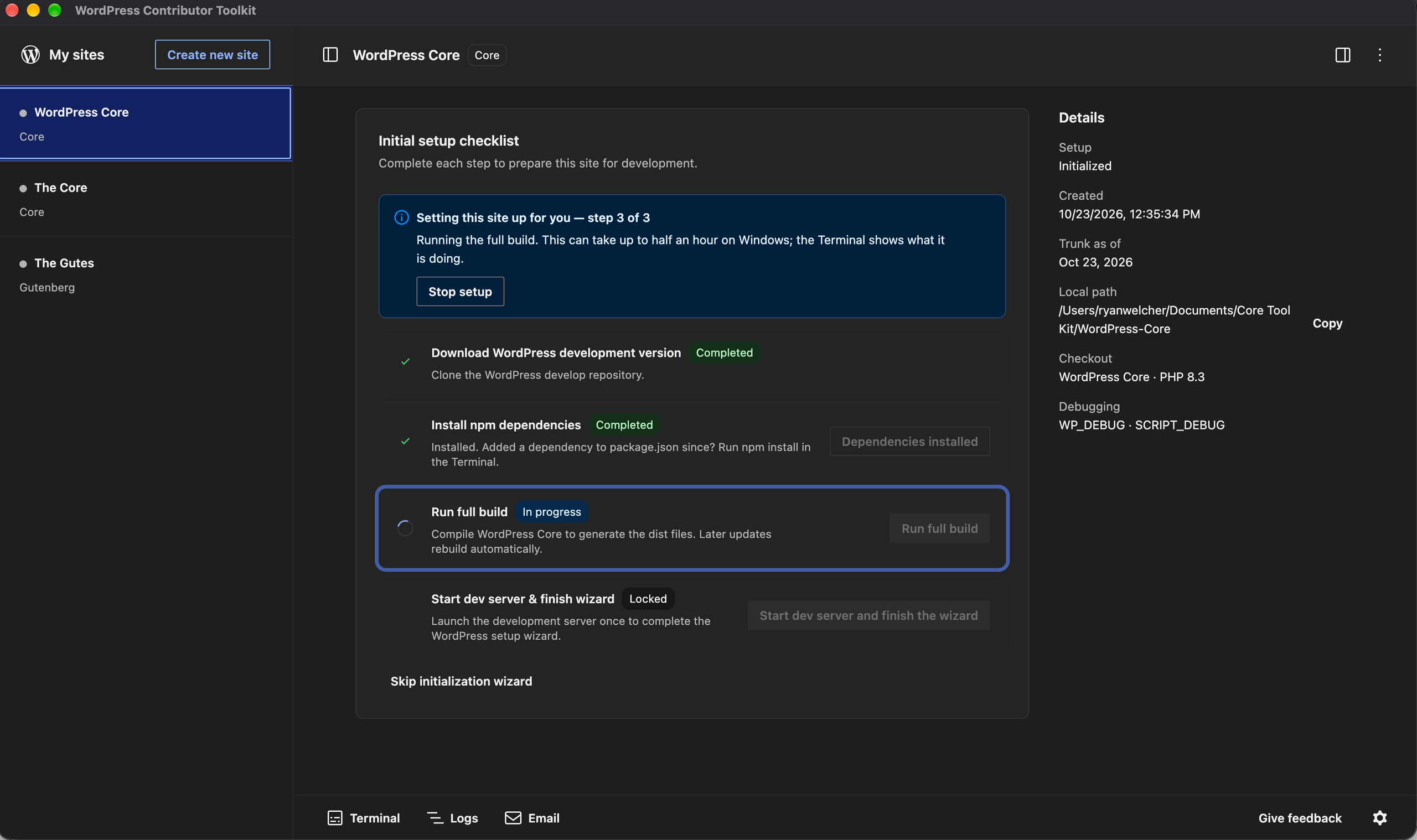
TL;DR: WordPress Contributor Toolkit v2.0.0 has been released with a new interface built on the WordPress Design System, a settings dialog, a dark theme, and translations into ten languages.
The WordPress Contributor Toolkit removes the points of friction first-time contributors face before they write a line of code, especially during Contributor Days. You do not have to install Git Git is a free and open source distributed version control system designed to handle everything from small to very large projects with speed and efficiency. Git is easy to learn and has a tiny footprint with lightning fast performance. Most modern plugin and theme development is being done with this version control system.
https://git-scm.com/, Node.js, npm, or Docker on your machine.
The app started by setting up a full WordPress Core development environment. Version 1.0 added the full Core contribution workflow, from reading a Trac An open source project by Edgewall Software that serves as a bug tracker and project management tool for WordPress. ticket Created for both bug reports and feature development on the bug tracker. to sending your fix back as a pull request or a patch A special text file that describes changes to code, by identifying the files and lines which are added, removed, and altered. It may also be referred to as a diff. A patch can be applied to a codebase for testing.. Version 1.2 added the same workflow for Gutenberg.
Now, version 2.0 brings a redesigned interface, available in ten languages. The Core Core is the set of software required to run WordPress. The Core Development Team builds WordPress. and Gutenberg The Gutenberg project is the new Editor Interface for WordPress. The editor improves the process and experience of creating new content, making writing rich content much simpler. It uses ‘blocks’ to add richness rather than shortcodes, custom HTML etc.
https://wordpress.org/gutenberg/ workflows work the same way as in 1.2.

A new look, built on the WordPress Design System
The whole window has been redesigned with the WordPress Design System: the sidebar A sidebar in WordPress is referred to a widget-ready area used by WordPress themes to display information that is not a part of the main content. It is not always a vertical column on the side. It can be a horizontal rectangle below or above the content area, footer, header, or any where in the theme., the page header The header of your site is typically the first thing people will experience. The masthead or header art located across the top of your page is part of the look and feel of your website. It can influence a visitor’s opinion about your content and you/ your organization’s brand. It may also look different on different screen sizes., the site details, the cards, the dialogs and the tray at the bottom. If you have used the block Block is the abstract term used to describe units of markup that, composed together, form the content or layout of a webpage using the WordPress editor. The idea combines concepts of what in the past may have achieved with shortcodes, custom HTML, and embed discovery into a single consistent API and user experience. editor, the buttons, notices and dialogs will look familiar.
A few smaller changes make the screen easier to read:
- The sites list shows each site’s server status beside its name, so you can see which sites are running without opening them.
- The footer’s tray buttons are labeled with their names, not only icons.
- The next-action cue is visible on warning notices, so the button that moves you forward stands out even when something needs your attention.
- The Trac window uses the app’s theme.
Settings in one place
Version 2.0 adds a settings dialog. Open it from the cog at the bottom right of the window, from Settings… in the app menu on macOS, or from the File menu on Windows and Linux.

The settings are in three groups:
- General. The theme, the language, whether a site’s server and build watch start when you open it, whether what was running at quit starts again next time, and a default folder for new sites.
- Sites. The PHP The web scripting language in which WordPress is primarily architected. WordPress requires PHP 7.4 or higher version every site’s development server runs on, and the WP_DEBUG and SCRIPT_DEBUG flags. A change applies the next time a server starts, and the site details show the values the next start will use.
- Account. Your WordPress.org The community site where WordPress code is created and shared by the users. This is where you can download the source code for WordPress core, plugins and themes as well as the central location for community conversations and organization. https://wordpress.org/ username and the event you are at, which go into a patch you hand to a mentor, and the GitHub GitHub is a website that offers online implementation of git repositories that can easily be shared, copied and modified by other developers. Public repositories are free to host, private repositories require a paid subscription. GitHub introduced the concept of the ‘pull request’ where code changes done in branches by contributors can be reviewed and discussed before being merged by the repository owner. https://github.com/ account the app opens pull requests with.
The theme can be light, dark, the same as your operating system, or custom: pick a background and a primary color, and the app builds every other color from them.
The app speaks your language
Every string in the interface is now translatable: the setup checklist, the trunk A directory in Subversion containing the latest development code in preparation for the next major release cycle. If you are running “trunk”, then you are on the latest revision. update, Review & submit changes, the pull request form and GitHub sign-in, the ticket and branch A directory in Subversion. WordPress uses branches to store the latest development code for each major release (3.9, 4.0, etc.). Branches are then updated with code for any minor releases of that branch. Sometimes, a major version of WordPress and its minor versions are collectively referred to as a “branch”, such as “the 4.0 branch”. notices, patch errors, the Terminal and Logs output, the mail dialog, the app menu, and the app’s own dialogs.
Version 2.0 ships in ten languages: Czech, Dutch, English (Canada), English (UK), Galician, Hungarian, Lao, Polish, Serbian and Turkish.
By default the app follows your operating system’s language. To choose another one, open Settings, pick a Language, and relaunch when the dialog offers to.

A language ships with the app once it is at least 80% translated on translate.wordpress.org, so the list grows with each release. If yours is not there yet, the Contributor Toolkit project on translate.wordpress.org is a good first contribution in itself.
See what changed, file by file
After you apply a patch or check out a pull request, the site’s details now list the Changed files as a tree of folders, in two groups:
- From the patch or From PR #N: the files the change itself touches. A pencil marks the ones you have edited since.
- Your changes: every other file you have changed on that ticket or issue.

Click a file to open it in your editor, inside the site’s folder. Each file you changed has a revert button that puts back just that file, so you can undo one experiment without losing the patch you are testing. Discard your changes now removes only your own work and leaves the applied patch or pull request in place.
Trac details that stay
When you click Read details from Trac, the app now keeps what it read. Quit and reopen it, and the ticket’s summary, status, type, component, milestone and keywords are still there, with the time they were read. A refresh button beside that line reads the ticket again when you want the latest.
The ticket card has also been reorganized: the ticket’s title leads, its facts are on labeled rows, and unsubmitted work on the ticket appears as a notice with Review and submit and Discard changes buttons.
A smaller download for Contributor Day Contributor Days are standalone days, frequently held before or after WordCamps but they can also happen at any time. They are events where people get together to work on various areas of https://make.wordpress.org/ There are many teams that people can participate in, each with a different focus. https://make.wordpress.org/support/handbook/getting-started/getting-started-at-a-contributor-day/
At a Contributor Day, everyone downloads the app at the same time, on the same network (versus site, blog). Version 2.0 is about 350 MB smaller once installed. It no longer ships PHP builds it never loads, libraries already bundled into the interface, or Chromium language files for languages the app has no translation The process (or result) of changing text, words, and display formatting to support another language. Also see localization, internationalization. for.
Other improvements
- Sites run as a local environment, so Application Passwords can be tested over HTTP HTTP is an acronym for Hyper Text Transfer Protocol. HTTP is the underlying protocol used by the World Wide Web and this protocol defines how messages are formatted and transmitted, and what actions Web servers and browsers should take in response to various commands..
- Adminer opens the right database when the site uses randomized SQLite storage or a custom DB_PATH.
- The debug.log pane no longer shows a line twice, or replays the whole file when you save it from an editor.
- The pull request preview no longer lists trunk’s files when the site’s trunk is behind.
- The main window can no longer be navigated away from the app or open other windows, and HTML HyperText Markup Language. The semantic scripting language primarily used for outputting content in web browsers. mail is shown in a separate frame.
The full list is in the v2.0.0 release notes.
Help shape the next version
Try it on a real ticket or issue, in your own language if the app includes it, and tell us how it went:
- Something broke? Open an issue with what you did and what happened.
- Something felt off? Use the feedback form, or the feedback button in the app.
- A string reads wrong in your language? Suggest a better one on translate.wordpress.org.
- Want to talk it through? Ask in #core, or #core-editor for the Gutenberg flow, or comment below.
Resources
Props to @greenshady for review and feedback.
+make.wordpress.org/playground/ +make.wordpress.org/test/ +make.wordpress.org/community/