A custom WordPress plugin is a PHP file (or a folder of files) stored in wp-content/plugins that adds or updates site functionality through hooks, without changing WordPress core. You may need one when existing plugins don’t quite do what you’re looking for, and a snippet in functions.php is something you don’t want to rely on.
In this guide, I’ll build a small plugin called Content Health Check. It flags posts with a missing featured image, no category, stale drafts, empty content, or fewer than 600 words.
WordPress is user-friendly, easy to manage, and can be enhanced with plugins. WooCommerce turns your website into an online store. Another popular plugin is Wordfence Security, which protects your website from hackers and malware.
With nearly 76,000 official plugins available, you can find plenty of ways to customize almost any WordPress website. If you have a more specific need and can’t find a plugin that does the job, you can always build your own.
How do WordPress Plugins Work?
To function, WordPress plugins mainly use Hooks. These are a way for one bit of code to interact with or modify another bit of code. There are two types of Hooks:
- Actions run your function when something happens, such as saving a post or loading the admin menu. They don’t return a value.
- Filters receive a value, change it, and must return it. For example, a filter can change a post title before it displays.
My plugin, Content Health Check, uses an action to add its page to the dashboard menu.
Plugins can also register shortcodes, widgets, and blocks. Shortcodes add functionality by placing a bit of code in the page or post editor. Widgets add features and content to your sidebar or footer. Hooks are the part every plugin needs.
Do You Need a Custom Plugin?
Before you write code, check whether something simpler solves the problem. Start by browsing thousands of plugins already available.
| Option | Best for | Limitation |
| Existing plugin | Common needs | Extra features and updates you don’t control |
| Code in functions.php | One-off tweak | Tied to the theme; a PHP error can take down the site |
| Must-use plugin (mu-plugins) | Code that must always run | No deactivation from the dashboard |
| Custom plugin | Unique logic you want to keep and move | You maintain it |
Pro tip
If plugin development feels overwhelming or you want to make sure it’s done right, consider working with Codeable experts. They specialize in custom WordPress development, including plugin creation, so you can describe your needs and get matched with a certified professional to build it for you.
How Do You Build a WordPress Plugin in 2026?
Before you start editing anything on your website, set up a testing environment or a staging site. You can then check changes with visual regression testing tools. One way to set up a local environment is the LocalWP app. Also turn on WP_DEBUG in wp-config.php so PHP errors show up while you work.
define( 'WP_DEBUG', true );Once you have done that, you can move on to the following steps.
Step 1: Define the problem and requirements
Write one sentence: who needs this plugin, and what can’t they do now? Then list the features. For this article, I’m building a plugin that checks content health and finds posts with:
- a missing featured image;
- no category assigned;
- drafts older than 30 days;
- empty content;
- content under 600 words.
When you run a blog, it’s helpful to make sure every post includes all the essentials, such as an excerpt or a featured image. If your blog has hundreds of posts (published years ago), checking each one manually can take a lot of time. A plugin that checks posts automatically can save you time and make the process much easier.
Step 2: Name your plugin
A good plugin name is unique, relevant to its function, and easy to remember. To make sure it’s unique, search Google and the WordPress plugin directory.
Two more things to keep in mind:
- You will use the plugin name for the plugin folder and the PHP file.
- Use a short prefix from the name for your functions to avoid naming collisions. For example, I use chc_ for Content Health Check.
My plugin has a simple name: Content Health Check.
Step 3: Create the folder and PHP file
Your plugin needs a home. Go to the wp-content/plugins folder and add a new folder with the name of your plugin. Separate individual words with hyphens.
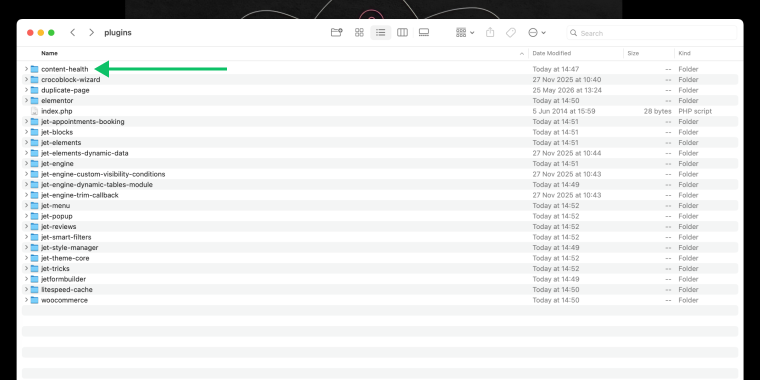
Then create a PHP file in this folder with the same name, like your-plugin-name.php. In my case, it’s content-health-check.php.
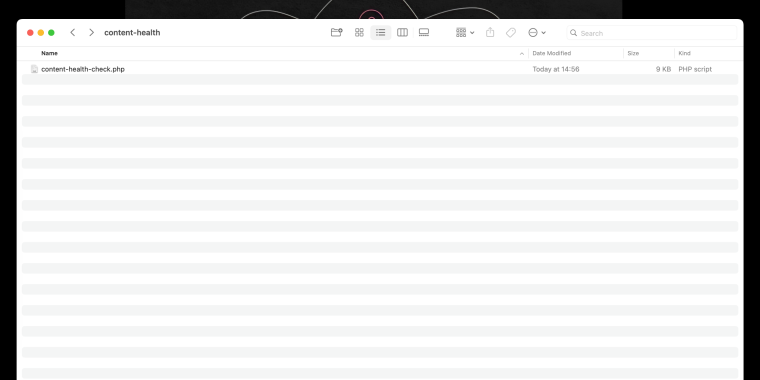
If your plugin is simple, it might have only that one PHP file. More complex plugins can have additional files for CSS, JavaScript, and languages.
The file header is a comment block that tells WordPress about your plugin. Add code like this at the top of the PHP file and replace the details with your own:
The last three lines stop anyone from opening the file directly in a browser.
NOTE:
Don’t add this header to more than one PHP file.
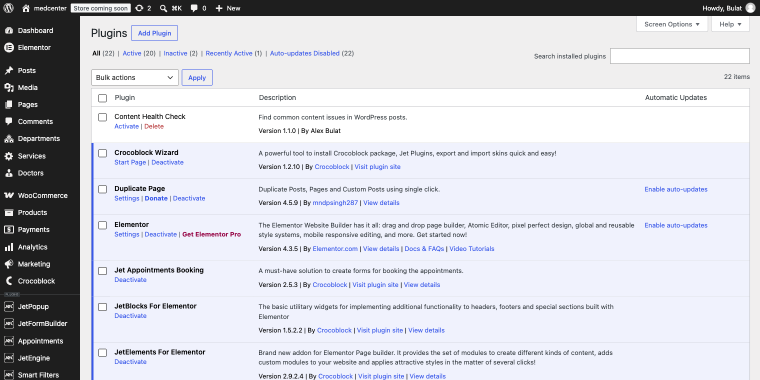
Save the file, and WordPress should detect your plugin. To check, go to WordPress Dashboard > Plugins, and you should see it listed:
Step 5: Add functions to the plugin
At this point, your plugin is listed but does nothing. You can write the code yourself using the Plugin Handbook and Plugin Basics, or ask an LLM for a first draft. I used ChatGPT.
Once the code was ready, I opened content-health-check.php in Sublime Text and pasted it in.
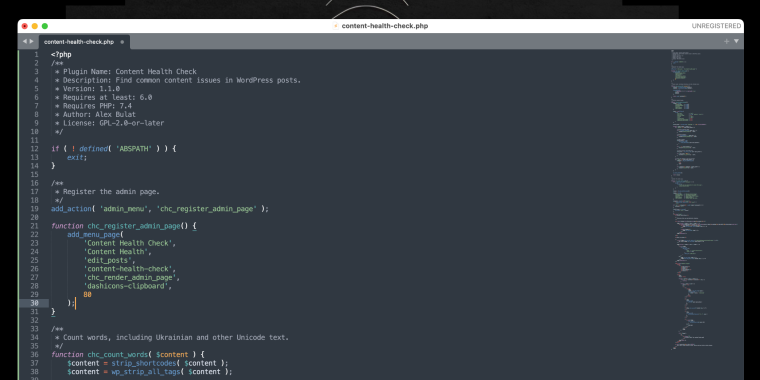
Don’t paste AI code into a live site without review.
When the code is in place, go to WordPress Dashboard > Plugins and click “Activate.” In my case, a new item called Content Health appears in the Dashboard sidebar. Clicking it opens the plugin interface, where I can see all the checks and a list of posts that may need attention.
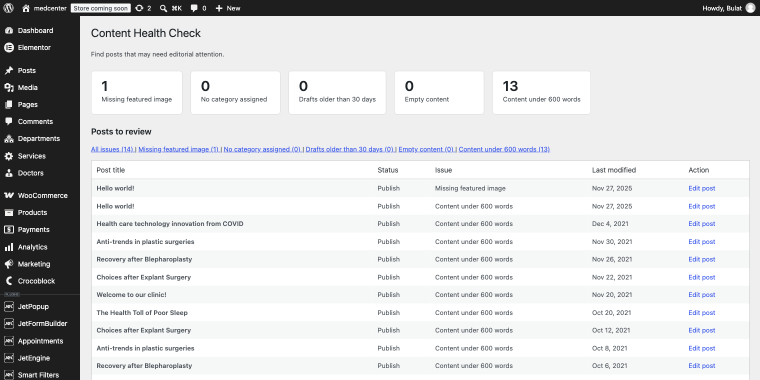
Here you can download and try the Content Health Check plugin on your setup.
How Do You Move a Plugin to Another Site?
If you built the plugin in wp-content/plugins on your local site, WordPress already sees it, so you can activate it right away. You need a .zip file only to move the plugin to another site, such as staging.
Compress the plugin folder, not its contents, so the archive contains content-health-check/content-health-check.php.
On Windows, right-click the folder and choose Send to > Compressed (zipped) folder. On macOS, right-click and choose Compress.
Then go to WordPress Dashboard > Plugins > Add New Plugin > Upload Plugin, choose the file, and click “Install Now,” then “Activate.”
What Should You Check Before You Ship a Plugin?
Run through this list before you share or publish your plugin:
/plugin-name
    plugin-name.php
    uninstall.php
    /languages
    /includes
    /admin
        /js
        /css
        /images
    /public
        /js
        /css
/images- Escape output and check permissions because this is the most common security gap, especially in AI-written code.
- Turn on WP_DEBUG and run Plugin Check to fix every error and warning before release.
- Add a Text Domain to make your plugin translatable.
- Plan the architecture. Conditional loading separates admin code from public code, and there are three main architecture patterns to choose from.
- Use a boilerplate for multiple plugins. A boilerplate starting point saves you from starting from scratch each time.
WordPress Plugin Development FAQs
Yes, for a first draft. You still need to read the code, test it on a staging site, and check security, or have someone who can actually understand PHP.
Not by default. Check capability checks, output escaping, input sanitizing, and nonces. Then run Plugin Check and test with WP_DEBUG on.
You can use functions.php, but it ties the code to that theme. If you switch or update the theme, you risk losing the code. A PHP error there can also break the whole site. A plugin keeps working when you change themes.
You need to know WordPress and have a good background in HTML, CSS, JavaScript, PHP, and SQL. For blocks, you also need JavaScript and React. The official documentation is the best place to learn: Plugin Handbook, Plugin Basics, and WordPress Coding Standards.
Not if you use it privately. If you share it publicly, it must follow the GNU General Public License v2 or later.
Not if you are only using it privately. However, if you want to share it publicly, it must adhere to the GNU General Public License v2 or later.
Deactivate it in the Plugins section of your dashboard, then delete it. If your plugin stores data, such as options or custom tables, add an uninstall.php file to clean it up on deletion.
WordPress Plugin Development: a Quick Recap
Plugins mainly work through hooks, which are either actions or filters. Before you build, check whether an existing plugin, a snippet, or a must-use plugin solves the problem.
The five steps for building a plugin are:
- Step 1: Define the problem first.
- Step 2: Name your plugin.
- Step 3: Create the folder and PHP file.
- Step 4: Add the file header.
- Step 5: Add functions to the plugin.
To use the plugin on another site, zip the folder and upload it. Whether you write the code or ask AI, review it before you ship it.
We hope this guide helps. If you have any questions, join the Crocoblock Discord community and start a discussion.