While optimizing a site with W3 Total Cache recently, we ran into the following issue:
A css file named https://domain.org/?code-snippets-css=1&ver=9 was render blocking, and causing a 150ms delay on mobile.
While this isn’t a huge problem, we still wanted to make sure we were being diligent.
Upon further investigation, we found that the user was using the the popular Code Snippets plugin (900,000+ active installs) and adding multiple CSS snippets. What that plugin was doing was combining all the snippets into 1 css file and then loading them via that /?code-snippets-css=1 url.
Solutions
There are many different solutions to this render blocking css. We’ll cover just a few below:
Solution #1 – Add your custom css via the Customizer
We were not dealing with a lot of css code, so this case we took the easy route and just added the css code to the customizer.
Solution #2 – Add a php snippet
Instead of using the “css” snippet, add a “php” snippet in the following manner:
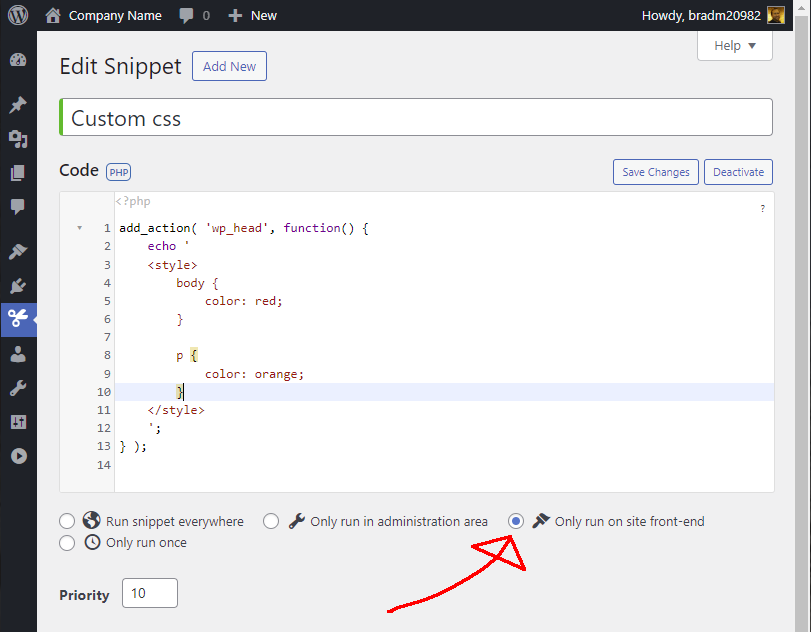
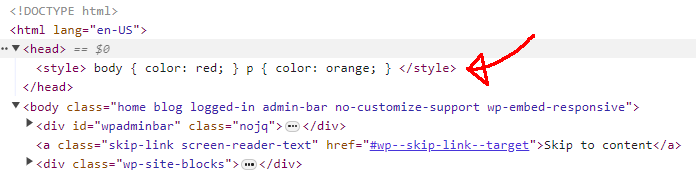
After you save and activate the snippet, the style will be added within the tag, and will no longer be render blocking.