At the end of 2025, we surveyed 382 WordPress professionals over eight weeks, recruited through Facebook communities, email, and paid social ads. The questionnaire had 115 questions covering work context, tech stack, tasks and goals, challenges, and decision factors, and it produced 517 open-ended answers that we use to illustrate patterns.
As a result, we see that WordPress professionals have moved well past brochure sites: 61% of the 382 people we surveyed build eCommerce, and more than 40% build membership or booking projects. This report shows how they do it – which stacks they combine, how they deploy, where they use AI, what they expect from their tools, and where the work still hurts.
About 86% of respondents are Crocoblock customers. The results describe an experienced, dynamic-site-focused slice of the community, not the WordPress market as a whole. Percentages are shares of all respondents and many questions allowed several answers, so totals in charts can exceed 100%.
Roles, Experience, and WordPress Share
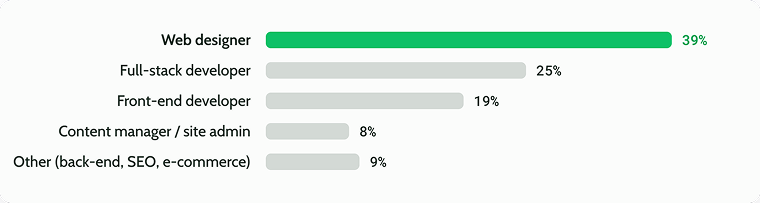
About 83% of respondents build sites hands-on, combining design and development. Designers and developers are both strongly represented; however, many of those who deliver websites from start to finish identify themselves as designers, not developers.
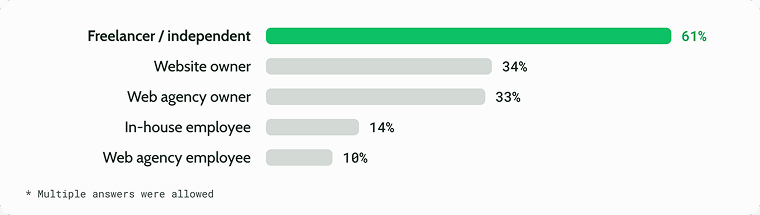
Most respondents are their own decision makers. Freelancers need fast solutions and buy for themselves; agency owners think in standards, repeatability, and multi-site use; site owners care more about business outcomes than technical details. In-house and agency employees influence choices but less often sign off on them.
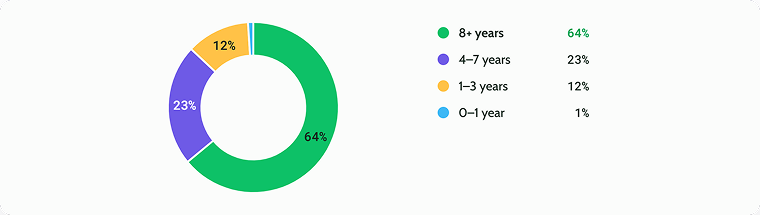
This is an experienced audience: 87% have worked with WordPress for four years or more, and 64% for eight years or more.
3 Ways Professionals Build WordPress Sites
Statistical grouping of the answers revealed three distinct working patterns. They differ less in raw skill than in role, stack, project mix, needs, and how decisions get made, so read them as working patterns, not as levels.
| Pattern | Share of respondents | How they describe their work | Typical stack and projects |
| Practical | 53% | “I tend to build reliable client sites quickly in a familiar stack, mostly with a builder.” | Page builder at the core, little custom code, business sites and simpler stores |
| Growth-Focused | 32% | “I combine design and development, try new tools, and want to take on more complex projects.” | Design + development hybrids, the widest mix of builders and dynamic tools, eCommerce, membership, booking, landing pages |
| Technical-First | 15% | “I tend to build custom systems and work with code, architecture and integrations.” | Custom PHP, block editor, Git, staging, VPS, complex integrations and large stores |
Practical site creators value a predictable process, fast delivery, compatibility, documentation, and support. Their friction starts where a project leaves familiar builder scenarios, such as custom logic, data architecture, integrations, or debugging. Most are freelancers or site owners, and 69% say design is not their focus.
Growth-Focused creators are designers and hybrids who keep taking on more complex projects. Forty percent start projects in Figma; they lead in landing pages (77%) and eСommerce (71%). They also report the greatest difficulties with development and maintenance, potentially because their projects involve a wider variety of requirements and less repeatable workflows.
Technically-Focused WordPress developers pick tools to fit the project rather than the reverse. Half of them identify themselves as full-stack developers and own an agency. For them, control, performance, architectural flexibility, testability, and production impact decide whether a tool is used at all; half never use ready-made templates.
Tech Stack and Development Approaches
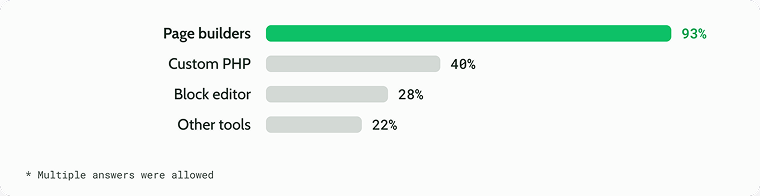
Page builders are the shared base of almost every workflow; what separates the three patterns is how much custom development and tooling is on top. About 40% of respondents use a single development approach, and about 70% use no more than two.
The skill base follows the same shape. Three in four respondents work confidently with HTML and CSS, about half with PHP and design tools, and roughly a third with SQL, REST API, or other ways to find custom solutions.
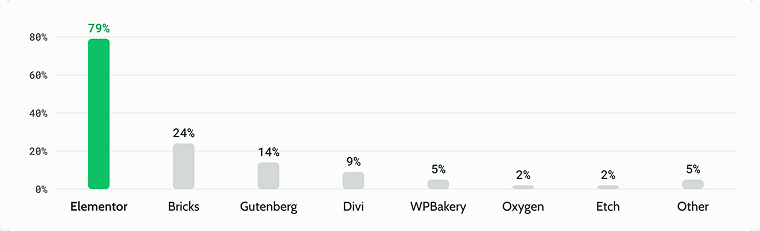
Builders such as Elementor, Bricks, Block Editor, and Divi all appear in the sample, and Growth-Focused web creators use the widest mix of them.
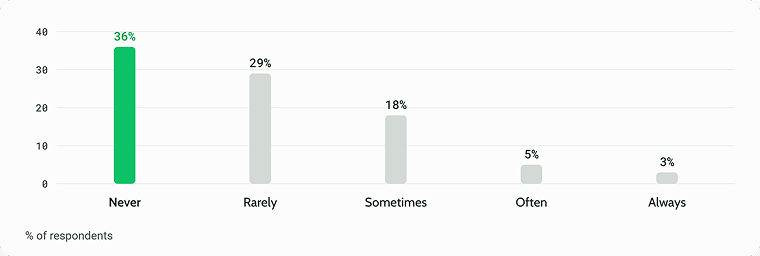
Ready-made templates play only a small role in professional work. About two-thirds of respondents never or rarely use them, and fewer than 1 in 10 rely on them often or always. Most prefer to build from scratch, which fits the picture of an audience that values flexibility and control over quick, prebuilt solutions.
Hosting, Deployment, and DevOps Maturity
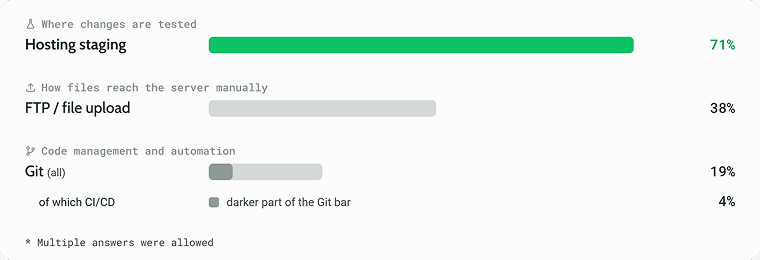
According to the survey, staging has become a standard tool: 71% of respondents test changes in a hosting staging environment before going live.
Manual file uploads remain common at 38%. Code management is where maturity drops off. Only 19% use Git, and just 4% have automated CI/CD pipelines built on top of it.
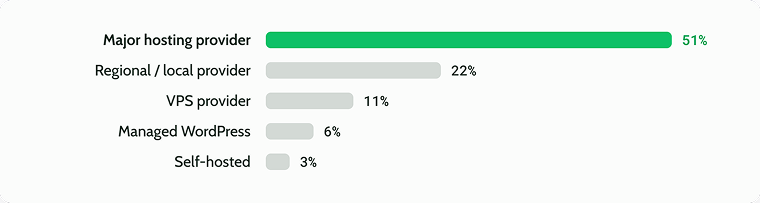
Hosting choices follow the same logic. Large mainstream providers are the most common choice:
When choosing a hosting provider, everyone starts with performance, security, and predictable cost.

WordPress Project Types
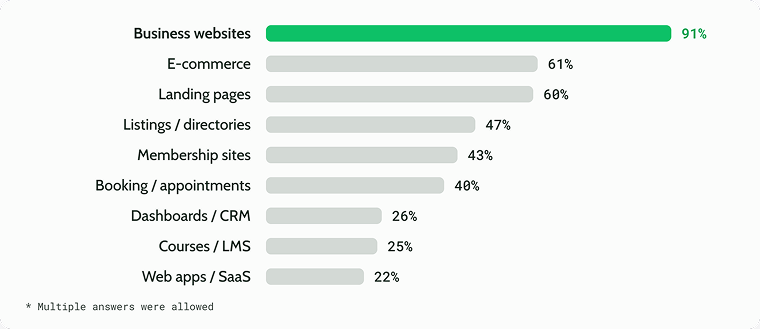
Almost everyone builds business websites, but their work typically extends beyond that: 40-61% of respondents also build eCommerce sites, directories, membership sites, and booking websites.
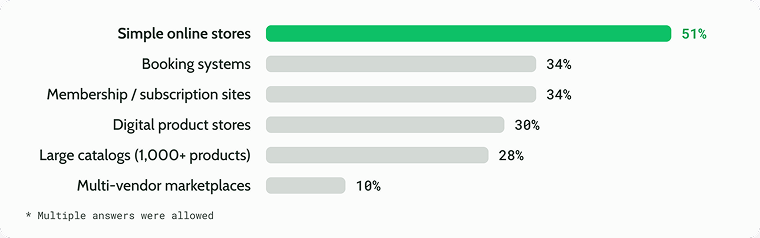
eCommerce projects range from a few products to large systems. Simple online stores lead at 51%, but bookings, memberships, and digital products (30-34% each) show that WordPress commerce is as much about services and recurring revenue as about shipping goods.
Large catalogs (28%) and marketplaces (10%) are less common but far from rare.
What Professionals Expect From Their WordPress Stack
Professionals judge WordPress tools first as infrastructure. Reliability, regular updates, performance, compatibility, scalability, and security all rate above 4.6 out of 5 – without them, trust and scaling are not possible, whatever else a tool offers.
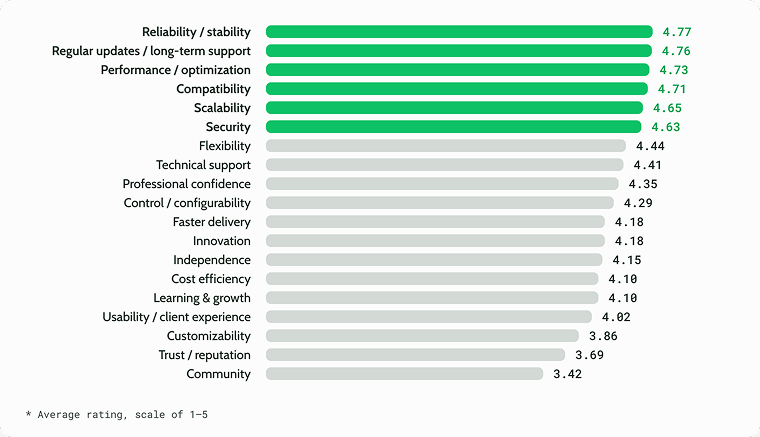
A second tier that includes flexibility, support, professional confidence, control, and speed of delivery matters a lot but rarely decides on its own. Community and reputation rank lowest; they work more as signals of maturity than as reasons to choose a tool.
Pain Points: Dynamic Logic, eCommerce, and Maintenance
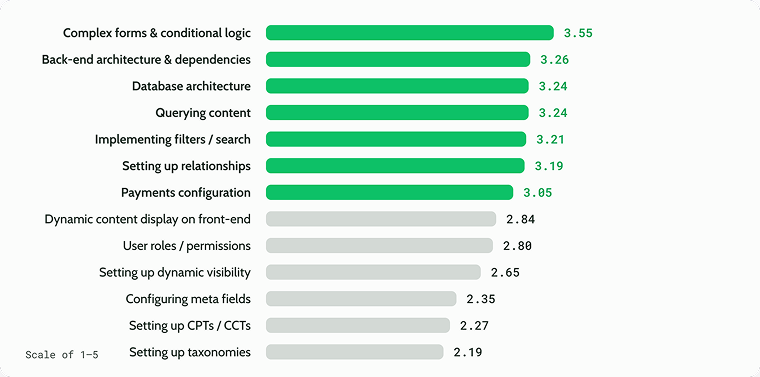
The hardest part of dynamic WordPress work is logic and architecture, not creating entities. Complex forms and conditional logic top the list at 3.55.
Close behind, all between 3.19 and 3.26, come back-end architecture and dependencies, database architecture, querying content, filters and search, and setting up relationships.
At the other end, the basic building blocks are rated the easiest: meta fields, custom post types, and taxonomies all score below 2.4. Middle-ground tasks such as dynamic content display, user roles, and conditional visibility sit between the two, at around 2.7-2.8.
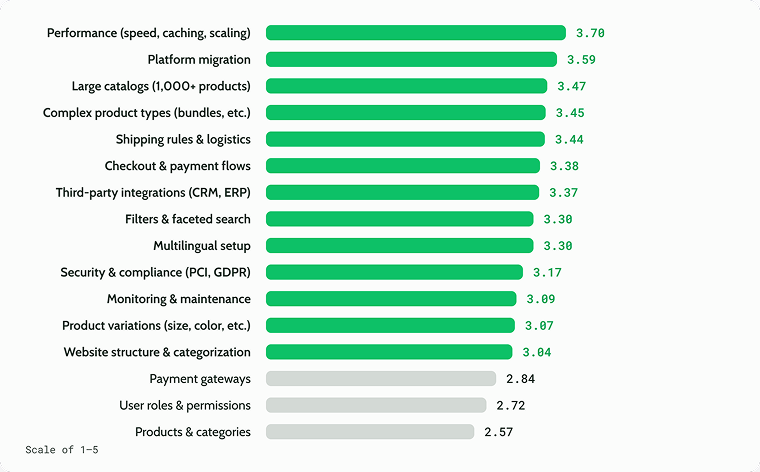
eCommerce is challenging almost across the board: 13 of 16 tasks are rated above 3. Performance (speed, caching, and scaling) is the biggest pain at 3.70, followed by platform migration (3.59).
Next comes a tight cluster of scale and complexity issues, all between 3.37 and 3.47: large catalogs, complex product types, shipping rules, checkout flows, and third-party integrations with CRM, ERP, or email tools. Only the basics, such as setting up products and categories, user roles, and payment gateways, are rated as relatively manageable.
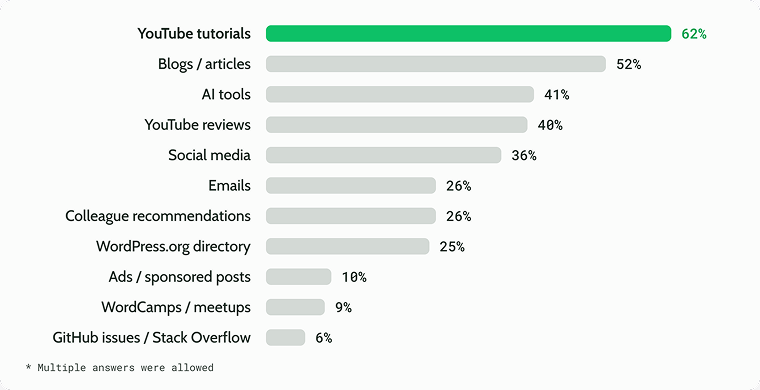
Video tutorials and written content are the main way professionals find new tools, and AI assistants have become a mainstream discovery channel as well. Paid ads reach only 1 respondent in 10.
When it comes to choosing new tools, the strongest factors are about risk: will the tool conflict with my theme and plugins, will it keep being updated, and can I rely on its documentation?
Documentation is read less as a reference than as a guarantee that results can be reproduced quickly, which was an interesting discovery for us.

Beyond risk, the decision comes down to cost and confidence. A lifetime license and positive reviews weigh almost as heavily as documentation, and free versions, tutorials, and demos help people get started quickly.
Hands-on checks like security reviews, staging tests, and performance audits matter to a smaller share (also, quite surprising).
Engineering signals such as inspecting the code or GitHub activity rank lowest: most users judge a tool by how it works for them, not by how it’s built.
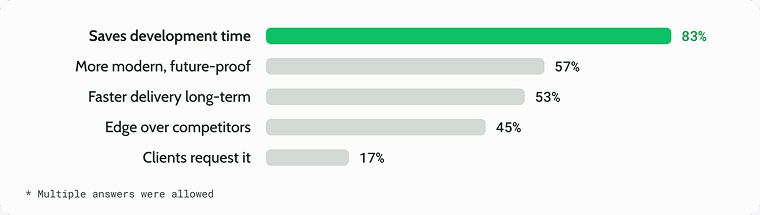
Time is the deciding currency. Saving development time is the leading reason to adopt a new tool in every group, and it matters most to Technical WordPress Builders. Growth-Focused web creators are the most competitive: 55% would switch to gain an edge over competitors.
The barriers are mostly about inertia and risk rather than any single objection. Nearly two-thirds of respondents say there is no better alternative or that they are used to their current tools.
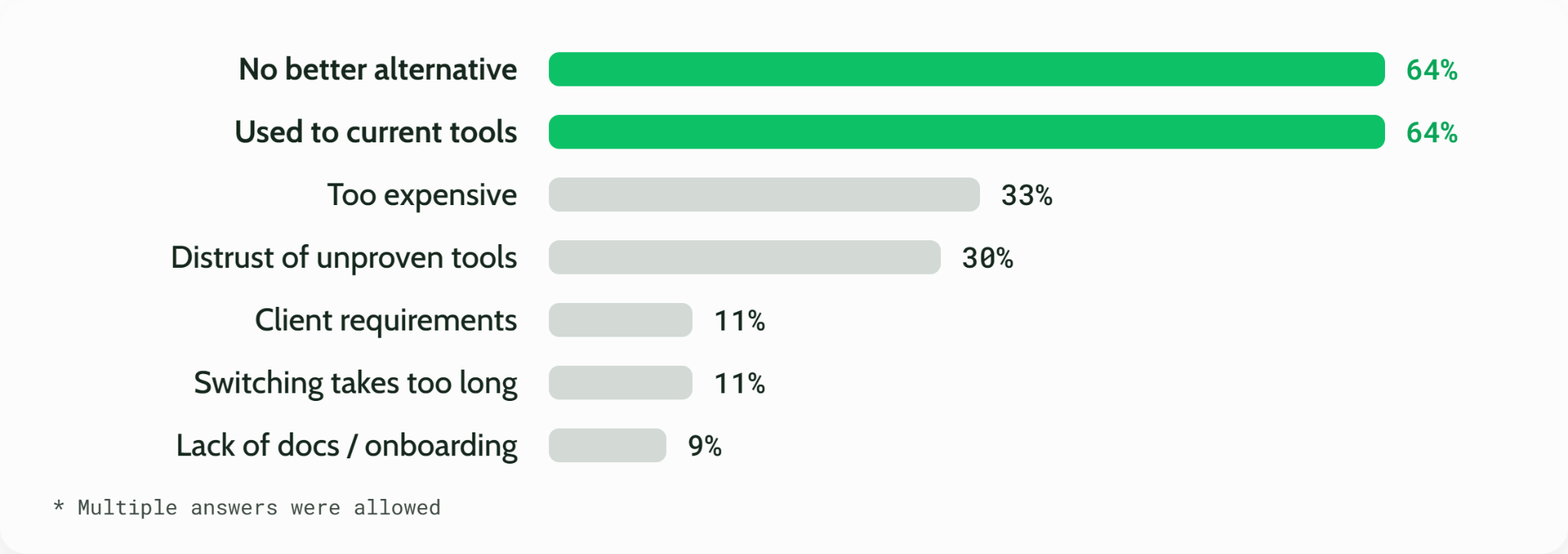
Cost and trust are the next obstacles: a third find new tools too expensive, and nearly as many distrust unproven ones. Practical concerns matter far less, with client requirements, migration time, and missing documentation each cited by only about 1 in 10.
In other words, the main competitor isn’t another product but the status quo. For tool makers, the lesson is that a better product isn’t enough: it has to be clearly better, and switching has to feel safe and worth the effort.
Why WordPress Developers Choose Crocoblock
And the final section is particularly about Crocoblock plugins. We asked respondents to rate (from 1 to 5) how much they agree with the following statements:
- When I’m working on a project, I want…
- Using Crocoblock helps me…
Both used the same list of outcomes, such as delivering projects faster, handling more complex requirements, offering clients new features, and controlling which features are active. Comparing the two answers shows where Crocoblock lives up to what developers expect from their tools.
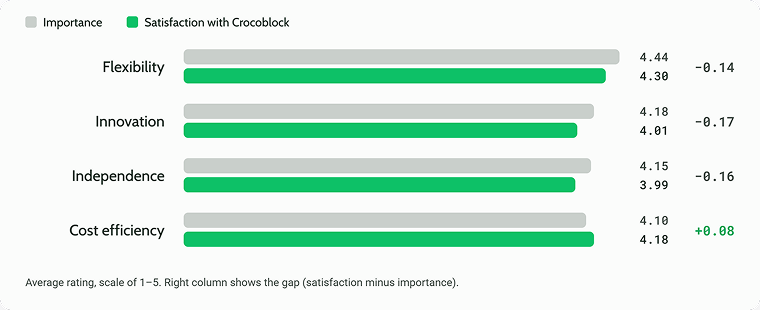
Four qualities stand out: flexibility, innovation, independence, and cost efficiency. In each of them, Crocoblock comes close to fully meeting what developers want, and these are also among its highest-rated areas.
Flexibility scores highest of all at 4.30, and cost efficiency is the area where Crocoblock exceeds expectations. In short, developers value Crocoblock as a flexible, cost-effective toolkit that lets them build more on their own.
Also, for most respondents, Crocoblock plugins are not something occasional, but a core part of how they work. Around 80% of respondents rate Crocoblock as critical to their work, and about two-thirds use it on most of their projects. Importance and usage go hand in hand: the more central Crocoblock is to someone’s workflow, the more often they reach for it.
I would like to share this quote, as it’s definitely inspiring:
“Crocoblock! I love using your plugins. I feel invincible when I know you are on my site!”
FAQ
Elementor, used by about 79% of respondents, which aligns with the overall WordPress statistics. Bricks is a distant second at 24%, followed by the Block Editor (Gutenberg) and Divi.
Performance (speed, caching, and scaling) is the top pain point, followed by platform migration, large catalogs, complex product types, shipping rules, and third-party integrations.
Yes, many do. Page builders speed up layout work, and professionals often combine them with custom code and dynamic content plugins for more complex functionality.
Yes. With WooCommerce, BigCommerce, and related plugins, WordPress can power anything from a small online store to large catalogs, bookings, memberships, and digital product shops.
A dynamic website displays content that changes based on data, user actions, or conditions, such as listings, directories, filters, or user dashboards. In WordPress, it’s usually built with custom post types, custom fields, and query or listing tools.
A staging site is a private copy of your website where you can test updates, plugins, and design changes before applying them to the live site. Most managed hosting providers offer one-click staging.
Git is recommended for any project with custom code, since it tracks changes, makes collaboration easier, and lets you roll back mistakes. For sites built mainly with builders and plugins, staging and regular backups are often enough.
Check compatibility with your theme and other plugins, how regularly it’s updated, and the quality of its documentation and user reviews. Testing it on a staging site before installing on a live site is the safest approach.
Use quality hosting, a caching plugin, optimized images, and a lightweight theme or builder. Limiting unnecessary plugins and scripts also makes a noticeable difference.
Crocoblock is a suite of WordPress plugins for building dynamic websites. It covers custom post types, listings, filters, forms, booking, memberships, and eCommerce features, and works with Elementor, Bricks, Divi, and the Block Editor. Also, the Crocoblock team created an AI-first atomic builder – CrocoBuilder that delivers the best possible speed and a bloat-free DOM.
Takeaway
We surveyed 382 WordPress professionals to understand how they really build complex sites, and several findings stood out. Most have moved far beyond brochure sites: 61% build eCommerce, and many also create memberships, bookings, and directories. Page builders are still the foundation of nearly every workflow, but the hardest part is the logic behind the pages: forms, data architecture, and queries.
Staging has become standard, while Git and automated deployment remain rare even among experienced developers. AI tools have already become a mainstream way to discover new plugins.
When choosing tools, professionals think about risk first, and their biggest reason for not switching isn’t price but habit. For us, the clearest lesson is that a better tool isn’t enough: it has to feel safe, proven, and easy to adopt.