
Photo: Bogdan Popa/autoevolution
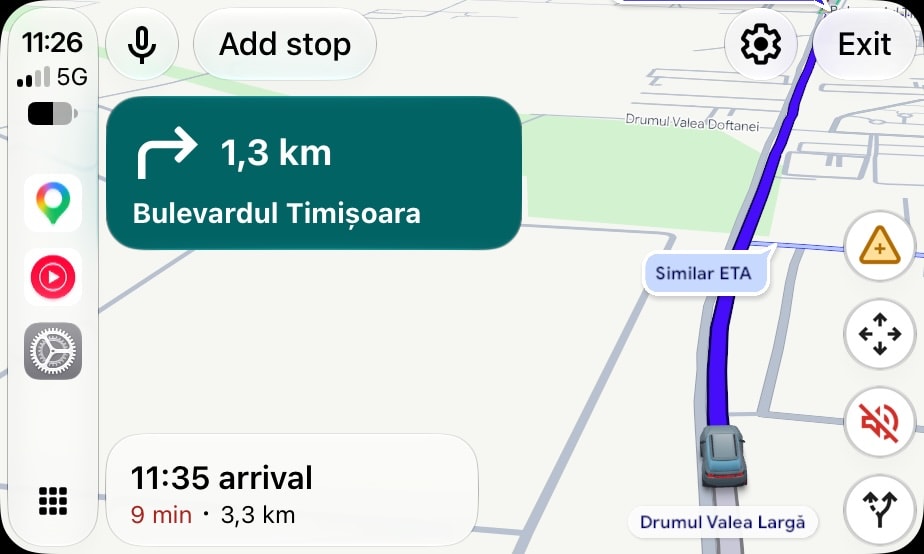
Google has announced that Gemini is now live in Google Maps on CarPlay. Users in the United States are getting it first, while the rollout in the rest of the world is still underway.
I’ve already received Gemini in Google Maps on CarPlay with an iPhone 15 Pro here in Europe, and the feature works exactly as you’d expect it to work. You just ask Gemini for directions, places, or anything else that exists in Google Maps, and you get a detailed answer.
Gemini is supposed to be an upgraded version of Google Assistant, though many people have described it as way too chatty, especially behind the wheel. This is an environment where users are supposed to be focused entirely on the road and avoid any distractions, so a digital assistant that keeps rambling on in the middle of the drive isn’t necessarily helpful.

Photo: Bogdan Popa/autoevolution
However, Google promises that Gemini will provide valuable information in a conversational way. Indeed, I’ve already interacted with Gemini, and the way you talk feels significantly more natural. You can keep the conversation going and submit follow-up requests based on what you’ve just said.
For example, you can ask Gemini for “a coffee place that serves the best cappuccino in this neighborhood,” and the AI-powered assistant will use its superpowers to look for nearby locations, check their ratings on Google, dig deep into reviews, and use any available data to determine the shop that serves that perfect cappuccino.
After showing the results, you can continue the conversation with something like “is it expensive?”, and Gemini will continue the search, knowing that you’re talking about the cappuccino. It’ll once again search for additional data and let you know about the dollars you’ll have to pay if you stop at this coffee place.

Photo: Bogdan Popa/autoevolution
Eventually, you can have Gemini set up a certain location as your destination in Google Maps, so you can begin navigation to this location.
In my time with Gemini, I really didn’t notice anything wrong or buggy, and to be honest, I was impressed with how responsive it was. It certainly feels like a welcome upgrade, and at some level, Gemini on CarPlay feels a lot more refined than Gemini on Android Auto.
This wouldn’t be a shocking thing, considering Google has previously shown impressive love for Apple’s platform, but Gemini on Android Auto has been extremely buggy since it started rolling out in late 2025.
That is why many Android Auto users who received the new AI power used the option to go back to Google Assistant when it was still available. Many people downgraded to Google Assistant, hoping Google would refine Gemini before it was enforced for everybody.

Photo: Bogdan Popa/autoevolution
This eventually happened last month, when Google Assistant was completely retired, and Gemini became the only option for Android Auto users. Many people described it as Cortana – Microsoft’s digital assistant, once supposed to be a Google Assistant and Siri competitor, that ended up becoming a flop – revealing that Gemini couldn’t even call 911 or make phone calls.
Gemini also allows users to submit traffic reports, and the best thing about this feature is that you don’t have to remember certain phrases to do it. Gemini can understand what you say and figure out what type of report it has to submit.
For example, you can say that “wow, traffic has become a nightmare on this small street,” and Gemini knows that you mean there’s bumper-to-bumper traffic on that road. It can then submit a heavy traffic report to the app.
Traffic reports have become an essential part of the experience with Google Maps, primarily after Google brought this feature to Android Auto and CarPlay in 2024. The feature was originally launched on mobile devices in 2019, but Google never looked interested in expanding it beyond smartphones.

Photo: Bogdan Popa/autoevolution
Many people believed this was a way to avoid the cannibalization of Waze, another Google-owned navigation app whose main selling point is the crowdsourced traffic report engine.
Google eventually changed its mind in 2024, bringing the ability to pin hazards to the map to CarPlay in early 2024 and to Android Auto later in the same year. Google is now encouraging users to contribute traffic data, also importing police reports from Waze to make the information provided to users in Google Maps more accurate.
Compared to Waze, Google Maps is focused only on the most common traffic reports, such as accidents, roadworks, and speed radars. Waze supports a significantly wider range of reports, including objects on the road, broken traffic lights, flooded roads, and potholes, and this is considered to be the only big reason why Google Maps and Waze continue to exist as separate applications.